Computer vision
Computer Vision Development Services
- Trained on your images and video
- Cloud, on-prem or edge
- You own the IP
1/4Frames arrive from the cameras you already have, a recorded video or a drone feed. Nothing is labelled yet.
- AI models delivered
- 150+
- API requests served
- 2M+
- AI engineers and specialists
- 50+
- GitHub stars on AS-One
- 580+
Our services
Computer vision software development, stage by stage
Take the whole project to us, or just the part you need. Each service has its own page with the detail.
Custom computer vision models
One model for one well-defined task, trained on your data: detecting a defect, reading a label or tracking an object.Detection · Classification · OCR · Video analyticsCustom modelsModel training
Dataset curation, annotation, training, evaluation and retraining for detection, segmentation and classification models.YOLO · Vision Transformers · Transfer learningModel trainingEdge deployment
Models optimised to run on NVIDIA Jetson, mobile phones and on-site servers, with low latency and no constant connection.Jetson · TensorRT · ONNX · CoreMLEdge deploymentComputer vision consulting
Feasibility checks, model selection and architecture design before you commit budget to a build.Strategy · Feasibility · ArchitectureConsultingManaged computer vision services
Monitoring, retraining and infrastructure for models in production, so accuracy holds as conditions change.Monitoring · Retraining · ScalingManaged servicesHire computer vision developers
Experienced computer vision engineers who join your team for a project or a longer engagement.Dedicated · Part-time · Project-basedHire engineers
How it works
A vision system is more than a model
Most of the work, and most of the cost, sits around the model: collecting and labelling data, integrating with your systems and keeping accuracy up after launch. We plan for all of it from day one.

- Stage 1
Scope the problem and the success metric
We look at your cameras, sample images and the decision the system has to support, then agree measurable targets such as recall on a class, latency per frame or cost per inference.Feasibility and accuracy targets - Stage 2
Collect and label the data
Footage is sampled across lighting, angles and seasons, then labelled to written guidelines with a review pass. Data and labelling are often the largest single cost, so we only label what the model needs.Versioned, labelled datasetBounding boxesMasksKeypoints - Stage 3
Train and evaluate models
We start from pre-trained architectures and fine-tune on your data, then test on held-out footage from your own environment rather than a public benchmark.Model that meets the agreed targetsYOLOVision TransformersSAM - Stage 4
Optimise for the target hardware
Quantization, pruning and distillation shrink the model, and TensorRT or ONNX export speeds up inference on the GPU, Jetson or phone it will actually run on.Benchmarked on production hardwareTensorRTONNXCoreML - Stage 5
Build the pipeline around it
Video ingestion, tracking, business rules and outputs: the parts that turn detections into events, counts, alerts and records in your systems.API, dashboard or alertsRTSP streamsREST APIsWebhooks - Stage 6
Monitor and retrain
Once live, we watch accuracy and drift, collect hard examples from production and retrain when conditions change.Accuracy that holds after launch
Core capabilities
What our computer vision systems do
The tasks we build most often, each with a project where we have done it.
Object detection and tracking
Find people, vehicles, animals or products in each frame and keep a stable ID on each one across the video.Player and ball tracking for MiniStatsSoccer analytics case studyVisual search and similarity
Turn images into embeddings and match them against a catalog in a vector database, for product lookup or recommendations.150K+ SKUs matched in under a secondSneaker retrieval case studyDrone and aerial analysis
Detect small objects from altitude in thermal and RGB footage, then classify them when the drone moves closer.98% thermal detection accuracy at 100mDrone monitoring case studyImage classification and tagging
Assign labels from your own taxonomy to every image, from room types and property features to listing compliance issues.50+ property features tagged per photoProperty image case studySegmentation
Pixel-level boundaries for rooms on floor plans, regions in medical scans or defects on a surface.Walls and rooms segmented on floor plansChoosing segmentation modelsOCR and document vision
Locate documents and labels in an image, read the text and validate it, including rotated text on engineering drawings.98% extraction accuracy on passportsPassport KYC case studyPose estimation
Track body keypoints and joint angles to flag unsafe lifting, count movements or analyse technique.Unsafe bends and twists flagged in real timePosture safety case studyMobile and on-device vision
Models quantized for phones and embedded devices, so detection keeps working without a connection.<30ms on-device inference on iPhoneFind My Ball case studyGenerative AI for images
Fine-tuned diffusion pipelines for virtual staging, inpainting and synthetic training data for rare cases.Rooms staged while keeping real architectureAI virtual staging
In production
Three systems, three kinds of input
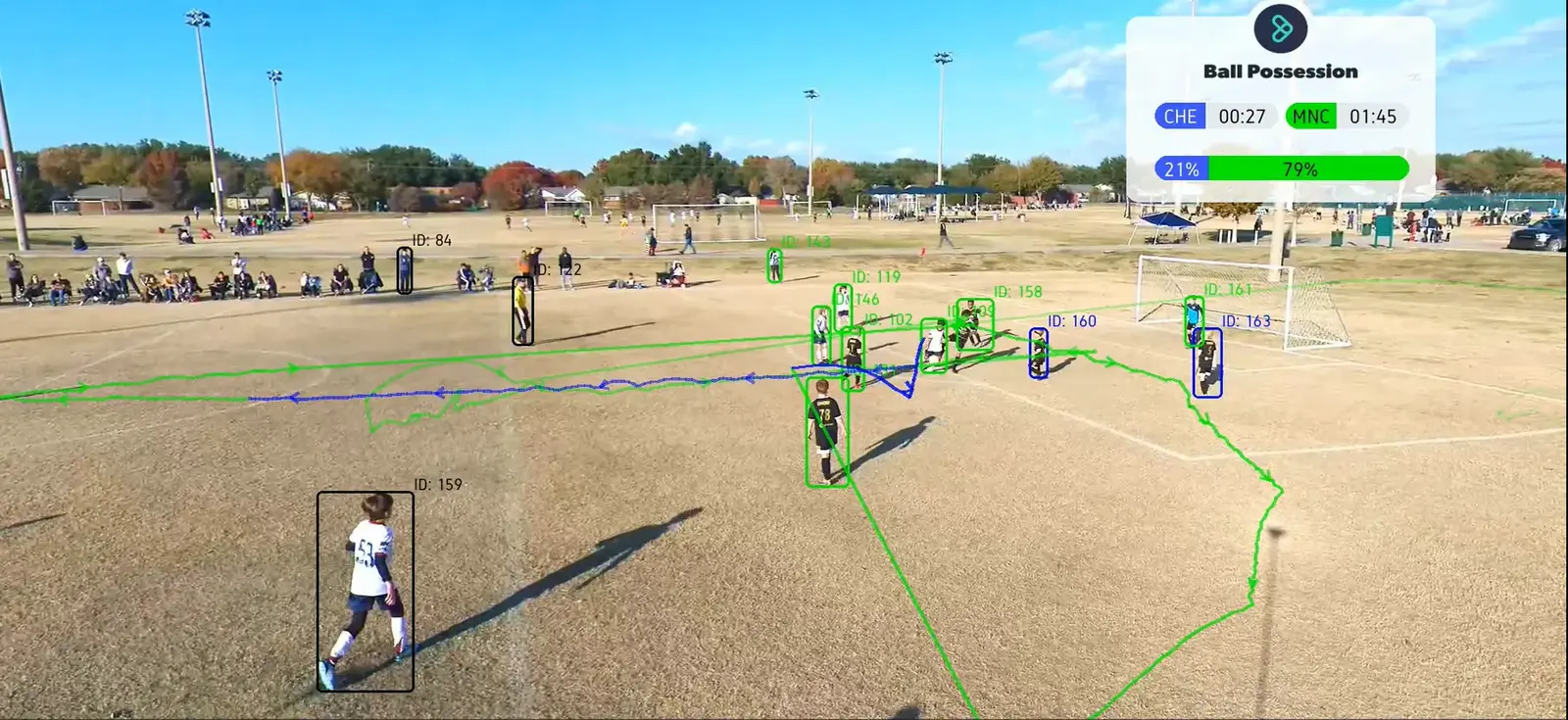
Soccer match analytics from a single video
- Player and ball detection and tracking
- Team identification without facial recognition
- Passes, intercepts and possession derived automatically
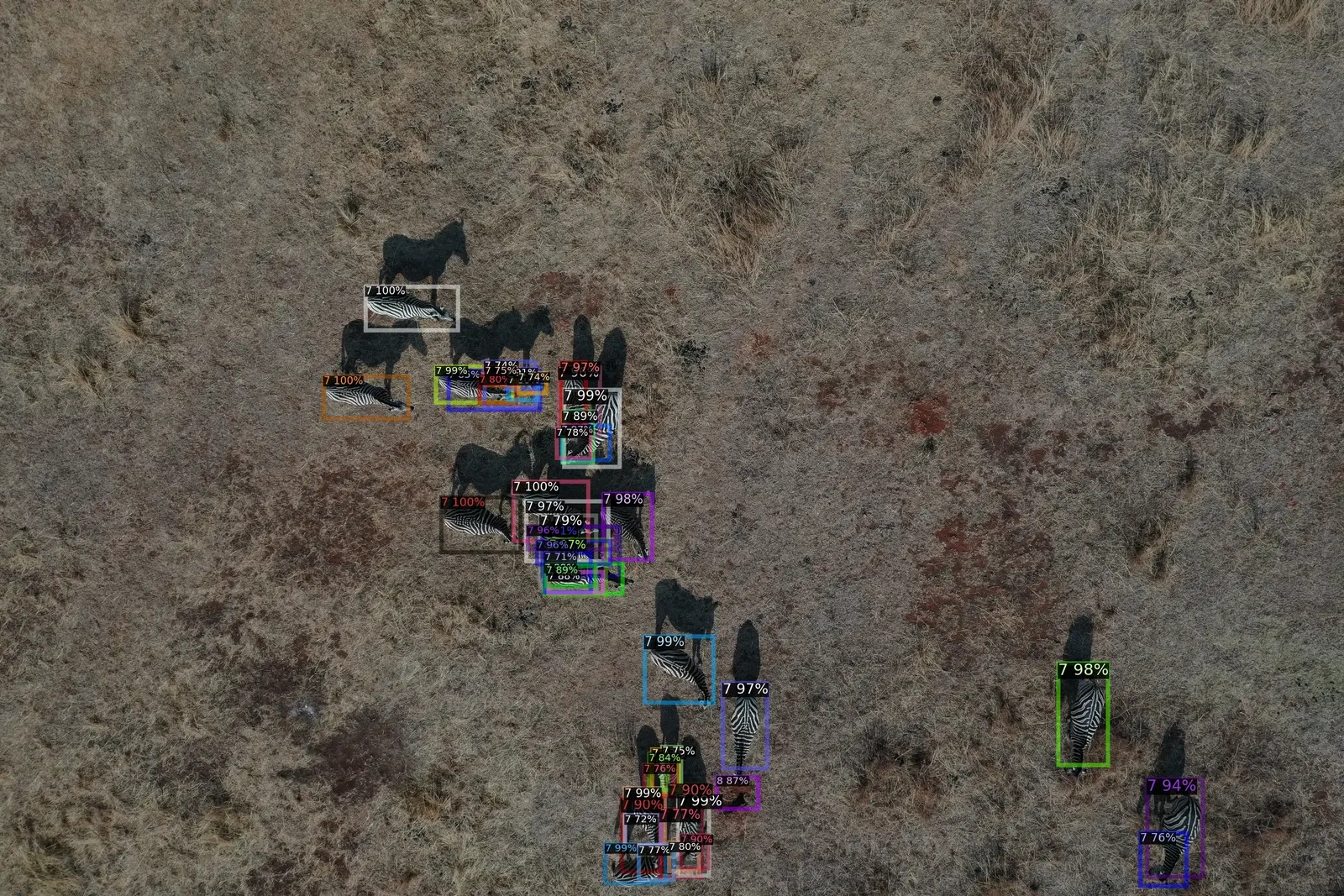
Drone monitoring across large areas
- 98% thermal detection accuracy at 100m
- 92% RGB species classification accuracy at 50m
- Small objects detected from altitude
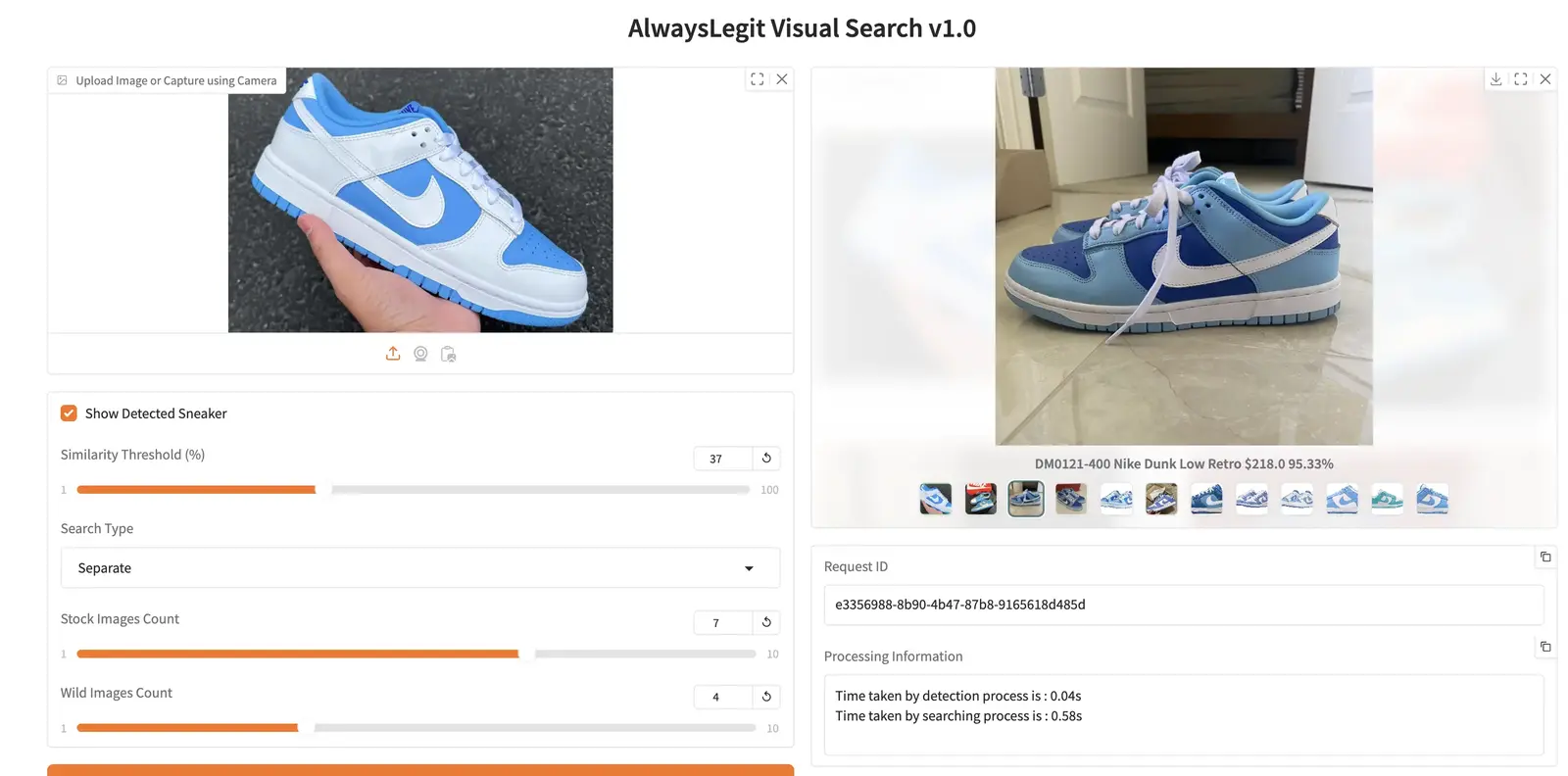
Identify a sneaker from one photo, out of 150K+ SKUs
- Detection removes background clutter first
- Embeddings capture panel layout and colour
- Sub-second retrieval across the whole catalog
Our work
More computer vision we have shipped
On-device detection on a phone, listing photo tagging, species identification in live safari streams, posture analysis, passport OCR and 3D reconstruction from X-rays.
 Sports AI & Mobile Computer VisionComputer Vision
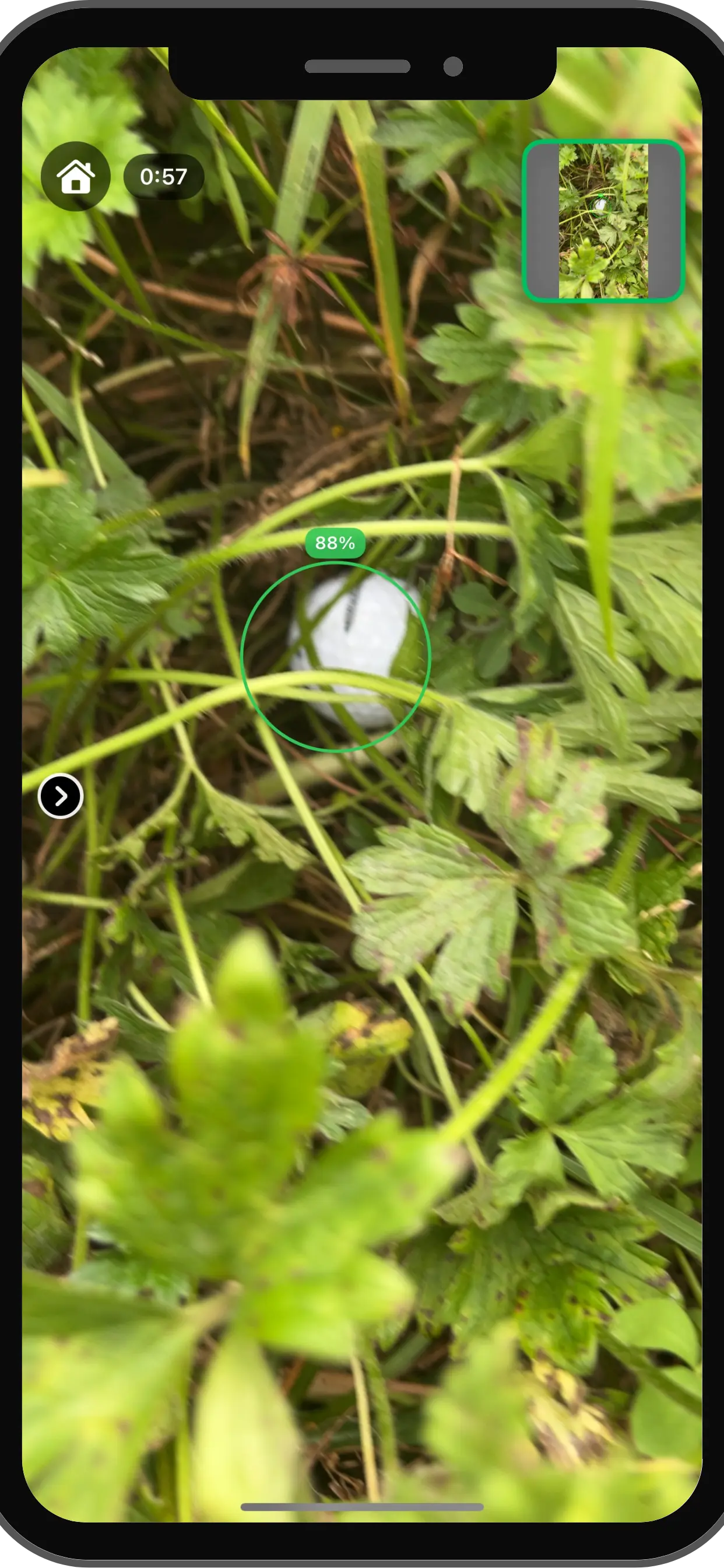
Find My Ball: Real-Time AI Golf Ball Detection on Mobile Devices
FMB wanted to build a mobile app that could automatically detect lost golf balls using the phone camera to help golfers quickly locate balls in challenging terrain.
- On-device inference time
- <30ms
- Detection recall
- 92%
 Real Estate & PropTechComputer Vision
AI Property Image Intelligence for Listing Optimization & Compliance
PropTech founders and real estate leaders understand that property photos are the most critical asset in closing deals. PropTexx needed an automated way to enforce strict listing compliance and extract valuable insights from millions of unstructured real estate images without slow manual review.
- Property features tagged automatically
- 50+
- Compliance violation types detected
- 15+
 Wildlife AI & Streaming AnalyticsComputer Vision
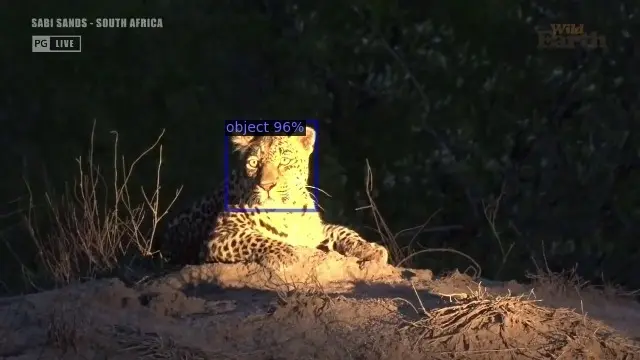
Real-Time Animal Identification in Live Safari Streams
WildEarth wanted to enhance viewer engagement by automatically identifying animals appearing in live safari broadcasts for an interactive viewer experience.
Real-time species identification. Interactive RTSP pipeline. Automated duplicate handling.
Read the case study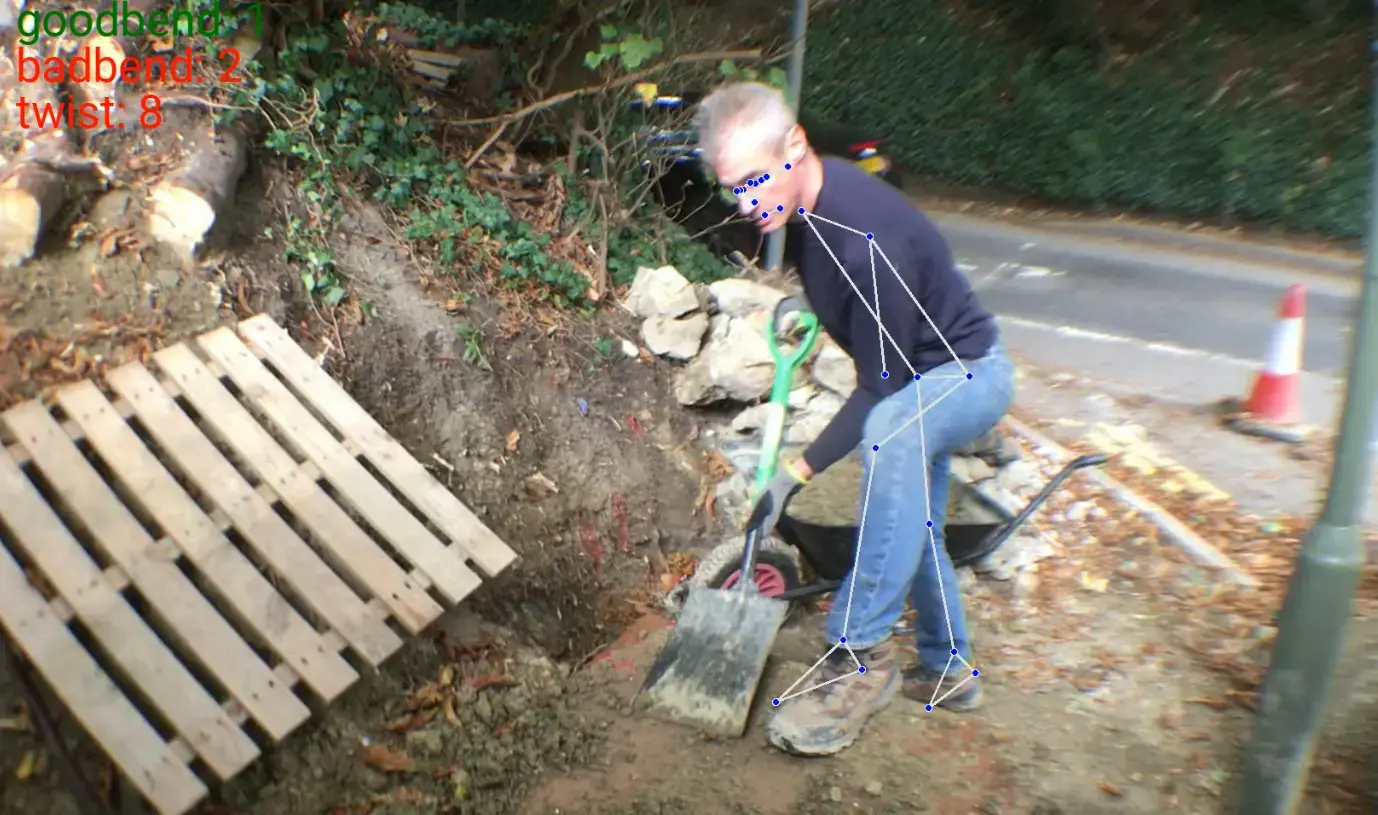 Industrial Safety AIComputer Vision
AI-Powered Human Posture Analysis for Workplace Safety
Human Focus International wanted an AI system to analyze worker posture during heavy lifting to identify unsafe behavior and prevent workplace injuries.
Real-time pose analysis. Biomechanical rule engine. Automated ergonomic feedback.
Read the case study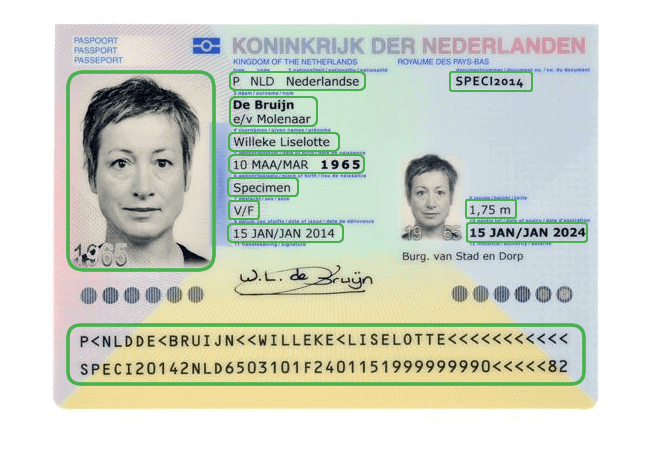 Identity Verification & KYC AutomationIntelligent Document Processing
AI-Powered Passport Verification and Identity Matching
BMedia needed a fast, automated identity verification (KYC) system to replace slow manual passport checks and prevent fraud.
- Data extraction accuracy
- 98%
- End-to-end KYC verification
- <5s
 Health & FitnessComputer Vision
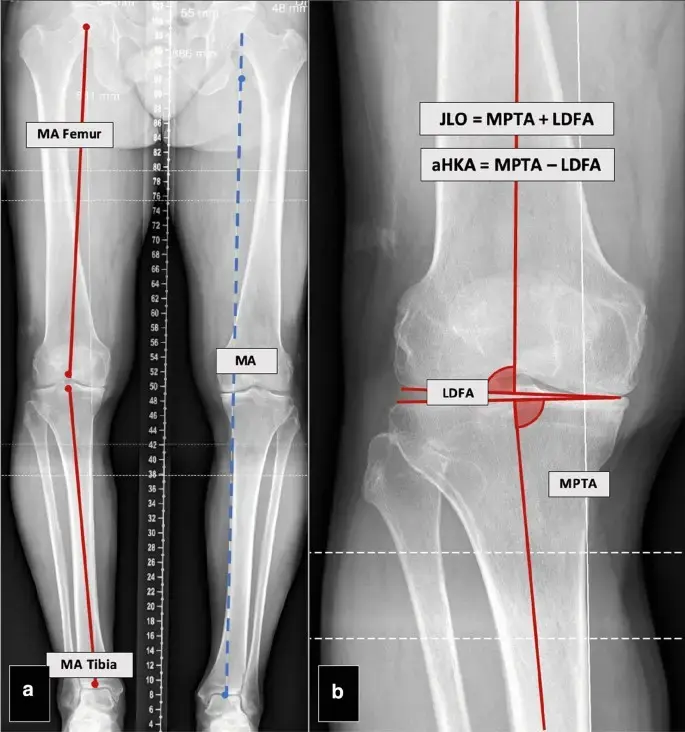
X-ray to 3D CT Reconstruction & Knee Alignment Analytics
Traditional CT scans are several times more expensive than X-rays, often delaying critical orthopedic diagnosis. Our client needed a system to reconstruct 3D CT-grade results from standard 2D X-rays to calculate precise bone alignment angles for surgical planning.
2D to 3D reconstruction. Automated angle calculation (CPAK, mHKAA). Enhanced with GANs.
Read the case study
Industry applications
Where computer vision earns its keep
It pays off where visual work is repetitive, costly or error-prone. Not sure yours qualifies? Read is computer vision worth it for SMEs.
- Real estate computer vision
Real estate and PropTech
Property image classification, room type detection, condition analysis, virtual staging and listing compliance. - Floor plan analysis
Construction and floor plans
Room segmentation, door, window and symbol detection, quantity takeoffs, code compliance and drawing review. - Safety monitoring
Safety and security
PPE and posture monitoring, restricted zone alerts, intrusion detection and perimeter monitoring from existing cameras. - Sports computer vision
Sports analytics
Player tracking, ball trajectories, event detection and tactical heatmaps from match video. - Healthcare AI
Healthcare
Imaging analysis such as 3D reconstruction from X-rays and automated bone angle measurement for screening. - Visual recommendations guide
Retail and e-commerce
Visual product search, automated product tagging, shelf monitoring and recommendations from images. Manufacturing
Defect detection, component inspection and assembly verification on the production line.Logistics and warehousing
Worker safety, forklift analytics, loading verification, inventory tracking and package counting.Agriculture and wildlife
Drone-based livestock and wildlife detection, crop monitoring and species identification.
Deployment
Run it wherever the cameras are
Edge, cloud or your own servers: we choose based on latency, bandwidth, privacy and running cost, not habit.
At the edge
On NVIDIA Jetson, industrial PCs or phones, for sites and vehicles without reliable internet.In the cloud
On your AWS, GCP or Azure account, or on an API we host and manage for you.On-prem and air-gapped
Containerised builds on your own servers when images cannot leave your network.Hybrid
Detection at the edge, with aggregation, dashboards and retraining in the cloud.
What we benchmark before go-live
Accuracy on your own validation set
Precision, recall and F1 against targets agreed at kickoff.
Throughput on target hardware
Frames per second on the GPU, Jetson or server you will run in production.
End-to-end latency
p95 response time through the full API or streaming pipeline.
Cost per inference
Hardware and cloud cost at your expected volume.
How we hit the targets
- Quantization, pruning and knowledge distillation
- TensorRT acceleration and ONNX export
- Batching and async inference for throughput
- Jetson tuning, see our YOLO on Jetson tutorial
Open source
We maintain AS-One, a computer vision framework on GitHub
AS-One puts detection, tracking, segmentation, OCR and pose estimation behind one Python API. We built it with Augmented Startups, and we use the same building blocks to prototype client systems quickly.
- YOLOv5 to YOLOv9 detectors behind a single interface
- ByteTrack and DeepSORT tracking with a standard API
- SAM segmentation, OCR and pose estimation
- PyTorch, ONNX and CoreML runtimes
580+ stars on GitHub
Getting started
Prove it on your own footage first
Start small with real images from your cameras, then scale what works.
Step 1: Scoping call
30 minutes
Share sample images or footage and the decision you want automated. We tell you what is feasible and what data it needs.
- NDA on request
Step 2: Proof of concept
4–6 weeks
A working model on your data, measured against the targets we agreed, on hardware close to production.
- Accuracy targets agreed up front
Step 3: Production
Ongoing
Integrated with your systems, deployed where you need it, monitored and retrained as conditions change.
- You own the IP
Planning a budget? Read how much computer vision development costs in 2026, or start with an AI opportunity audit.
FAQ
Frequently asked questions
What teams usually ask before starting a computer vision project.
Want an engineer's view first? Talk to a computer vision consultant.
Computer vision development services cover designing, training and deploying AI models that understand images and video, such as object detection, image classification, OCR and video analytics. Unlike off-the-shelf tools, custom models are trained on your data, which usually gives better accuracy on your specific problem.
You need a custom solution when your use case is domain-specific, prebuilt APIs don't meet your accuracy requirements, you require on-prem or edge deployment, or data privacy is critical.
Yes. You can hire experienced computer vision engineers on a dedicated, part-time or project basis, which lets you scale your team without long-term hiring commitments.
Yes. Our computer vision consultants help evaluate feasibility, define use cases, select models and design scalable architectures for your business.
Yes. We deploy computer vision models on devices such as NVIDIA Jetson, mobile phones and embedded systems for real-time, low-latency processing.
Cost depends on complexity, data availability and deployment requirements. We provide a tailored estimate after understanding your use case.
A typical proof of concept takes 4–6 weeks. The timeline to production depends on data readiness and complexity, and we keep improving the model after deployment.
Not always. We use transfer learning, synthetic data and data augmentation to build effective models even with limited data.
Computer vision is used in real estate, construction, manufacturing, retail, healthcare, logistics, agriculture and security for applications such as floor plan analysis, quality inspection, surveillance, automation and analytics.
Yes. We build APIs and pipelines that integrate with your existing software, dashboards and workflows.
Accuracy depends on data quality and use case complexity, but custom-trained models typically outperform generic APIs on specialized tasks. We agree on accuracy targets up front and monitor performance after deployment.
Yes. We provide managed services including monitoring, retraining, performance optimization and infrastructure management.
Related
Keep exploring
- Computer visionCustom computer vision modelsModels trained on your own images, video and edge cases.
- Computer visionModel trainingData labelling, training, evaluation and retraining for vision models.
- Computer visionEdge deploymentModels optimised for NVIDIA Jetson, mobile and on-prem hardware.
- Computer visionAll solutionsEvery AI solution we build, by industry and capability.
Case studies
Book a strategy session
Talk to an AI engineer about your project
Tell us what you want to automate. The first call is a 30-minute working session with an engineer, not a sales pitch.
- Send the form, it takes 2 minutes
- We reply within 1 business day, under NDA if you need it
- A 30-minute call to scope feasibility and next steps