Edge AI deployment
Edge Computer Vision & NVIDIA Jetson Deployment
- YOLO on Jetson with TensorRT
- Runs offline
- Video stays on site
- 3 streams → edge device
- dock-cam-01
- dock-cam-02
- dock-cam-03
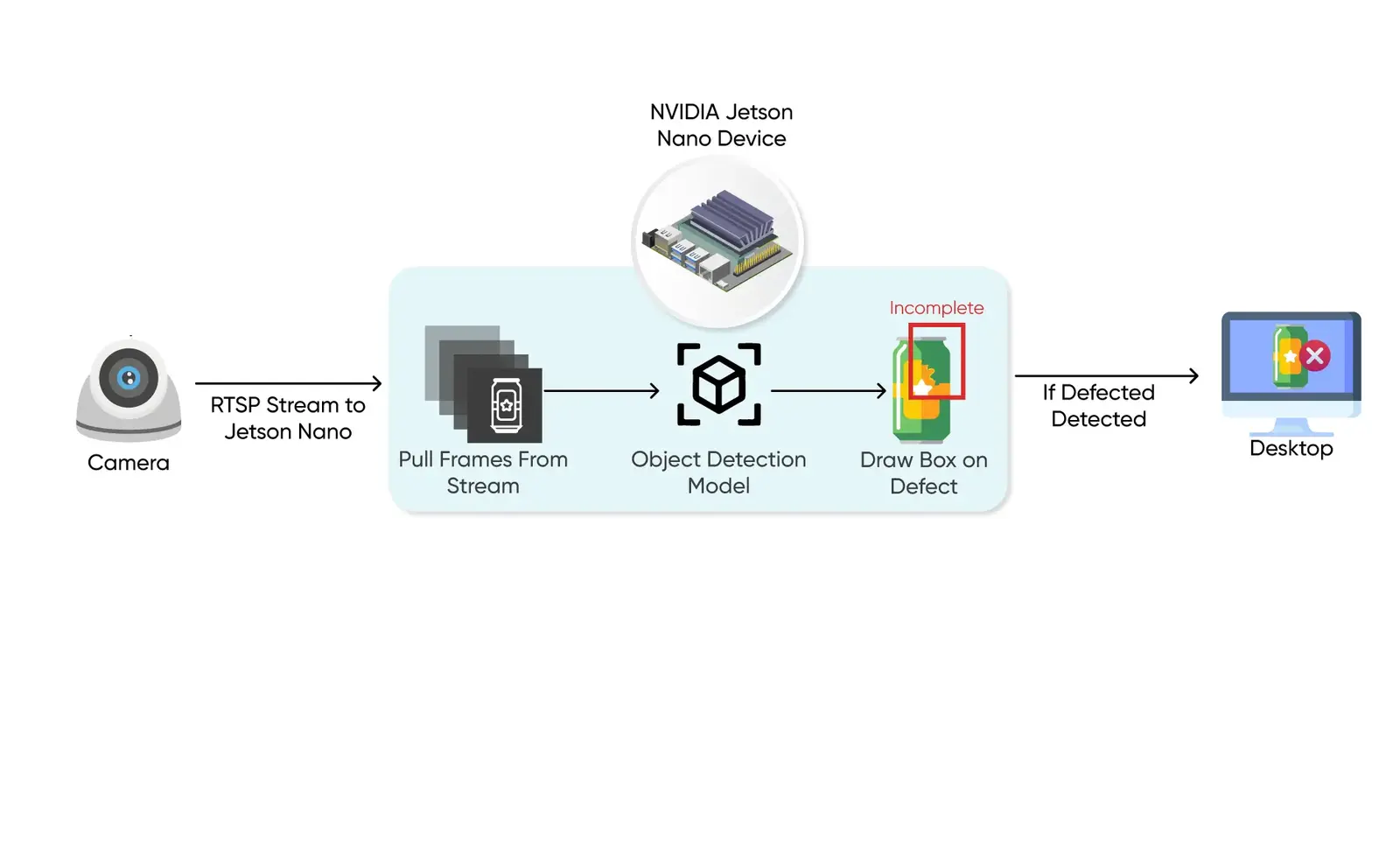
1/4Existing IP cameras stream to a small device on site over RTSP. Nothing is uploaded yet.
Why run vision at the edge
Some decisions can't wait for the cloud
Sending every frame to a cloud API adds network delay, bandwidth bills and privacy questions. When a system has to react on site, the model belongs next to the camera.
Not every workload should move. Training, heavy analytics and fleet-wide reporting usually stay central. Our guide to edge AI vs cloud AI for computer vision walks through the trade-offs, and the on-prem vs cloud enterprise guide covers cost and compliance.
Real-time response
No network hop. Alerts for safety zones, defects or robots fire within milliseconds.Less bandwidth
Devices send labels, counts and alerts instead of continuous video streams.Data stays local
Faces, plates and patient images never have to leave the building.Works offline
Remote sites, tunnels and outages don't stop detection. Results sync later.
| Topic | Cloud-only inference | Edge deployment |
|---|---|---|
| Latency | Cloud round trips of roughly 200 ms to 2 s, with jitter | Around 10–50 ms on local hardware |
| Bandwidth | ~3 Mbps per 1080p camera streamed upstream | ~0.05 Mbps per camera when only metadata is sent |
| Connectivity | No connection means no detection | Keeps running offline and syncs when back online |
| Privacy | Raw images travel over the network | Raw images stay on the device or site |
Typical figures from our edge vs cloud guide. Your numbers depend on model, hardware and network.
How it works
From trained model to a device on site
Edge deployment is more than exporting weights. The model, video pipeline, business rules and update path are engineered together for one piece of hardware.
- Stage 1
Choose the hardware
We match the device to your frame rate, model size and power budget, or work with hardware you already have. See which Jetson to buy for YOLO.Hardware and power planJetson OrinXavier NXCoraliPhone / Android - Stage 2
Optimise the model
Weights are exported to ONNX and compiled into a TensorRT engine for the target module, with FP16 or INT8 precision and pruning where accuracy allows.Device-specific engineONNXTensorRTCore ML - Stage 3
Build the video pipeline
RTSP streams are decoded, batched and fed to the model efficiently, so several cameras can share one device.Multi-stream inferenceDeepStreamOpenCVCUDA - Stage 4
Turn detections into events
Rules for zones, counts, dwell time or defects convert raw boxes into events your team cares about, with confidence scores attached.Alerts and metadata - Stage 5
Package and install
The pipeline ships as a container on the device's JetPack image, with only the events you choose sent to your dashboard, VMS or cloud.Running system on siteDockerJetPackMQTT / REST - Stage 6
Monitor and update
Device health and accuracy are tracked, and new model versions go out over the air with rollback. We can run this for you as a managed service.OTA updates across the fleet
Where we deploy
The right hardware for the job
The same model can run on very different devices. We pick the target from your latency, power and cost constraints.
NVIDIA Jetson
YOLOv8, YOLOv10 and YOLO-World detection, instance segmentation and pose models compiled with TensorRT on Orin and Xavier modules.Industrial cameras, robots, dronesDeploy YOLO on JetsoniOS and Android
Quantised models running in the app with Core ML on iPhone, or optimised runtimes on Android phones and rugged tablets.Field apps with no cloud dependencyFind My Ball case studyOn-prem GPU servers
A local server handles many camera streams at once when a site needs more compute than a single module offers.Factories, warehouses, hospitalsOn-prem vs cloud guideLow-power accelerators
INT8 models on NPUs such as Google Coral for battery-powered or thermally constrained devices.Sensors and remote installationsAir-gapped and private
Fully offline deployments where images must stay inside the building, such as hospitals and secure facilities.No data leaves your networkPrivate and sovereign AIHybrid edge and cloud
Edge devices make the instant decisions; the cloud aggregates events, stores hard examples and retrains models.Best of both for most fleetsWhen to use edge, cloud or hybrid
Reference numbers
What a Jetson can do with TensorRT
Throughput measured in our Jetson tutorial with TensorRT engines. Real systems add video decoding and business logic, so we always benchmark on your cameras.
| Model | Orin NX (20 W) | AGX Orin (50 W) |
|---|---|---|
| YOLOv8 Nano | 145 FPS | 420 FPS |
| YOLOv10 Nano | 160 FPS | 465 FPS |
| YOLO-World Small | 38 FPS | 115 FPS |
Which Jetson for which job
- Jetson NanoPrototyping and simple detection
- Jetson Xavier NXMobile robotics, medium-size models
- Jetson Orin NanoSmart cameras, transformer-based models
- Jetson AGX OrinIndustrial and multi-camera systems
In production
Edge and real-time vision we have shipped
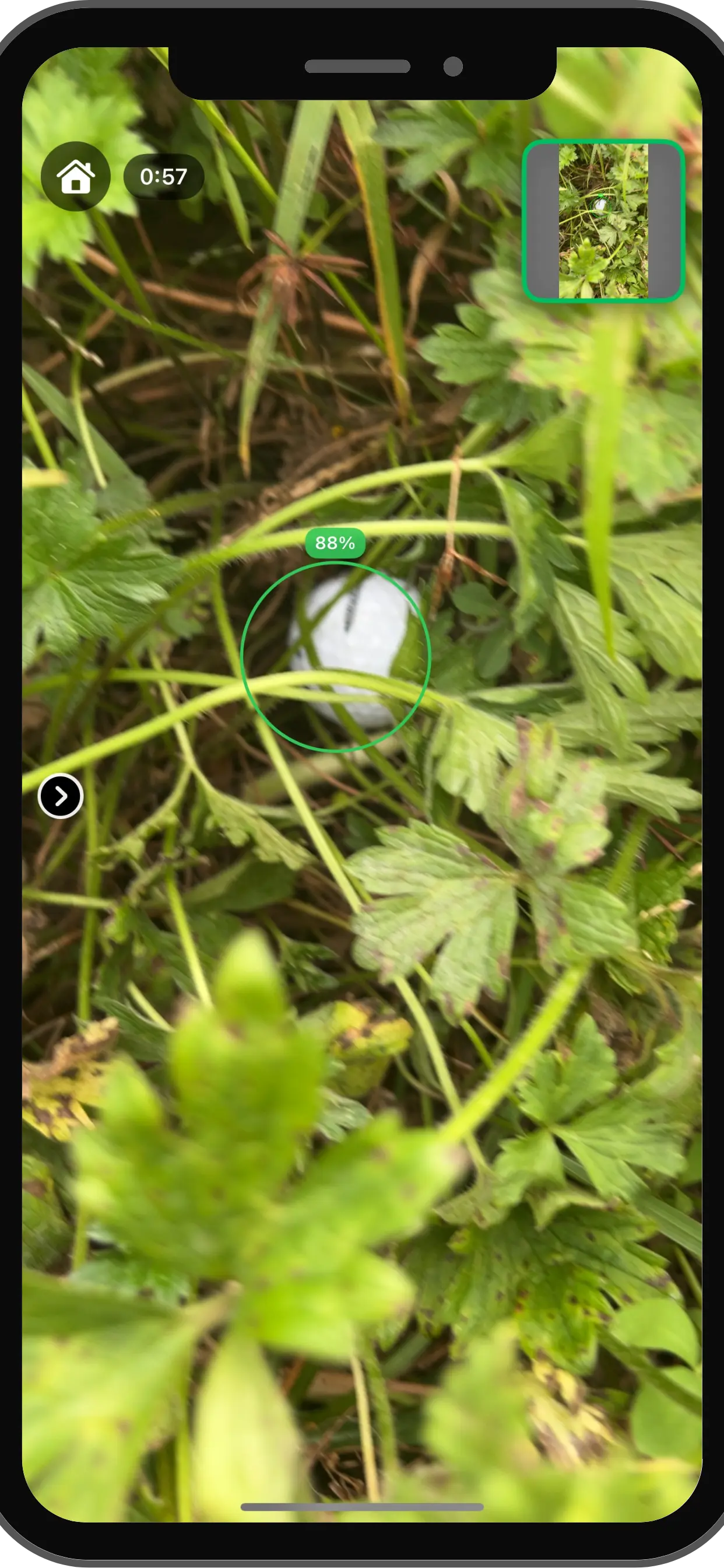
Find My Ball: golf ball detection on the phone
- <30 ms on-device inference time
- 92% detection recall
- Works anywhere on the course, no signal needed
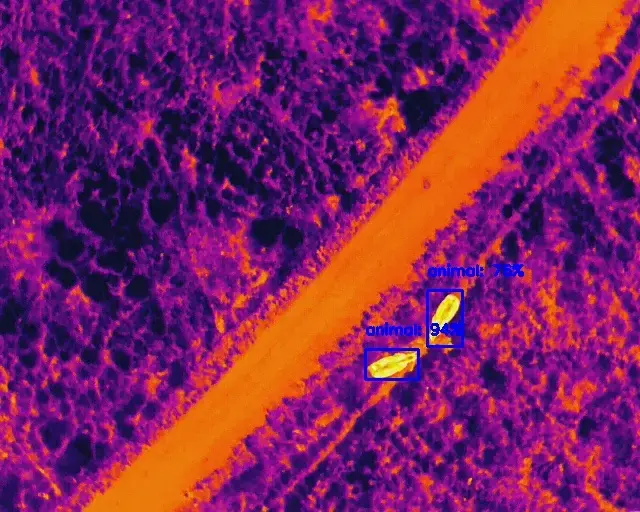
Drone wildlife monitoring against poaching
- 98% thermal detection accuracy at 100 m
- 92% RGB species classification accuracy at 50 m
- Designed for computational efficiency in real time
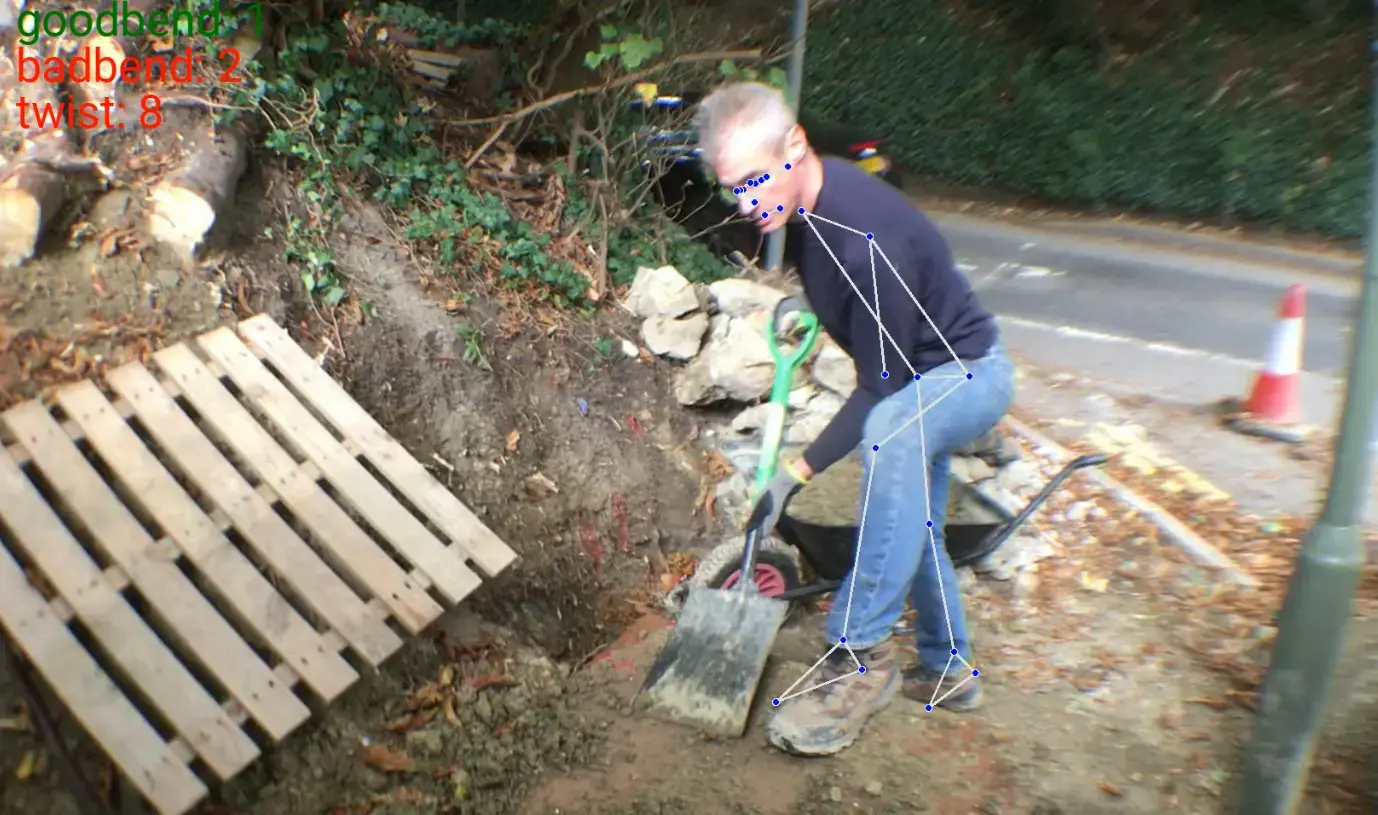
Real-time posture analysis for workplace safety
- Joint angles calculated frame by frame
- Unsafe movements counted and flagged
- Instant ergonomic feedback
On-premise computer vision
Private by design
Regulated teams in healthcare, finance and public sector often need images to stay inside their own walls. Edge and on-prem deployment make that the default, not an exception.
- Inference on your devices or servers, inside your firewall
- Offline and air-gapped operation when required
- Only the events and metadata you approve leave the site
- Standard formats like ONNX to avoid lock-in
- Versioned model updates with a rollback path
Getting started
Benchmark on your cameras first
Already have a model? We can deploy it. Need one built first? See model training.
Step 1: Scoping call
30 minutes
We review your cameras, latency needs, power limits and any hardware you already own.
- NDA on request
Step 2: Proof of concept
4–6 weeks
Your model running on the target device with your footage, measured for accuracy, latency and throughput.
- Targets agreed up front
Step 3: Rollout
Ongoing
Devices installed across sites, with monitoring and over-the-air updates in place.
- Rollback on every update
FAQ
Questions, answered
What teams ask before moving vision to the edge.
Not sure edge is right for you? Talk to a consultant.
Yes. We deploy YOLOv8, YOLOv10, YOLO-NAS and YOLO-World models on Jetson Orin and other modules, compiled with TensorRT for the specific device. Our step-by-step Jetson tutorial shows the same export and inference pipeline we use.
Inference runs next to the camera, so there is no network round trip. Responses typically take tens of milliseconds instead of hundreds, the system keeps working when the connection drops, and raw video does not have to leave the site. Only events and metadata are sent on.
Yes. We deploy object detection, instance segmentation and pose estimation models on NVIDIA Jetson and other edge hardware, optimised for the frame rate and power budget of your application.
Because the model runs inside your network, images and video can stay behind your firewall. We can deploy fully offline or air-gapped for hospitals and other secure facilities, and send nothing but the events you choose.
Yes. Edge systems are built to run offline. Detection and alerts continue during network outages, and results are buffered and synced when the connection returns.
It depends on frame rate, model size and power. As a rule of thumb from our hardware guide: Jetson Nano for prototypes, Xavier NX for mobile robotics, Orin Nano for smart cameras and AGX Orin for multi-camera industrial systems. We can also optimise for Xavier NX and other NVIDIA edge devices you already own.
It depends on the model, resolution and frame rate you need per camera. As a reference, our tutorial measured YOLOv8 Nano at 145 FPS on a Jetson Orin NX (20 W) and 420 FPS on an AGX Orin (50 W) with TensorRT, and that throughput is shared across all streams. We size the hardware against your real cameras during the proof of concept.
We set up over-the-air update pipelines that push new model versions to your devices in stages, keep the previous version for rollback, and avoid disrupting operations. Ongoing monitoring and retraining are available as a managed service.
Related
Keep exploring
- LLMs & agentsSovereign AIPrivate LLMs and vision models on your own servers, VPC or air-gapped network.
- Computer visionManaged AI servicesMonitoring, retraining and support for models in production.
- Computer visionModel trainingData labelling, training, evaluation and retraining for vision models.
- Computer visionSafety monitoringPPE, posture and zone monitoring from existing cameras.
Case studies
Book a strategy session
Talk to an AI engineer about your project
Tell us what you want to automate. The first call is a 30-minute working session with an engineer, not a sales pitch.
- Send the form, it takes 2 minutes
- We reply within 1 business day, under NDA if you need it
- A 30-minute call to scope feasibility and next steps