Sports video analytics
Computer Vision for Sports
- Works on standard match video
- Player IDs kept across the match
- Events and stats, not just boxes
1/4Standard match footage goes in. No special cameras: a broadcast feed or a single elevated camera is enough to start.
Why it matters
The video exists. The numbers behind it usually don't.
Clubs, academies and media teams record everything and watch it back by hand. Tagging a match takes hours, clip turnaround misses the news cycle, and coaching feedback ends up based on impressions rather than counts.
Manual tagging eats the week
An analyst scrubs through a full match to log passes, turnovers and set pieces before anyone can use them.Highlights arrive late
By the time clips are cut and captioned, the moment has passed on social.Players get lost in the footage
Occlusions and similar kits break simple tracking, so per-player numbers are unreliable.Technique feedback is subjective
Without joint angles and repeatable measurements, coaching notes are hard to compare week to week.
| Topic | Manual video analysis | Vision pipeline on the same footage |
|---|---|---|
| Tagging | Hours of scrubbing per match | Events logged automatically as the video is processed |
| Per-player data | Spot counts for a few players | Every tracked player, with an ID kept through the match |
| Clips | Cut by hand after the game | Clips built around detected events |
| Technique | Coach's eye and slow motion | Joint angles and ball trajectories measured frame by frame |
How it works
A pipeline, not a single model
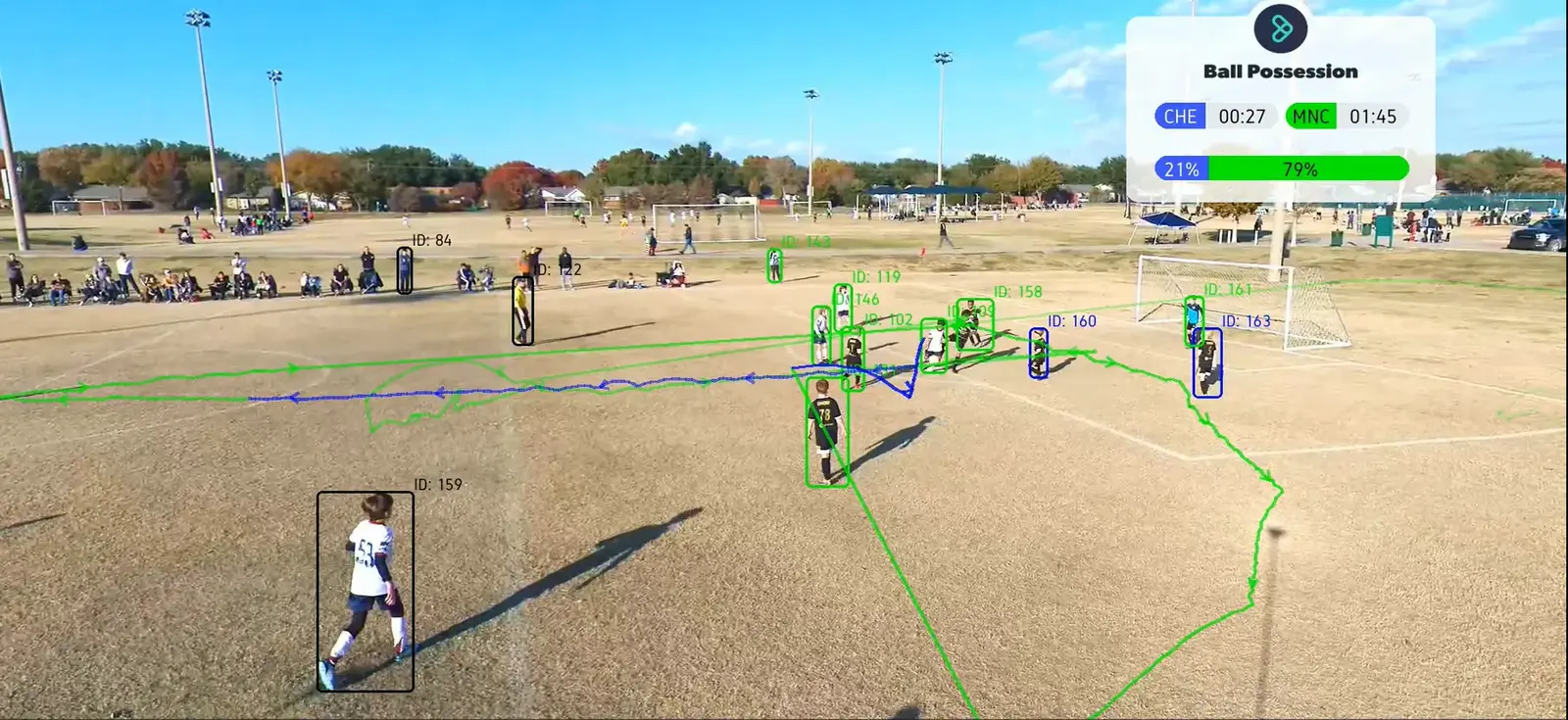
This is the structure we built for MiniStats: detection, tracking, team identification and then event logic on top of the tracks. Each stage is trained and checked on your own footage.
- Stage 1
Ingest the footage
Broadcast video, a single elevated camera or phone footage from the sideline. Frames are extracted and the playing area is located so positions can be related to the pitch.Frames with field geometry - Stage 2
Detect players and the ball
A detector trained on annotated match video finds every player and the ball in each frame, including the small, fast-moving cases that general models miss.Boxes per frameYOLOv8 - Stage 3
Track and re-identify
A tracker links detections across frames so each player keeps an ID, and re-identification picks players back up after they leave the frame or are occluded.Player and ball tracksNorfair - Stage 4
Assign teams
Players are clustered by appearance using the full player crop, which in our testing separated teams more reliably than shirt-colour histograms alone.Team label per trackk-means clustering - Stage 5
Derive events
The ball's position and the nearest player drive the event logic: ball moving between team-mates is a pass, to an opponent an interception. Each event carries a timestamp.Timed event log - Stage 6
Produce stats and clips
Events roll up into possession, pass counts and per-player numbers, and the timestamps mark the moments worth cutting into highlight clips.Match report and clipsJSONAPI
What we build
Tracking, technique and match intelligence
Every sport has its own objects, rules and camera angles. We train for yours rather than forcing a generic model onto the footage.
Player tracking and re-identification
Multi-object tracking that holds an ID through occlusions and substitutions, giving distance covered, positioning and heatmaps per player.Per-player movement dataMatch analytics case studyBall detection and trajectory
Small, fast objects tracked frame by frame for release speed, flight path and deviation, in cluttered outdoor conditions.Trajectories and speedsGolf ball detectionPose and form analysis
Joint keypoints per frame for bowling actions, swings and serves, with angles you can compare between sessions and athletes.Joint angles over timeEvent detection and tagging
Passes, interceptions, shots and possession changes derived from ball and player tracks, each with a timestamp into the video.Timestamped event logAutomated highlights
Detected events become short clips ready for social or broadcast, without an editor scrubbing the full match.Clips cut around eventsTraining drill analysis
Repetition counting and form checks over practice footage, so coaches see what happened across a whole session.Rep counts and form flagsCustom model training
In practice
Projects we have shipped in sports
Match analytics for MiniStats
- Player and ball detection trained on annotated matches
- Re-identification through occlusions and re-entries
- Possession, passes and interceptions per team
Find My Ball: detection on the phone in your pocket
- Small-object detection in cluttered terrain
- Quantized and compiled for on-device inference
- No cloud round trip during a round
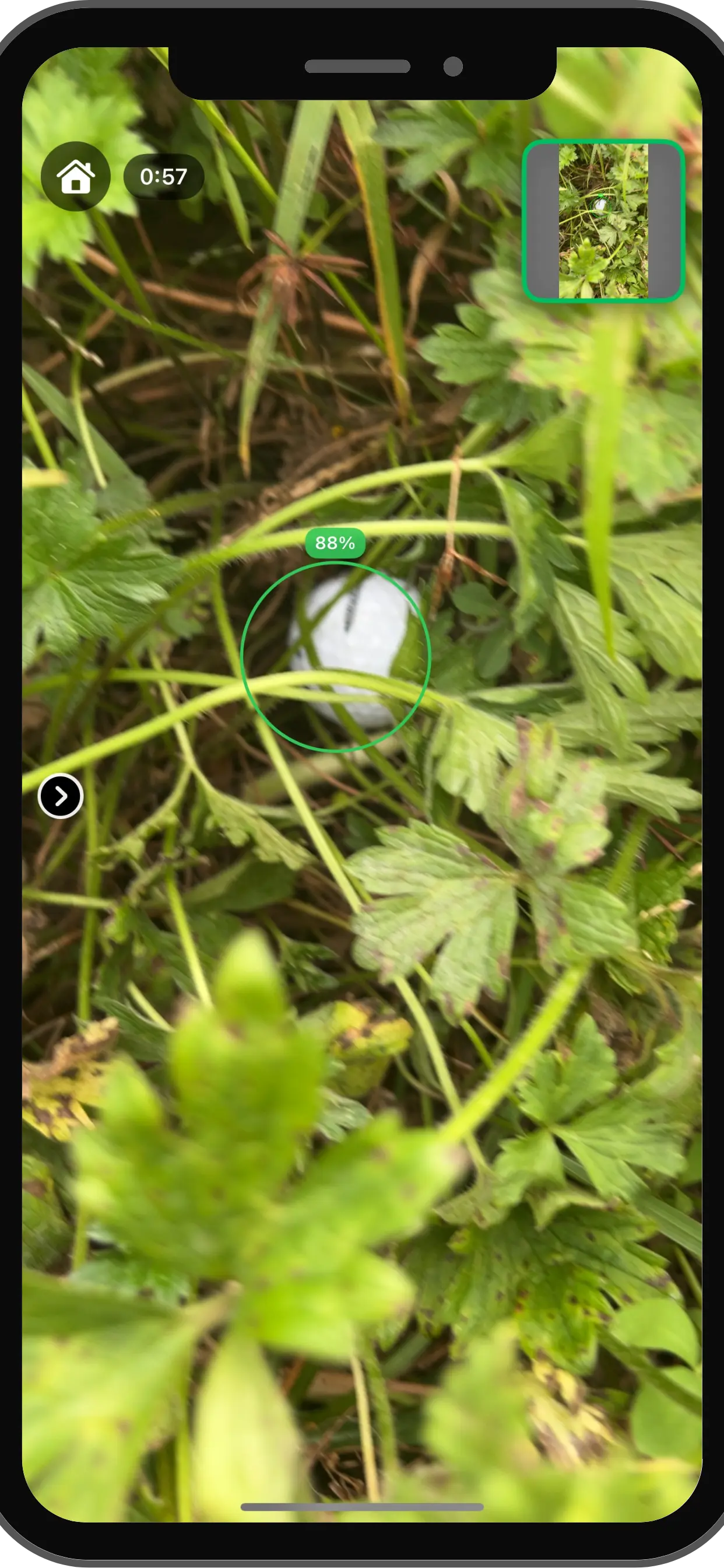
Find My Ball, on iPhone hardware
- On-device inference time
- <30ms
- Detection recall
- 92%
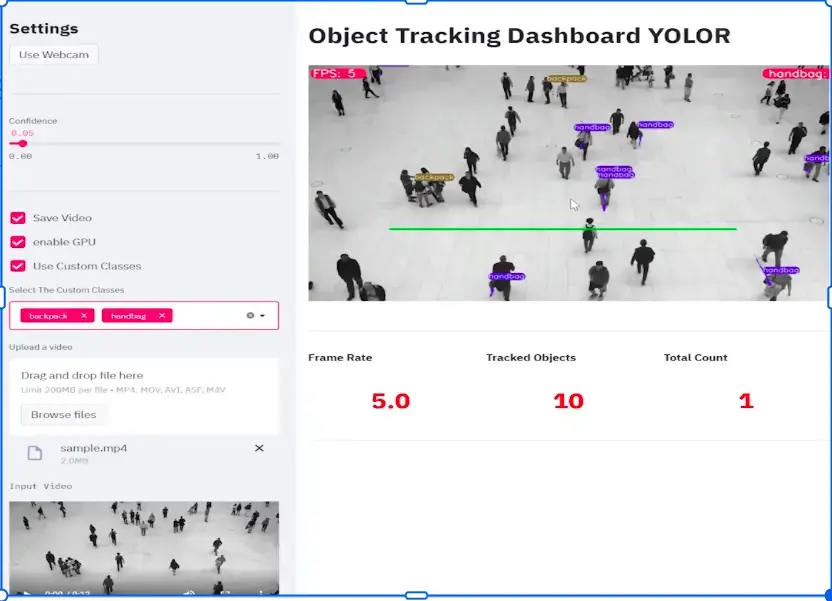
Open-source foundations: AS-One
- Detectors and trackers behind one API
- PyTorch, ONNX and CoreML runtimes
- 580+ GitHub stars
Delivery
Batch after the match, or live on the wire
Post-match processing is the simplest place to start. Where latency matters, the same models run optimised on a GPU or an edge device; our Jetson deployment tutorial shows the approach.
Batch processing
Upload a match, get an event log, stats and clips back through an API.- Edge deployment
Live overlays
Low-latency inference for real-time graphics on a stream or broadcast. On-device apps
Quantized models running on phones for coaching and consumer apps.Your dashboards
JSON events and stats into your own analytics platform or app.
Getting started
Start with a few matches of your own video
We work from your footage and your definitions of the events that matter in your sport.
Step 1: Scoping call
30 minutes
We look at sample footage, camera angles and the metrics you want, and say what is realistic from that video.
- NDA on request
Step 2: Proof of concept
4–6 weeks
Annotation, detector training and tracking on your matches, measured against manually tagged clips.
- Accuracy checked on held-out video
Step 3: Production
Ongoing
Integrated with your platform or app, scaled for the season, and retrained as kits, venues and camera setups change.
- You own the IP
FAQ
Questions, answered
What clubs, academies and media teams ask before a pilot.
Need tracking somewhere other than a pitch? See computer vision development.
Our models are trained to handle standard broadcast video at various resolutions and lighting conditions, so no special cameras are needed.
Yes. We perform detailed cricket bowling analysis, tracking ball release speed, trajectory, deviation, and bowler biomechanics.
Our AI detects high-intensity events (goals, wickets, celebrations, crowd reactions) and automatically creates short clips ready for social media.
Precision depends on camera angle, frame rate, and resolution, so we validate pose estimation on your own footage during the proof of concept. With a suitable capture setup, it supports detailed coaching and injury-prevention analysis.
Yes. Our low-latency inference pipeline enables real-time data overlays for live streaming or TV broadcasts.
Yes. We provide crowd analytics to monitor venue occupancy, queue times, and engagement metrics during live events.
A proof of concept on your own footage typically takes 4–6 weeks. We label a sample of your video, train the detectors your sport needs, and agree what accuracy looks like before production.
Related
Keep exploring
- Computer visionComputer vision developmentDetection, tracking, segmentation and OCR systems built for production.
- Computer visionEdge deploymentModels optimised for NVIDIA Jetson, mobile and on-prem hardware.
- Computer visionCustom computer vision modelsModels trained on your own images, video and edge cases.
- Computer visionAll solutionsEvery AI solution we build, by industry and capability.
Book a strategy session
Talk to an AI engineer about your project
Tell us what you want to automate. The first call is a 30-minute working session with an engineer, not a sales pitch.
- Send the form, it takes 2 minutes
- We reply within 1 business day, under NDA if you need it
- A 30-minute call to scope feasibility and next steps