Enterprise CV Strategy
On-Premises & Edge
Ultra-Low Latency
Sub-10ms Inference
Data Sovereignty
Local Firewall Control
Predictable CapEx
High-Volume Efficiency
Public Cloud
Elastic Scaling
Unlimited GPU Capacity
Managed Infrastructure
Streamlined MLOps
Flexible OpEx
Pay-As-You-Go Structure
Modern computer vision (CV) applications – from factory QA and warehouse monitoring to retail analytics and security – can run either in an on-premises datacenter/edge environment or in the public cloud. Each approach has distinct trade‑offs. Cloud deployment offers virtually unlimited scaling, managed services, and pay‑as‑you‑go flexibility. On-premises (or edge) deployment offers ultra-low latency, local data control, and often lower long-term cost for steady workloads. In practice, most enterprises adopt a hybrid approach: they train and burst to the cloud for heavy workloads, while running latency-sensitive or regulated inference jobs on local hardware. This report analyzes the key factors – performance, scalability, cost, security, operations and more – that influence the choice of on-prem vs. cloud for CV. We highlight common CV workloads (inference, training, video analytics), present example architectures, benchmark numbers, and cost models, and offer a checklist for choosing the right deployment.
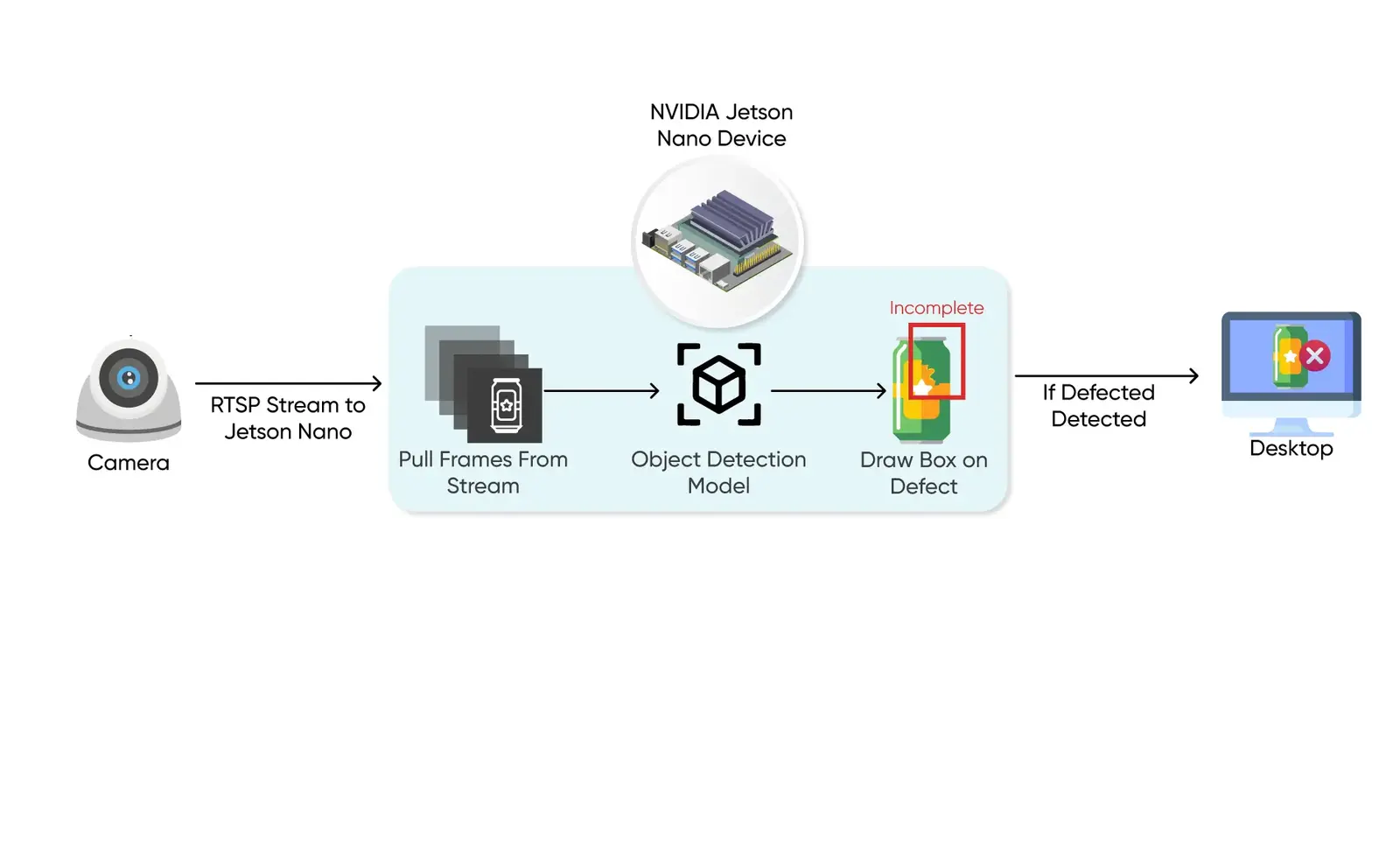
- Workloads: In practice, CV workloads include training large models on image/video datasets (often done in the cloud), batch inference (e.g. image tagging at scale), and real-time video analytics (e.g. defect detection on a factory line or object tracking in CCTV). Video analytics and “edge CV” (inference on camera streams) often drive the need for on-site compute.
- Performance: Edge/on-prem inference can achieve sub-10ms latency and 100s of frames/sec throughput on GPU-accelerated servers or smart cameras. In contrast, cloud inference usually incurs network round-trip times of tens to hundreds of milliseconds (50–500 ms is typical). For many CV use-cases (e.g. robotics, automation, safety) every millisecond counts, favoring on-prem/edge inference. Cloud services excel at massive parallel workloads, but network latency and jitter can make them unsuitable for ultra-low-latency needs.
- Scalability & Elasticity: Cloud platforms can elastically add CPU/GPU instances to handle traffic spikes or new training jobs, effectively giving unlimited burst capacity. On-prem systems scale only with added hardware (often months of lead time) and have fixed limits. (A typical break-even: cloud is cheaper for sporadic/low volumes, but on-prem’s higher fixed cost pays off when processing reaches tens of thousands to millions of inferences per month.)
- Cost Models: On-premises requires CapEx (buy servers, GPUs, setup) and ongoing power/maintenance, but yields predictable costs per inference at high scale. Cloud is OpEx: no upfront hardware cost, but you pay by the second/hour and for data transfer. Cloud can be very cost-effective for bursty or experimental use, and offers spot/preemptible discounts. However, at scale or with high data volumes, cloud costs (compute + egress) can outstrip on-prem (e.g. continuous 720p video streams generate hundreds of GB per camera per month). We include a sample cost breakdown below.
- Security & Compliance: On-prem deployment keeps data fully inside the corporate firewall, simplifying compliance with strict data residency or privacy laws (GDPR, HIPAA, etc.). Major cloud providers do offer compliance certifications and on-premises hybrid solutions (AWS Outposts, Azure Stack, GCP Distributed Cloud) to address these needs. Still, regulated industries (healthcare, finance, government) often mandate on-prem or edge processing.
- DevOps / MLOps: Cloud CV services are fully managed (no hardware patching) and updates roll out automatically. On-prem systems require in-house ops and more complex deployment pipelines (e.g. model packaging with containers, OTA updates). As one AWS partner notes, cloud allows “centralized updates” while edge devices need “complex, device-by-device” update processes. In practice a hybrid CI/CD/MLOps strategy is needed: train and version models in the cloud, then distribute optimized models to edge appliances or on-prem servers for inference.
- Hardware & Connectivity: On-prem CV often uses GPUs (NVIDIA Tesla/Jetson/T4/V100), FPGAs, or specialized ASICs (TPUs, VPUs) installed locally. Cloud CV leverages multi‑GPU instances or dedicated inference chips (AWS Inferentia/Trn1, Google TPU, Azure ML FPGA). High-bandwidth fiber or 5G links are critical for moving video data; limited connectivity pushes workloads on-site. For example, AWS Panorama and Azure IoT Edge let you run vision models on local hardware (camera-connected appliances or servers) when Internet is spotty or forbidden.
Below we dive deeper into each factor with examples, tables and diagrams, concluding with a decision checklist and recommended architectures for typical enterprise profiles.
Computer Vision Workloads and Scenarios
Computer vision covers diverse tasks – image classification, object detection, semantic segmentation, OCR, anomaly detection – deployed in many settings:
- Batch Inference / Photo Analysis: E.g. tagging millions of images stored in enterprise databases. Often done in cloud batches.
- Video Stream Analytics: Real-time object tracking, anomaly detection on camera feeds (manufacturing QA, retail analytics, security surveillance). This may be performed on-prem for low latency.
- Training & Transfer Learning: Training CNNs/transformers on large labeled datasets (often requires clusters of GPUs). Cloud is ideal here due to on-demand compute.
- Edge/Embedded Vision: Smart cameras or Jetson-like devices infer on-device for instant response (e.g. in robotics, smart cameras).
- Hybrid Pipelines: A common pattern is “split inference”: a lightweight model runs on-camera, and edge cases or logged video snippets are sent to cloud for further analysis or retraining. For example, license-plate detection might run locally, while OCR/text interpretation happens in the cloud.
Why On-Prem? In low-connectivity environments (remote facilities, ships, airplanes) or where data privacy is paramount, on-premises inference is preferred. Also, when latency requirements (≤10 ms) exceed what the network can deliver, edge/center deployment is necessary.
Why Cloud? When you need virtually unlimited GPU capacity (for massive inference volume or large models) and your data can be sent off-site, cloud is convenient. It’s pay-as-you-go, easy to scale, and often integrates managed CV APIs (e.g. AWS Rekognition, Azure Vision, Google Vision). Prototyping in the cloud avoids big hardware purchases upfront.
Below is a simple comparison of key attributes. Detailed tables appear later.

Performance: Latency, Throughput and Accuracy
Performance differences between cloud and on-premises deployments hinge on network latency and local GPU compute densities, with local inference achieving sub-10ms response times compared to 50ms+ in cloud settings.
| Deployment Type | Target Hardware | Avg. Inference Latency | Max Throughput (FPS) | Reliability / Connection Dependency | Reference / Source |
|---|---|---|---|---|---|
| On-Premises (Edge) | NVIDIA Jetson Orin Nano (8GB) | 12 – 18 ms | ~60 FPS | 100% Offline Capable | NVIDIA Jetson Orin benchmarking |
| Local Server | 1x NVIDIA T4 GPU (On-Prem) | 3 – 5 ms | ~200 FPS | Local LAN Only | Roboflow YOLOv8 T4 benchmarking |
| Public Cloud API | AWS Rekognition | 180 – 350 ms | Elastic / Unlimited | Dependent on WAN/5G | AWS Service SLA |
The latency of CV inference is often critical. On-prem or on-device inference can typically process frames in single-digit milliseconds. For example, running small object-detection models on a GPU (e.g. an NVIDIA T4) can yield 2–3 ms per image. Roboflow’s tests show a YOLO-based model achieving ~3 ms/inference on a T4 GPU. By contrast, sending that frame to a cloud endpoint incurs network delay: even a fast 5G or fiber link can add tens of milliseconds (often 50–100 ms minimum), plus queuing time. In practice, cloud round-trip latencies of 50–500 ms are common. For use-cases like robotics or manufacturing QA, even 100 ms may be too slow, so on-prem/local inference is mandatory. Cloud CV is more acceptable when 100+ ms delay is tolerable (e.g. batch analysis, user-facing image apps).
Throughput (frames per second) depends on hardware and model. A well-equipped server with GPUs or accelerators can process hundreds or thousands of frames per second. For instance, on a T4 GPU Roboflow reports >400 FPS (2.3 ms per frame) for a small DETR transformer model. Edge devices (Jetsons, Coral TPUs) deliver lower throughput (tens of FPS for complex models). In any case, on-prem allows using the latest GPUs or specialized chips (TPUs, FPGAs) without per-hour charges. Cloud can scale throughput by adding instances (horizontal scaling), but each VM has finite GPUs (e.g. 4–8 GPUs). If you need 100× current capacity at a moment’s notice, the cloud can spin up new instances quickly, whereas on-prem would require having idle hardware or waiting for procurement.
Accuracy is largely a function of the chosen ML model, not the deployment. You can run the same neural net in cloud or on-prem (often using ONNX/TensorRT). However, compute constraints may force model trade-offs: very large transformer models (hundreds of millions of params) may only fit on high-end cloud GPUs, whereas on-device or on-prem embedded accelerators may require quantized or smaller models. In some hybrid designs, a compact model runs on-site and a heavyweight “second opinion” model runs in the cloud to boost accuracy.
Scalability and Elasticity
Cloud: Practically unlimited. Public clouds offer a near-infinite pool of CPUs/GPUs. If demand spikes, you can launch many nodes in minutes. Autoscaling groups can adjust to workload. This makes cloud ideal for variable or unpredictable loads. For example, a retail store may only need 10 camera feeds normally, but seasonally scale to 100 cameras; the cloud can handle this with instant provisioning. (Moreover, many clouds offer spot/preemptible instances for cost savings during non-critical periods.)
On-Prem: Fixed capacity. You buy a certain number of servers or accelerators. Scaling beyond that requires buying and racking new hardware (often a multi-week procurement). You can architect redundancy (e.g. N+1 clusters, multiple data centers), but each site has a ceiling. For steady, high-volume workloads (e.g. 24/7 video monitoring at a nationwide chain of warehouses), on-prem may be more cost-effective because the hardware is fully utilized. But if usage jumps dramatically, you may run out of capacity. In some scenarios, enterprises provision slight over-capacity for bursting, or deploy hybrid (see below).
Elastic/Burst Scenarios: A common hybrid strategy is cloud bursting: run core inference on-premises, but overflow traffic (say when local GPU nodes hit 80% utilization) is sent to the cloud. This leverages on-prem low-latency as primary, using cloud on-demand only when needed. Conversely, cloud can be used for nightly batch re-processing or retraining of models based on data collected on-prem. AWS Outposts, Azure Arc, and Google Distributed Cloud are designed to make on-prem resources appear part of the cloud, smoothing such hybrid workloads.
Reliability and High Availability
Cloud HA: Major cloud providers guarantee 99.9–99.99% uptime with multi-Availability Zone deployments. If one zone goes down, another continues. They handle hardware failures, cooling, power, etc. However, your on-prem camera feeds then rely entirely on network connectivity; a cloud outage or internet failure means no inference.
On-Prem HA: Achieving similar HA on-premises requires investment: duplicate servers, racks, network links, and possibly geo-replication (local data centers, co-location). For example, an industrial CV application might deploy two identical GPU servers for failover. This adds CapEx but avoids reliance on internet. In practice, some enterprises accept on-prem as “HA enough” if they have UPS/generators and spare servers. Public clouds can also be used as a backup: e.g. if on-prem hardware fails, fallback to cloud inference temporarily.
Case in Point: AWS highlights that Outposts/Edge compute is ideal for low-latency or local data processing needs. In other words, you would run your critical real-time CV inference on Outposts (on-prem), and have failover to the AWS Region if needed.
Why do regulated industries mandate on-premises computer vision?
Regulated sectors (healthcare, finance, defense) deploy computer vision on-premises to enforce absolute data residency compliance under HIPAA and GDPR, keeping raw video feeds within the local firewall.
"For high-throughput industrial pipelines, local GPU resources offer predictable performance and lower total costs once hardware depreciation is factored in." — Naeem Maqsood, CTO at AxcelerateAI.
Data Residency: On-prem deployments keep images and video inside the corporate network. This simplifies compliance (e.g. GDPR, HIPAA, PCI-DSS) because sensitive data never leaves your jurisdiction. NVIDIA notes that industries like healthcare and finance “have strict standards for data sovereignty and privacy,” making on-prem DL systems attractive for meeting regulations. Public clouds do offer many compliance certifications and tools (e.g. customer-managed keys, dedicated hardware), but some regulations still favor total data locality.
Data Security: On-prem gives you full control over encryption, access controls, and audit logs. The security scope is limited (your firewall). In cloud, security is a shared responsibility. Cloud providers implement robust protections, but misconfigurations or multi-tenant exposure are possible. For very sensitive data (e.g. medical scans), companies often prefer on-prem or an isolated “air-gapped” environment. Azure’s Cognitive Services containers pitch exactly this: run CV models in Docker on local devices when “dealing with sensitive data that needs to be analyzed on-site”.
Network Security: Cloud deployment requires sending images/videos over the network. Enterprises must secure these links (VPN/DirectConnect) and account for encryption in transit. Bandwidth is another factor: high-res video can saturate links (see cost discussion below), so even if security is acceptable, network limits may push processing local.
Regulatory Compliance: Some industries demand that production data stay within certain boundaries. For example, a European government project might forbid cloud hosting. Tools like AWS Outposts, Azure Stack or Google’s Distributed Cloud allow running native cloud services on-premises, addressing this by bringing “AWS infrastructure, APIs, and tools to any data center”. Nonetheless, any specialized hardware (like a cloud TPU) still has data flow implications. In practice, organizations check both legal and cybersecurity aspects: “On-prem provides complete audit trails and means your data never crosses organizational boundaries,” whereas cloud requires trust in third-party compliance.
Cost Models and TCO
Cost comparison is complex. Roughly:
- On-Premises: High upfront CapEx (servers, GPUs, licenses) + fixed annual OpEx (power, cooling, maintenance, amortization). You may also pay a support contract. Over 3–5 years, hardware cost is spread out. On-prem tends to have lower per-inference cost at high volume because hardware can be fully utilized. However, poor utilization hurts ROI.
- Cloud: OpEx only: pay for compute hours, storage GB, data transfer. No hardware buying, but you “rent” CPU/GPU time. Cloud has variable costs – spikes in usage or data volumes directly raise your bill. You can reduce costs with reserved instances, spot VMs (preemptible), etc. Cloud billing is granular (per second/minute).
A simplified cost comparison for a hypothetical CV scenario is shown below. (Values are illustrative.)
| Item / Scenario | On-Premises | Cloud |
|---|---|---|
| Compute Hardware | 2 GPU servers with 8×T4 GPUs (~$120k CAPEX) | 8×GPU instances (e.g. p3.2xlarge) at ~$3.00/hr ⇒ ~$200k/year if run 24/7 |
| Compute Utilization | ~3 years depreciation (effective ~$40k/year) | Usage-based: stops when idle |
| Data Storage | On-site storage 50 TB (~$5k initial, $1k/yr O&M) | 50 TB S3 ($0.023/GB) ≈ $1,150/yr |
| Data Transfer/Egress | N/A (LAN only) | 50 TB egress (e.g. $0.08/GB) ≈ $4,000/yr |
| Network | Private LAN | Internet/Dedicated link fees |
| Software / Licensing | Possibly paid OS/DB licenses | Cloud API calls (if using paid APIs) |
| Support / Staff | IT maintenance (on-site staffing) | Minimal (cloud is managed) |
| Total 3-year TCO | ~$150k (hardware + ops + power) | ~$700k (compute + storage + transfer) |
Cost Driver Dynamics
at High Volumes
with 24/7 Streams
In summary, on-prem can be cheaper for steady, high-volume inference (once hardware is paid off), while cloud is cheaper for bursty, low-volume, or experimental tasks (no idle hardware). A detailed ROI calculator should include hardware depreciation, power, space and personnel costs for on-prem, versus instance pricing and data egress for cloud. (See TechAhead’s analysis: cloud inference is “economically efficient for variable or low-volume workloads,” while on-prem has “predictable costs that decrease per inference” as volume rises.) For a detailed breakdown of ongoing licensing, data annotation, and maintenance fees, see our Cost Breakdown of Building a Computer Vision System.
Operational Complexity (DevOps and MLOps)
Cloud Simplifies Ops: Using cloud CV services means the provider handles cluster setup, scaling, monitoring, and hardware refreshes. You interact via APIs or containerized endpoints. Updating a model is simply re-deploying a new endpoint or version. For example, AWS SageMaker and Azure ML allow “one-click” model deployment and A/B testing without worrying about the underlying servers. Nvidia notes that in cloud you “don’t have to count how many GPU hours” – you just run jobs on demand.
On-Premises/Edge Requires In-house Ops: Building an on-prem CV service means setting up servers (possibly virtualized with NVIDIA vCS, or container platforms like Kubernetes with GPU scheduling). You must handle OS/driver updates, scheduling, health monitoring, and scaling. MLOps pipelines become more complex: after training in the cloud, models must be exported (e.g. ONNX), optimized (TensorRT, Neo), and distributed to devices. Updating models often requires “over-the-air” (OTA) mechanisms, rollback strategies for failures, and orchestration across many edge nodes. Azure IoT Edge or AWS IoT Greengrass can help by treating devices as remote-managed compute – Microsoft’s blog highlights that Cognitive Services can run in Docker containers on edge, with a single pane to operate all sites. Still, enterprises need staff with embedded/firmware skills for the edge, in addition to cloud DevOps. This deployment structure is critical for industrial applications, such as Automated Property Inspections where offline reliability is mandatory.
Monitoring and Management: In-cloud metrics and logging are centralized (CloudWatch, Azure Monitor, Google Cloud Monitoring). On-prem, you must install monitoring agents and handle log aggregation yourself. Model drift monitoring is similar either way, but on-prem you also monitor hardware health (GPU temperature, rack power, etc.). Tools like SageMaker Edge Manager or Azure Monitor IoT can ease this, but they are newer.
Hybrid MLOps: A practical setup is: Train and evaluate models in cloud (where data and GPUs live). Then export and distribute to edge. Use CI pipelines: check in model code, run cloud training, package artifacts, test on a staging edge device, then push to field. Some vendors now offer “hybrid cloud” tools: e.g. AWS Outposts and Azure Arc allow using the same ML platform UI for on-prem and cloud alike.
The Closed-Loop Hybrid MLOps Pipeline
& Validation
(TensorRT/ONNX)
Servers
(Anomalies)
Hardware and Infrastructure Considerations
GPUs and Accelerators: Computer vision thrives on specialized hardware. On-prem deployments often use:
- NVIDIA GPUs: Powerful and versatile. Enterprise servers with multiple GPUs (e.g. NVIDIA Tesla T4, A100, H100) deliver high throughput for image/video inference. Or desktop/workstation GPUs for smaller scale. VMware with NVIDIA vGPU also allows GPU virtualization.
- NVIDIA Jetson / Edge Devices: For very local processing, Jetson modules or Google Coral/Intel Movidius chips run CV models right on the camera or gateway. Jetson Orin/Xavier can do 30–100 TOPS on edge tasks.
- FPGAs / ASICs: Some enterprises use FPGAs (e.g. Xilinx Alveo) or custom ASICs (Google Edge TPU, AWS Trainium/Inferentia) on-prem for low-power inference.
- Servers/Appliances: Composed of above hardware plus CPU, often in rugged industrial form factors (NVIDIA RTX Server, IGX Orin platform).
Cloud CV typically uses: virtual machines with GPUs (NVIDIA Tesla, Ampere, or Intel Habana NPUs), or managed services (AWS Elastic Inference, GCP TPU pods). The advantage is no hardware procurement or maintenance. Users always get the latest GPUs (e.g. AWS P5 instances with H100 GPUs).
Edge Devices: For perimeter or remote analytics, small form-factor appliances or smart cameras can run models. AWS Panorama is an example: it’s a local appliance that runs neural nets on live video feeds (an on-prem “box with GPUs”). Azure IoT Edge allows any X64 server to run containerized Vision SDK services. These are essentially on-prem inferencing nodes that can run models developed in the cloud.
Data Center vs. Edge: On-prem CV might run in a central IT data center or at a local site. Often the decision is between a central “on-prem” cluster vs distributed “edge” nodes:
- Central On-Prem (Datacenter): A rack of GPU servers in your co-lo or DC. Useful if you have many cameras feeding one site. Network latency to the cameras is negligible, but cameras may be on factory LAN or remote site (then video must be sent to DC).
- Edge/Distributed: In cases like retail or field sites, it's better to process right at the source (camera + local compute), then send only meta-data or results. This minimizes network use and latency.
Architecture diagrams (below) contrast pure on-prem and cloud setups.
Deployment architecture: on-premises edge vs cloud
Sync Results to cloud
The above illustrates a hybrid: cameras feed both a local edge device and (optionally) the cloud.
Networking and Data Flow
Network connectivity is a critical factor:
- Bandwidth & Latency: High-resolution video (4K, 30FPS) generates huge data rates. Sending raw video to the cloud can be infeasible. As Roboflow notes, a single 720p@10FPS stream is ~1.5 Mbps (≈486 GB/month). Multiply by 100 cameras and you’d need 150 Mbps continuously – often impractical. By contrast, on-device inference sends only metadata (counts, alerts, small cropped images), dramatically cutting network load. 5G and fiber help, but if bandwidth is limited (eg, rural sites), on-prem is safer.
- Connectivity Requirements: Pure cloud CV assumes reliable internet. Outages or jitter will stall processing. Offline scenarios (ship, oil rig, battlefield) require local compute. AWS Panorama and Azure IoT Edge are explicitly meant for “limited or no internet connectivity” situations.
- Edge Synchronization: Even on-prem systems often need to sync models or logs with the cloud. For example, an edge camera might download new model weights from S3 once per day. This hybrid syncing is simpler in cloud (just call an API) than in pure on-prem (you’d have to set up secure VPN/transfer).
Security of data-in-motion is also a concern: images should be encrypted in transit (HTTPS/VPN), and architectures may use virtual private networks or DirectConnect/ExpressRoute links for reliability and compliance.
Vendor Lock-in and Portability
Using a specific cloud service can lock you into that provider’s ecosystem. For example, if you use AWS Rekognition APIs, your code and data formats are tied to AWS’s interface. Porting to Azure or on-prem would require rework. In contrast, on-premises deployments often rely on open frameworks (TensorFlow, PyTorch, ONNX) and standard servers, which are portable across datacenters.
To mitigate lock-in, many enterprises containerize models (using NVIDIA Triton, Docker with OpenCV/TensorRT runtime, etc.) so they can run anywhere. AWS and Azure also offer containerized versions of their Cognitive Services. For instance, Microsoft’s Computer Vision service is available as a Docker container you can run on any X64 system.
Some lock-in is inevitable. However, modern hybrid approaches aim to minimize it: e.g. training in the cloud on TensorFlow, exporting an ONNX model, then running it on Jetsons at the edge. Or using Kubernetes with Kubeflow on any cloud or on-prem cluster. Enterprises should evaluate how easy it is to migrate workloads if needed. TechAhead advises understanding whether you can “switch deployment models” later; moving from cloud to on-prem typically requires significant engineering, whereas the reverse (on-prem → cloud) is usually simpler.
Hybrid Architectures and Migration Strategies
Multi-Tier Pipelines: A common architecture is layered:
Multi-Tier Data Pipeline
- Cameras
- Edge Inference
- Cloud Heavy Lifting
- Dashboard/DB
For example, an autonomous vehicle might do object detection on its onboard computer, and send only bounding boxes or rare anomalies to the cloud for context or logging. Retail stores might run a simple vision model on-prem to count customers, while uploading snapshots of unusual scenes for cloud review.
Consistent Tools: Hybrid solutions like AWS Outposts, Azure Stack Edge, or Google Distributed Cloud allow you to run the same ML stack both on-prem and in the cloud. For instance, Outposts lets you deploy SageMaker or Rekognition in your datacenter with the same API as AWS cloud. This simplifies “lift-and-shift” of CV workloads between environments.
Migration to Hybrid: If an enterprise has existing on-prem CV, adding cloud capabilities can improve scalability. Conversely, if they started in the cloud (e.g. early PoC on GPU instances) but need local inference, they can repackage models with Edge agents or containers. Many companies evolve through phases:
- Prototype in Cloud: Low cost to start, minimal commitment.
- Pilot On-Prem: Deploy a small GPU/Jetson cluster locally to meet latency/privacy needs.
- Full Hybrid: Cloud for training and overflow; on-prem for production inference.
Examples: NVIDIA’s Metropolis is designed for video analytics “edge-to-cloud” in retail, warehousing, cities. AWS highlights scenarios like real-time CCTV on Outposts, and Microsoft Azure IoT Edge runs CV containers for automation.
Benchmarking and Metrics
To make informed choices, enterprises often benchmark their own models/workloads. Common benchmarks include measuring inference latency per image, FPS per GPU, or accuracy vs model size.
- Latency/Throughput: Roboflow’s recent tests show that even tiny transformer models (RF-DETR-Nano) achieve ~2.3 ms latency on a T4 GPU, rivaling classic CNNs. In real-world pipelines, measuring end-to-end time (camera capture to decision) is key. It’s advisable to benchmark on your target hardware: e.g. a Jetson Orin might handle 10 FPS for a given YOLO model; a cloud V100 might do 100 FPS of the same model.
- Accuracy vs Optimization: Quantizing a model (for edge) can slightly drop accuracy but yield large speedups. E.g., Google found that converting MobileNet to a TPU-optimized model cut inference time in half with negligible accuracy loss in their internal tests. Always measure the accuracy drop from compression (TensorRT, ONNX quantization, etc.).
- Network Benchmark: Measure throughput and latency of your actual network links (LAN vs internet). For example, if remote offices only have 20 Mbps connectivity, cloud inference of high-res video may be infeasible. Also check cloud region proximity: AWS local zones or GCP regions near you can reduce RTT.
- Cost Benchmark: Estimate cost per inference: e.g., if a cloud GPU costs $5/hr and does 500 inferences/sec, that’s $0.000011/inference (on GPU cost alone). Compare with hardware amortization (say $50k HW doing 1000 inferences/sec for 3 years is ~$0.00045/inference just for capex amortized).
In published benchmarks, GPU clusters outperform CPU-based inference by 10–100×. AWS reports that using SageMaker Neo can often double inference throughput on specialized hardware with no loss in accuracy. Academic MLPerf and industry blogs (e.g. AWS, NVIDIA) provide more data on specific models (ResNet, YOLO, etc.) on various GPUs and TPUs.
Case Studies and Real-World Examples
- Manufacturing Quality Inspection: A factory uses a local GPU server to inspect products on the line. Cameras send images to an on-prem server running a CNN that spots defects in <5 ms, triggering robotic sorters. They keep data local for IP protection and because the site has poor internet. Training was done on AWS (flexible GPU clusters) but inference is fully on-prem.
- Retail Analytics (Visio.ai): Visio.ai’s store management solution processes camera feeds in Google Cloud. They started with GPUs but switched to Cloud TPU pods to scale better. They collect data from stores and send it to GCP for inference, achieving 6× speedup and 50% cost reduction. This illustrates a cloud-centric CV use-case: bursty need for many models, and no data residency issues.
- Smart Cities / Traffic: A municipality might deploy smart cameras at intersections. Each camera runs a Jetson Nano for immediate detection (e.g. red-light violation), and sends summary stats to a city cloud dashboard. If cameras capture rare event video (crash), they upload segments for further analysis. Low latency was critical for real-time alerts.
- Healthcare Imaging: A hospital runs an on-prem AI workstation for MRI image analysis. Patient scans stay on-site for privacy. The AI helps flag anomalies. The hospital staff tested cloud options but kept everything on-prem due to strict data rules.
- Retail Self-Checkout: A pilot store used Azure IoT Edge with a local server to recognize products at checkout. Only metadata was sent to Azure for record-keeping. They needed instant response and offline operation (store has backup power but no internet outage tolerance).
These scenarios reflect how enterprises actually mix architectures. Note how many “on-prem” cases also use cloud for training/backup: e.g. the manufacturing example uses AWS SageMaker to train the defect-detection model, then deploys it locally with SageMaker Neo. This hybrid pattern – cloud train, on-prem infer – is very common.
Decision Checklist & Recommendations
Evaluation Pillars
Performance
- Sub-10ms Latency
- On-Prem
- Network Jitter Tolerance
- Cloud
Data & Privacy
- Strict GDPR/HIPAA
- On-Prem
- Shared Responsibility
- Cloud
Scalability
- Fixed Capacity Load
- On-Prem
- Elastic Burst Workloads
- Cloud
Financial Model
- Predictable CapEx
- On-Prem
- Zero Upfront OpEx
- Cloud
Bandwidth
- Heavy Video Feeds
- Edge
- Light Metadata
- Cloud
Operations
- In-house IT Fleet
- On-Prem
- Managed Pipelines
- Cloud
To choose the right deployment for your CV project, consider:
- Latency Needs: Do you need decisions in <50 ms? Edge/on-prem is likely necessary. For ≥100 ms, cloud may suffice.
- Data Volume: How much image/video data is generated and must be transmitted? If it’s terabytes per day, on-prem/edge will save huge bandwidth fees. If data is smaller (e.g. still images or low FPS streams), cloud transfer is manageable.
- Connectivity: Is your network reliable and high-bandwidth? If connectivity is flaky or metered, plan on local processing.
- Data Sensitivity: Are there regulatory or privacy constraints on moving data? If yes, lean on on-prem solutions (or hybrid cloud with strong encryption and regional controls).
- Scale & Elasticity: Will your workload grow or spike unpredictably? If you need to seamlessly scale up/down, cloud is advantageous. If workload is steady and large, an on-prem cluster amortized over time could be cheaper.
- Budget Model: Do you prefer CapEx or OpEx? If you have capital to invest in servers (and time to manage them), on-prem may yield lower long-term costs. If you want no upfront spend and can accommodate variable monthly bills, cloud fits.
- Expertise & Resources: Do you have staff to maintain hardware and networks? If not, cloud is “hands-off” managed. If you have strong IT/DevOps and need full control, on-prem is viable.
- Vendor Ecosystem: Are you locked into a particular cloud already? If your stack is on Azure or AWS, using their CV tools may integrate better. But avoid proprietary traps if multi-cloud flexibility is a goal.
- Hybrid Option: Often, a split solution is best. For example:
- Edge-first: Run a model on-site for real-time detection, then send inputs or flagged cases to cloud for heavy analysis or logging.
- Cloud-first: Use cloud for initial inference, but install local compute as backup or for cached results when offline.
Below is a sample decision flow:
Deployment Decision Flow
Is ultra-low latency needed?
Sub-50ms response for real-time control
YES → On-PremIs data highly regulated or large?
GDPR, HIPAA, or TBs of raw video
YES → On-PremBudget OpEx vs CapEx preference?
Preference for upfront investment
YES → On-PremNO → Cloud
Final Action
Ensure Local Hardware
Final Action
Provision Cloud APIs
Recommendations for Enterprises:
- Hybrid Default: In most cases, plan for both: prototype in cloud, then evaluate edge. For example, train your vision model using cloud GPUs (SageMaker, GCP ML Engine, Azure ML) and then benchmark on a local device. AWS SageMaker Edge Manager or similar can help push models to edge fleets.
- Use Cloud for Heavy Lifting: Offload non-real-time tasks (batch re-training, bulk image recognition, analytics) to the cloud. A hybrid CV pipeline often looks like: cloud train → on-prem infer → cloud retrain. This minimizes data movement while leveraging cloud AI services.
- Prepare for Elasticity: If you anticipate growth, consider containerized solutions and Kubernetes clusters that can run in both environments. Tools like Rancher or KubeEdge can unify cloud and local K8s.
- Benchmark Realistically: Measure with your actual workloads. For example, run your inference code on an NVIDIA Jetson vs. on an AWS EC2 G-series and compare latency/throughput. Also stress-test your network (simulate camera streams). Use these metrics for sizing.
- Calculate TCO: Build a 3–5 year cost model. Include hardware depreciation, energy costs, and staff vs cloud-hourly fees. Vendors often provide calculators (AWS TCO tools, Azure pricing), but customize them for your CV context (number of inferences, image sizes, etc.).
- Plan for Model Updates: In your architecture, include a robust pipeline for pushing model updates. Cloud-only allows “swap endpoint” easily; on-prem requires version control and distribution. Investigate tools: AWS IoT Greengrass or Azure Digital Twins can automate OTA updates to devices.
- Security by Design: If on-prem, implement network segmentation (cameras → CV servers on isolated VLANs). If in cloud, use private VPCs and encrypted storage. In both cases, secure the model and data. For example, apply encryption for saved models (NVIDIA’s NGC supports private model registries).
Summary
On-premises and cloud CV each have clear strengths. Cloud is unmatched for on-demand scale, managed services, and rapid experimentation. On-prem/edge wins on latency, data control, and predictability at high scale. The best architectures blend both: train and stage in the cloud, deploy critical inference on-site, and connect them in a hybrid pipeline.
Use the above trade-offs, tables, and decision checklist to evaluate your enterprise’s needs. For example, a highly regulated manufacturer with 5 ms inspection requirements should likely deploy an on-prem GPU/edge vision system, perhaps with periodic cloud retraining. A video analytics startup might do everything in the cloud initially, moving only to hybrid if/when real-time or data-locality issues arise.
Ultimately, there is no one-size-fits-all. What matters is aligning the deployment model with your latency requirements, data constraints, cost structure, and growth plans, as informed by both vendor whitepapers (AWS, Azure, NVIDIA) and real-world benchmarks.
Sources: Vendor blogs and docs (AWS, Azure, NVIDIA) and industry benchmarks were reviewed to inform this analysis.