- 580+ GitHub Stars
- pip install asone
- YOLOv9 + SAM
Overview
What is AS-One?
Developed by Augmented Startups and maintained by AxcelerateAI, AS-One allows developers to experiment with modern computer vision models using standardised APIs. Instead of integrating different frameworks, pipelines, and dependencies for each model, AS-One provides one unified interface — switch from YOLOv5 to YOLOv9, or from ByteTrack to DeepSORT, with a single flag change.
Read how we built it in the AS-One case study.
Object Detection
YOLO v5–v9, YOLOX, YOLO-NAS with PyTorch, ONNX, CoreML
Object Tracking
ByteTrack, DeepSORT, NorFair, StrongSORT, OCSORT, MoTPy
Segmentation
SAM (Segment Anything Model) integration with YOLO detection
Text Detection & OCR
CRAFT text detection with EasyOCR recognition + tracking
Pose Estimation
YOLOv7-w6-pose, YOLOv8m-pose — keypoint detection & visualization
Edge & Mobile
CoreML support for M1/M2 Apple Silicon, mobile-optimized inference
Installation
Get Started in Minutes
Install AS-One with pip, or build from source for Windows support and custom environments.
- Install GPU drivers if you want CUDA acceleration. See the driver installation guide in the repo.
- On Windows: install MS Build Tools and Git for Windows.
- Python 3.8 or higher is required. Use a virtual environment (strongly recommended).
pip install asoneThis installs AS-One and all dependencies. For GPU support, also install the correct PyTorch version for your CUDA version.
Windows users must install from source due to compiled dependencies. Follow these steps:
git clone https://github.com/augmentedstartups/AS-One.git
cd AS-Onepython3 -m venv .env
source .env/bin/activate
pip install -r requirements.txt
# For CPU
pip install torch torchvision
# For GPU (CUDA 11.3)
pip install torch torchvision \
--extra-index-url https://download.pytorch.org/whl/cu113Quick Start
Run Your First Detection in 5 Lines
AS-One's unified API means you spend time on your application logic, not on framework integration boilerplate.
import asone
from asone import ASOne

# Instantiate with tracker + detector
model = ASOne(
    tracker=asone.BYTETRACK,
    detector=asone.YOLOV9_C,
    use_cuda=True          # set False for CPU
)

# Track vehicles in a video
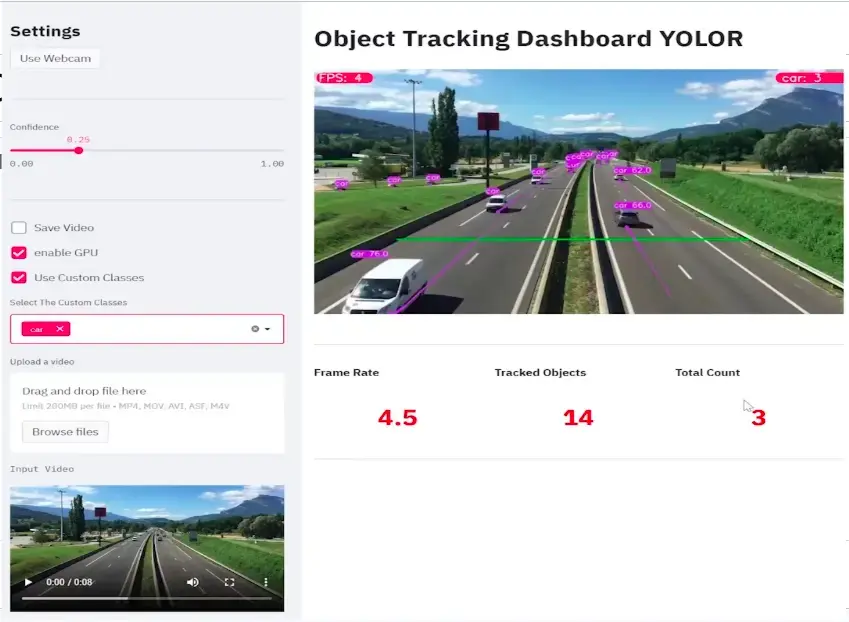
tracks = model.video_tracker(
    'data/sample_videos/test.mp4',
    filter_classes=['car', 'truck']
)

for model_output in tracks:
    # Draw annotations on each frame
    annotations = ASOne.draw(model_output, display=True)
    # model_output also contains bboxes, ids, classnames, scores
Switch tracker or detector by changing a single flag — no other code changes required. See all supported flags in the Usage section below.
Usage
All Capabilities, One API
Every capability follows the same instantiation pattern. Swap flags to change models with zero structural changes to your code.
Run Object Detection
import asone
from asone import ASOne

# Initialize detector (GPU)
model = ASOne(detector=asone.YOLOV9_C, use_cuda=True)
vid = model.read_video('data/sample_videos/test.mp4')

for img in vid:
    detection = model.detecter(img)
    annotations = ASOne.draw(detection, img=img, display=True)
    # detection contains: bboxes, class_ids, scores, class_names
Custom Trained Weights
# Use your own fine-tuned weights
model = ASOne(
    detector=asone.YOLOV9_C,
    weights='data/custom_weights/my_model.pt',
    use_cuda=True
)
for img in vid:
    detection = model.detecter(img)
    annotations = ASOne.draw(
        detection, img=img, display=True,
        class_names=['license_plate', 'vehicle']
    )
Switch Models
# Change detector with one flag
model = ASOne(detector=asone.YOLOX_S_PYTORCH, use_cuda=True)

# Apple Silicon (M1/M2) — CoreML models
model = ASOne(detector=asone.YOLOV8L_MLMODEL)  # no GPU needed
model = ASOne(detector=asone.YOLOV5X_MLMODEL)
model = ASOne(detector=asone.YOLOV7_MLMODEL)
Run from Terminal
# GPU
python -m asone.demo_detector data/sample_videos/test.mp4

# CPU
python -m asone.demo_detector data/sample_videos/test.mp4 --cpu
Model Support
Everything in One Library
AS-One supports the most widely-used models in the detection, tracking, and segmentation ecosystem — and is continuously updated as new architectures are released.
Detectors
- YOLOv5 (PyTorch, ONNX)
- YOLOv7 (PyTorch, ONNX)
- YOLOv8 (PyTorch, ONNX, CoreML)
- YOLOv9-C (PyTorch)
- YOLOX (PyTorch, ONNX)
- YOLO-NAS
- PP-YOLOE
Trackers
- ByteTrack
- DeepSORT
- NorFair
- StrongSORT
- OC-SORT
- MoTPy
- SAM (Segment Anything)
OCR
- CRAFT (text detection)
- EasyOCR (recognition)
Pose Estimation
- YOLOv7-w6-pose
- YOLOv8m-pose
- YOLOv8l-pose
Roadmap
- YOLOv5 / v7 / v8 / v9 (done)
- YOLO-NAS (done)
- SAM Integration (done)
- Apple M1/M2 CoreML (done)
- Pose Estimation (done)
- OCR & Text Tracking (done)
Need a Production Computer Vision System?
AS-One helps you experiment fast. AxcelerateAI helps you scale to production — with custom models, edge deployment, and enterprise SLAs.
FAQ
Common Questions
Yes. Set use_cuda=True when instantiating ASOne. You need a compatible GPU with CUDA drivers installed. See the driver installation guide in the repository.
Yes. Pass the weights path as the weights argument to ASOne: model = ASOne(detector=asone.YOLOV9_C, weights='path/to/weights.pt'). The library handles inference with your weights automatically.
AS-One supports Python 3.8 and higher. We recommend using a virtual environment (venv or conda) to avoid dependency conflicts.
Yes. AS-One supports CoreML format for YOLOv5, YOLOv7, and YOLOv8 on Apple Silicon. Use the _MLMODEL variants (e.g., asone.YOLOV8L_MLMODEL) and no GPU flag is needed.
The project is open-source under the GPL v3 license. Fork the repository, make your changes, and submit a pull request. Bug reports and feature requests are welcome via GitHub Issues.