Is Computer Vision Worth It for Small and Mid-Sized Companies?
Computer vision has moved from research labs and big tech companies into practical business environments. It now powers systems like automated quality inspection, retail analytics, security monitoring, and logistics optimization. But despite its maturity, the real question for small and mid-sized companies is not “Can we use computer vision?” but rather “Does it actually make economic and operational sense for us?”
The answer is not universal. Computer vision can deliver strong ROI in specific conditions, but it can also become an expensive, maintenance-heavy system that never stabilizes if adopted without the right problem fit, data readiness, and infrastructure maturity.
This article breaks down when computer vision is worth it, when it is not, and what it actually takes to deploy it in a real-world SME environment.
1. What “Computer Vision in Business” Actually Means
In practical terms, computer vision (CV) refers to systems that extract structured information from images or video streams. Unlike traditional software that processes numbers or text, CV deals with unstructured visual data.
Typical business applications include:
- Detecting defects in manufacturing lines
- Counting inventory in retail shelves
- Reading license plates in parking systems
- Monitoring safety compliance (helmets, PPE, restricted zones)
- Analyzing customer behavior in physical stores
- Document scanning and OCR-based automation
Modern systems usually rely on deep learning models such as convolutional neural networks (CNNs) or transformer-based vision models, often deployed through frameworks like PyTorch or TensorFlow, and served via APIs or edge devices.
However, the real complexity is not the model itself—it is everything around it: data collection, labeling, deployment, integration, monitoring, and continuous updates.
2. The Core Question: Value vs. Complexity
For SMEs, every technology decision is constrained by three factors:
- Budget constraints
- Engineering capacity
- Operational urgency
Computer vision sits at the intersection of all three. It can automate tasks that are otherwise labor-intensive, but it introduces a pipeline that requires ongoing maintenance.
A simple way to evaluate CV is:
Does visual information currently create measurable cost, delay, or error in your operations?
If the answer is yes and the cost is significant, CV can be worth it. If not, it often becomes an over-engineered solution.

3. Where Computer Vision Actually Works Well for SMEs
Not all use cases are equal. Some domains naturally align with CV because they involve repetitive visual inspection or monitoring.
High-ROI Environments: SME CV Sweet Spots
Manufacturing / QC
- Repetitive conveyor inspection
- Controlled lighting/camera setup
Retail / Inventory
- Product placement metrics
- Shelf stock & movement analytics
Logistics / Warehouse
- Automated package counting
- Predictable object damage detection
Security / Access
- License plate recognition
- Perimeter intrusion detection
3.1 Manufacturing and Quality Control
This is one of the strongest ROI areas.
Example:
- Detecting scratches, cracks, or misalignment on products moving along a conveyor belt.
Why it works:
- Tasks are repetitive and high-volume
- Errors are costly but visually detectable
- Lighting and camera setup can be controlled
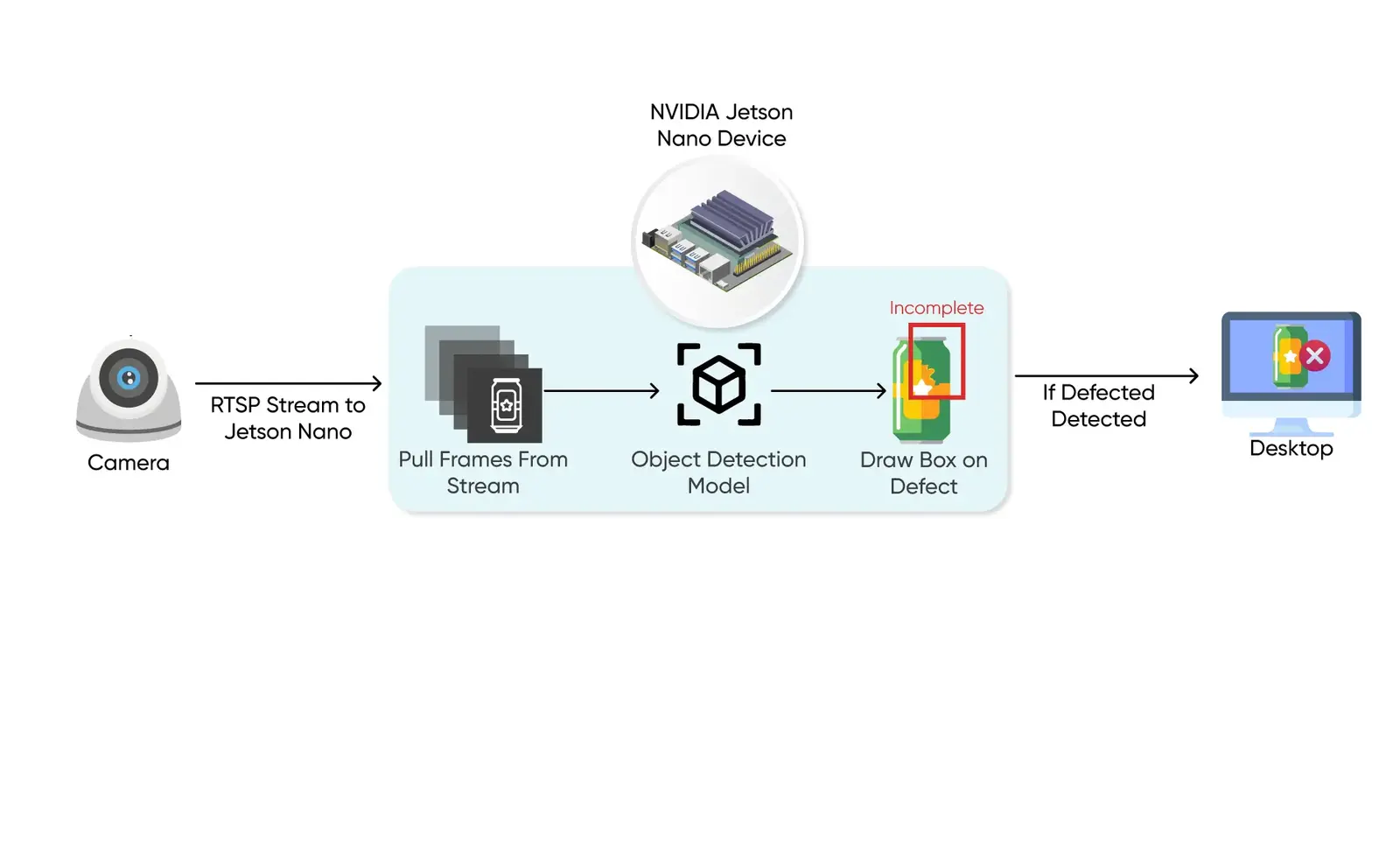
Typical architecture:
- Industrial camera → edge device (Jetson or similar) → inference model → rejection/flagging system
In many cases, CV replaces or augments human inspection teams.
3.2 Retail and Inventory Monitoring
CV can be used to track:
- Shelf stock levels
- Product placement compliance
- Customer movement patterns
However, this is more complex than manufacturing because:
- Lighting changes frequently
- Occlusions happen often
- Store layouts vary
Still, SMEs in retail chains can benefit significantly if deployed selectively (e.g., high-value product aisles).
3.3 Logistics and Warehousing
Use cases include:
- Package counting
- Barcode reading automation
- Damage detection in shipping
This domain is highly CV-friendly because:
- Environment is structured
- Objects are predictable
- High throughput justifies automation
3.4 Security and Access Control
Examples:
- License plate recognition
- Face-based access systems (with compliance considerations)
- Intrusion detection
These systems are mature but require careful attention to privacy regulations and false-positive handling. For real estate developers and property managers, similar automated scanning pipelines are used to reduce audit overheads: see How Property Image Analysis Improves Valuation Accuracy.
4. Where Computer Vision Usually Fails for SMEs
Many CV projects fail not because models are weak, but because expectations are misaligned with reality.
4.1 Lack of Clean Data
Unlike traditional software, CV systems are data-hungry.
A usable dataset requires:
- Hundreds to thousands of labeled images per class
- Consistent labeling standards
- Real-world variability (not just “perfect” images)
SMEs often underestimate this effort. Data labeling alone can take weeks or months.
4.2 Changing Environments
CV models degrade when environments shift:
- Lighting changes
- Camera angle changes
- Product packaging changes
- Seasonal variation in retail stores
This leads to model drift, which requires retraining and continuous monitoring.
4.3 Hidden Operational Costs
The visible cost is model development. The hidden costs include:
- Camera installation and calibration
- Data pipelines (storage, streaming, preprocessing)
- Edge hardware maintenance
- MLOps infrastructure (monitoring, retraining, versioning)
In many SME cases, the ongoing cost exceeds initial development cost within 6–12 months.
4.4 Overengineering Simple Problems
A common mistake:
Using CV to solve problems that could be handled with:
- Simple sensors
- Barcode scanning
- Rule-based systems
- Human-in-the-loop workflows
For example, using object detection to count items when a weight sensor would be more reliable and cheaper.
Failure Analysis: 4 Fatal Pitfalls of SME Vision
Data Starvation
Requires thousands of manually labeled images per class to reach stability.
Environmental Shift
Model drift caused by changes in lighting, camera angles, or product packaging.
Hidden OPEX Drag
Ongoing costs for calibration, data storage, and MLOps often exceed build costs.
Problem Misalignment
Deploying AI where simple sensors or barcodes would be 10x cheaper and more reliable.
5. What a Real Computer Vision System Looks Like
A production-grade CV system is not just a model. It is a pipeline:
5.1 Data Layer
- Image/video capture
- Storage (cloud or on-prem)
- Labeling tools (manual or semi-automated)
5.2 Model Layer
- Training pipeline (PyTorch/TensorFlow)
- Model selection (YOLO, EfficientNet, Vision Transformers depending on task)
- Validation and testing
5.3 Deployment Layer
- Edge inference (low latency use cases)
- Cloud inference (scalable but latency-dependent)
- API layer for integration
5.4 Monitoring Layer
- Drift detection
- Accuracy tracking
- Feedback loop for retraining
SMEs often underestimate the importance of the monitoring layer, but it is what keeps the system usable after deployment.
Production System Lifecycle
1. Data Layer
Capture, Storage & Labeling
2. Model Layer
Training, Selection & Testing
3. Deployment Layer
Edge Hardware vs. Cloud APIs
4. Monitoring Layer
Drift Detection & Accuracy
Production data flows back to the data layer to combat model drift and environmental shifts.
6. Cloud vs Edge Deployment: A Key Decision
For SMEs, deployment architecture is one of the most important decisions.
Cloud-based CV
Pros:
- Easier to build and scale
- Lower upfront hardware cost
- Centralized updates
Cons:
- Latency issues
- Ongoing API or compute costs
- Privacy concerns for sensitive images
Edge-based CV
Pros:
- Real-time processing
- Lower bandwidth usage
- Better privacy control
Cons:
- Hardware cost (NVIDIA Jetson, TPU devices)
- Harder to update models at scale
- Limited compute capacity
In practice, many systems use a hybrid model: edge for inference, cloud for training and analytics.
Strategic Architecture Matrix
Edge Compute
Latency, Privacy, Bandwidth
- Sub-10ms
- Offline
- Secure
Requires local accelerator hardware (NVIDIA Jetson). Harder orchestration at scale.
Cloud-Based
Low CapEx, Central Upgrades
- Pay-as-you-go
- Scalable
- Fast MVP
High ongoing streaming bandwidth costs. Latency is dependent on network round-trip.
Hybrid Strategy
Balanced Efficiency
- Optimized ROI
- Best of Both
- Future-Proof
Local edge devices for fast inference, synced with cloud for retraining and analytics.
7. Cost Reality for SMEs
A realistic cost breakdown looks like this:

Initial Setup
- Camera systems: low to moderate cost depending on scale
- Model development: moderate to high (depending on customization)
- Infrastructure setup: moderate
Ongoing Costs
- Cloud compute or edge maintenance
- Data storage
- Model retraining cycles
- Monitoring and debugging
A small pilot project can start relatively cheap, but production scaling is where costs increase significantly. For a complete itemized list of camera installation, software licensing, and operational MLOps costs, consult our Cost Breakdown of Building a Computer Vision System.
When does computer vision deliver a positive ROI for small and mid-sized businesses?
Computer vision delivers a positive ROI for SMEs when applied to high-volume visual tasks where labor costs are high, visual errors are expensive, or the inspection environment can be tightly controlled.

To quantify this, SMEs should use the following basic ROI equation:
$$\text{Annual Savings} = (\text{Manual Inspection Error Cost} + \text{Inspector Labor Cost}) - \text{CV System Amortized Cost} - \text{Annual MLOps Maintenance}$$
In practice, this means:
- High-volume visual tasks exist: If humans are repeatedly doing visual checks at scale, automation gains compound quickly. For example, in a manufacturing study, replacing manual conveyor inspection with an automated camera reduced the QA defect escape rate from 2.4% to 0.15%, saving $68,000 annually.
- Error cost is high: Such as manufacturing defects, security breaches, or logistics mistakes.
- Labor cost is significant: If visual inspection requires multiple shifts or teams, CV can reduce long-term operational cost.
- Environment is controllable: Controlled environments (factories, warehouses) are ideal.
"For SMEs, the decision to deploy computer vision should be based on a clear, visual bottleneck that costs the business money or time daily." — Shehryar Malik, CEO at AxcelerateAI.
9. When It Is NOT Worth It
CV is usually not worth it when:
- The problem can be solved with simpler automation
- Data collection is unreliable or expensive
- Environment is highly unpredictable
- The business cannot support ongoing ML maintenance
- ROI is unclear or marginal
A critical failure pattern is building CV “because it is modern,” not because it solves a measurable bottleneck.
10. Build vs Buy Decision
SMEs have two main paths:
10.1 Build In-House
Best when:
- You have ML engineering talent
- Problem is highly specific
- Long-term control is required
Risk:
- High learning curve
- Maintenance burden
10.2 Use Prebuilt Solutions
Best when:
- Standard use case (OCR, face detection, basic inspection)
- Fast deployment needed
- Limited ML expertise
Risk:
- Vendor lock-in
- Limited customization
In practice, many SMEs start with vendors and gradually move toward hybrid or in-house systems if the ROI is proven.
11. The Real Decision Framework
A practical way to decide:
- Identify a visual bottleneck costing money or time
- Estimate current manual cost per month
- Compare with CV system cost over 12–24 months
- Evaluate data availability and environment stability
- Run a small pilot before scaling
Decision Framework Blueprint
Step 1
Identify Bottleneck
Identify a visual bottleneck costing money or time.
Step 2
Cost Estimation
Estimate current manual operational cost per month.
Step 3
TCO Comparison
Compare manual costs against 12-24 month system TCO.
Step 4
Verify Stability
Verify local data availability and environment stability.
Step 5
Small-Scale Pilot
Execute an isolated small-scale pilot project.
Did the pilot showcase clear, measurable performance improvement?
YES: Scale Up
Proceed to Enterprise Scale
NO: Abort System
Flaws detected. Do not scale.
If a pilot cannot show measurable improvement, full-scale deployment will not fix it.
Conclusion
Computer vision is not a universal efficiency tool. For small and mid-sized companies, it is a selective amplifier—it performs extremely well when applied to structured, repetitive, high-volume visual tasks in controlled environments.
It fails when treated as a general-purpose automation layer without considering data readiness, infrastructure cost, and ongoing maintenance requirements.
In practical terms:
- If your problem is stable, visual, and repetitive → CV is often worth it
- If your problem is ambiguous, low-volume, or poorly structured → CV is usually overkill
The strongest ROI comes not from adopting computer vision broadly, but from applying it surgically to the right bottlenecks.
Unsure if CV is right for your workflow?
Don't build in the dark. Our AI Opportunity Audit identifies visual bottlenecks in your operations and provides a detailed ROI projection before you spend a dollar on development.
Book an AI Opportunity Audit