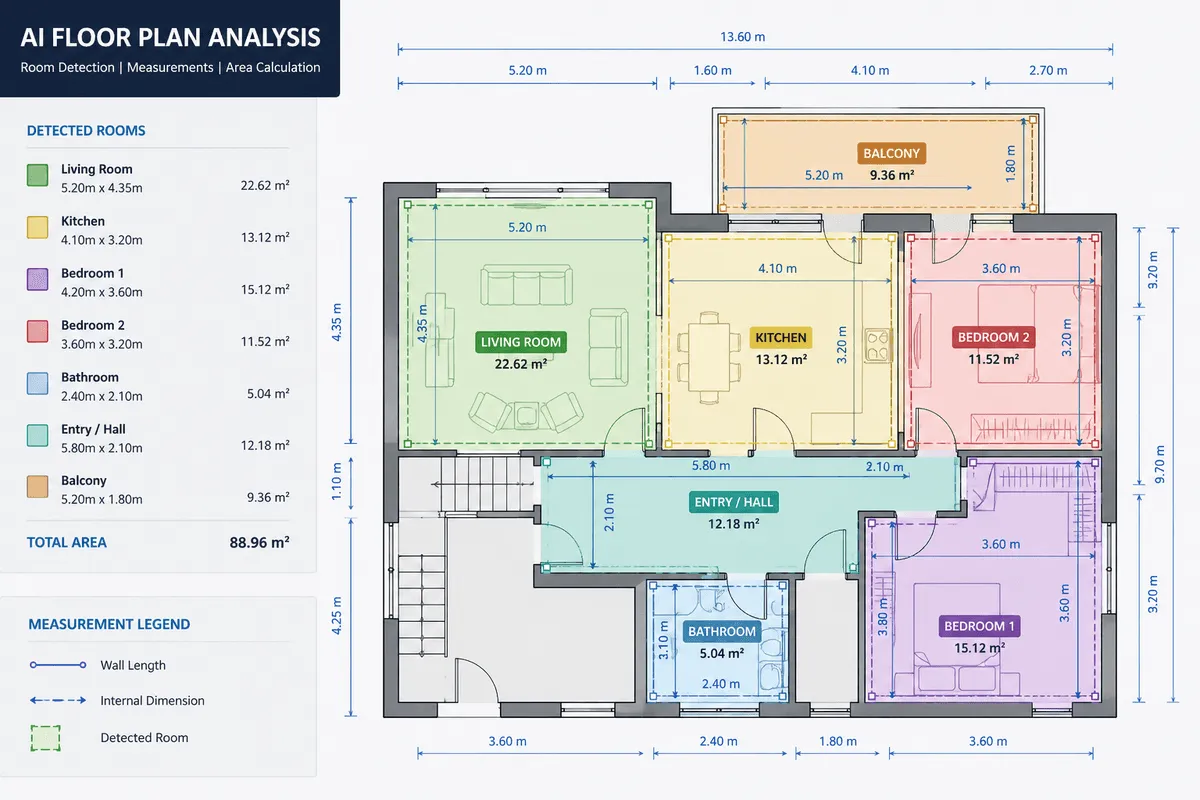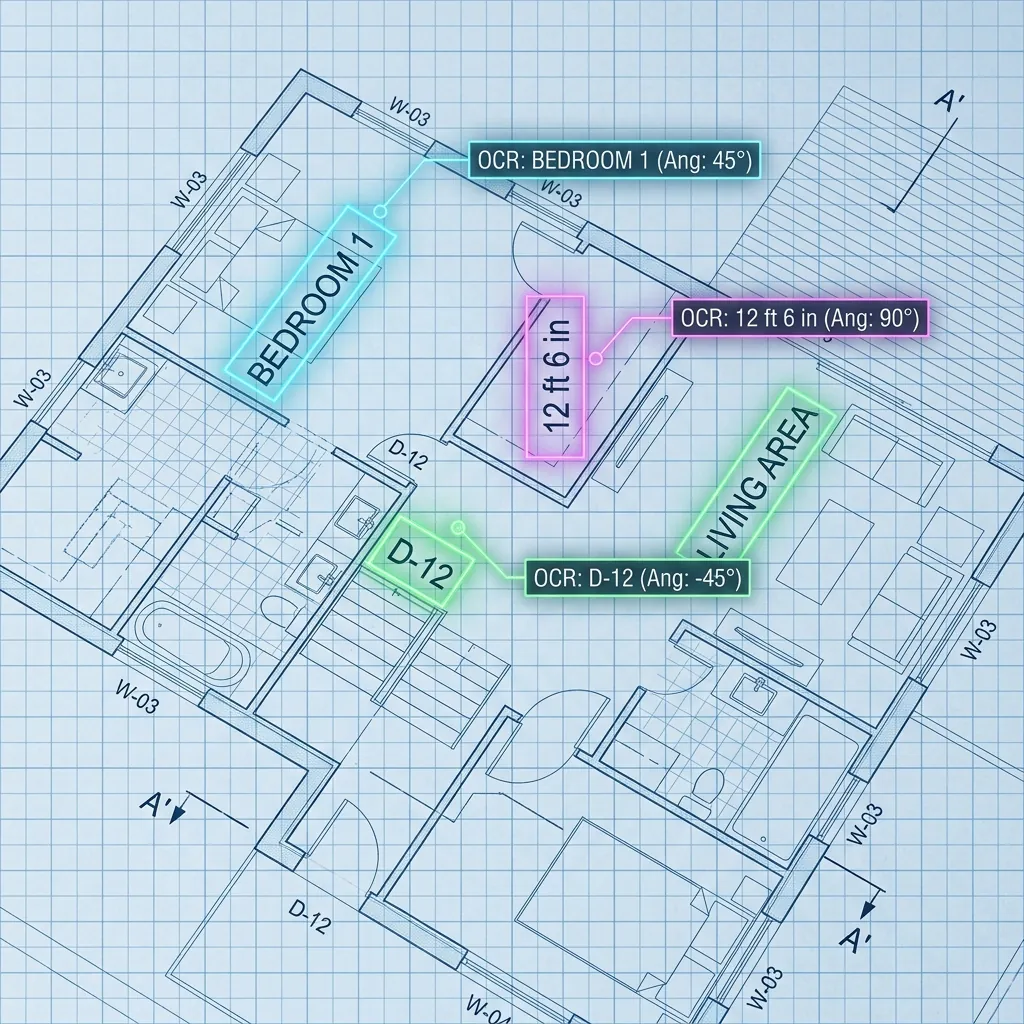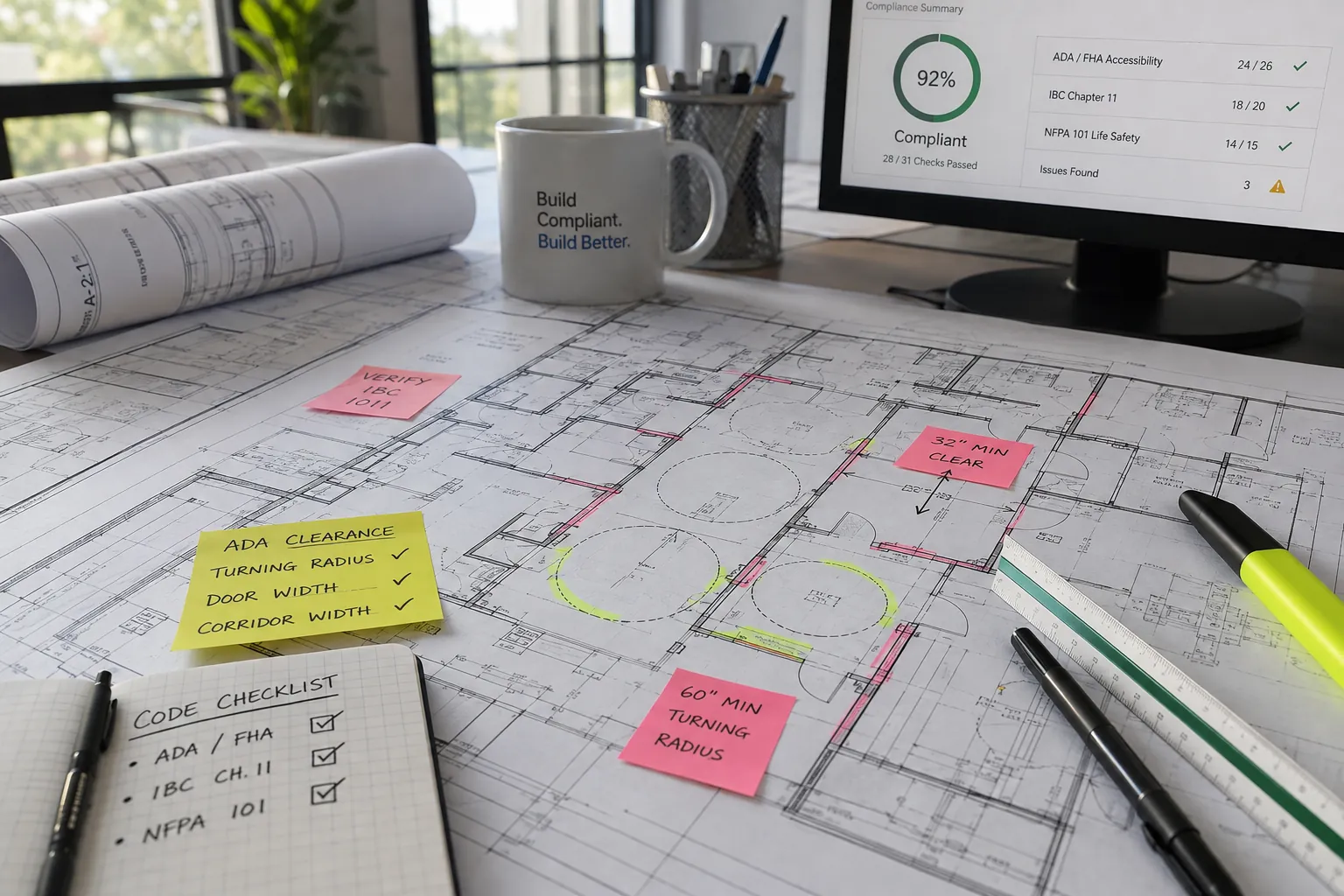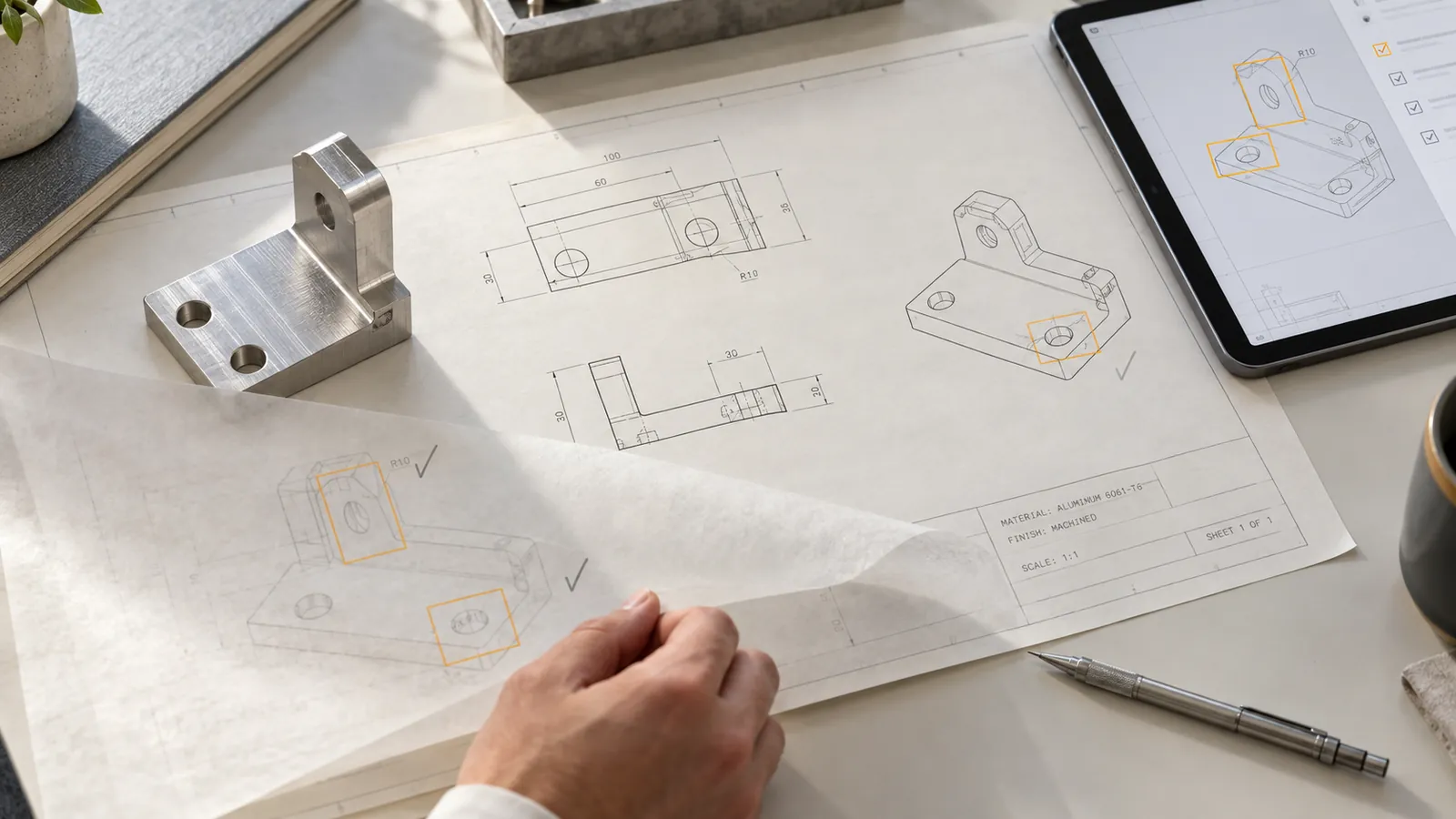
AI-assisted drawing analysis brings technical details into focus while engineers retain final review authority. Illustrative image.
An engineering drawing can be readable and still leave a manufacturing team with unanswered questions.
Which revision should the supplier use? Does a general note establish the tolerance for that dimension? Is the material specification included elsewhere in the package? Has a changed requirement reached the inspection team?
Answering these questions takes more than extracting text from a PDF, or even the geometry a floor plan analysis API pulls from a drawing. It requires connecting drawing content, supporting documents, engineering rules, and approval decisions.
AI engineering drawing review combines document extraction, computer vision, and validation rules to identify information that needs an engineer’s attention. A useful system returns traceable findings—linked to the relevant drawing location and requirement—while keeping approval with the responsible engineering team.
For manufacturers considering this technology, the practical challenge is choosing a review scope that can be tested, trusted, and integrated into daily work.
This guide explains the capabilities to evaluate, the architecture behind a custom solution, and how to decide whether a pilot creates business value.
What is AI engineering drawing review?
AI engineering drawing review is the use of machine learning and software rules to extract, organize, compare, and check information in technical drawings.
Depending on its scope, a system may identify part numbers, read material notes, extract dimension callouts, compare revisions, or flag inconsistencies across a document package.
Three activities need to remain distinct:
| Activity | Purpose | Example |
|---|---|---|
| Extraction | Read what the source contains | Capture a material designation and its location |
| Validation | Check extracted information against defined requirements | Identify a conflict between a drawing note and a related specification |
| Approval | Decide what is acceptable and authorize action | Resolve the conflict and approve the applicable requirement |
A model that extracts a tolerance correctly has not necessarily determined whether that tolerance is appropriate. A system that finds no issues has not necessarily established that a part is ready for manufacture.
Useful automation makes those boundaries explicit.
What is a technical data package?
A technical data package, or TDP, brings together the product information needed to support activities such as manufacturing and maintenance. NIST describes the TDP in this broader product-data context, rather than as an individual drawing. NIST technical data package report
The contents vary by product and engagement. A package may include drawings, models, specifications, parts lists, revision records, and other supporting information.
That distinction affects how an AI review should work.
A blank field on one sheet does not automatically mean the requirement is missing from the package. The information may appear in a general note, an assembly drawing, or a referenced specification.
Before flagging an omission, the system needs to establish:
- Which documents were provided.
- Which references it was expected to check.
- Which sources are authoritative.
- Whether the information was absent, unreadable, conflicting, or simply not evaluated.
“Not found in the supplied files” is a more useful finding than an unsupported declaration that a requirement does not exist.
Where can AI assist drawing review?
The best starting points are recurring checks with clear evidence and a well-defined review decision.
| Review area | Potential AI assistance | What requires further judgment |
|---|---|---|
| Document identification | Extract drawing numbers, part identifiers, sheet numbers, and revisions | Confirm the authoritative configuration |
| Requirement extraction | Capture material notes, finishes, dimensions, and tolerances | Interpret applicability and engineering suitability |
| Package completeness | Compare supplied files with an expected document list | Decide whether an absent item is required |
| Cross-document consistency | Surface conflicting values or identifiers | Resolve precedence and exceptions |
| Revision comparison | Identify candidate changes in text, callouts, or tables | Assess their manufacturing and inspection impact |
| Reviewer preparation | Draft clarification questions with source references | Approve communications and corrective actions |
Treat these as separate capabilities with separate acceptance tests.
A successful title-block extraction pilot does not establish that the same system can perform comprehensive geometric dimensioning and tolerancing analysis.
Start with a bounded workflow
Consider a supplier-intake team that repeatedly checks incoming packages for drawing identification, revision consistency, and material requirements.
That is a more testable initial scope than asking AI to “check everything that could go wrong with this part.”
The narrower scope makes it easier to define correct answers, understand failures, and measure whether engineers spend less time gathering information.
Why OCR alone is not enough
Optical character recognition converts visual text into machine-readable characters. Engineering review also needs the relationships between those characters and the drawing.
A dimension belongs to a feature. A note may apply globally or locally. A tolerance may be stated directly or inherited from an applicable general requirement.
Research on engineering drawing interpretation has explored combinations of annotation detection and vision-language parsing to address complex layouts, rotated text, and engineering symbols. These studies support investigating specialized approaches, but their experimental results do not establish performance on a particular manufacturer’s documents. Research on hybrid drawing interpretation
A useful system therefore needs to preserve context alongside extracted values.
For example, it should distinguish:
- The original text as printed.
- A normalized representation used by software.
- The associated feature or document region.
- The source page and revision.
- Any uncertainty about the extraction or association.
If a model reads a number but attaches it to the wrong feature, the characters may be correct while the engineering interpretation is wrong.
This is where engineering drawing analysis overlaps with intelligent document processing: the output must be organized for a business workflow, with validation and traceability built into the process.
A practical architecture for a custom drawing-review system
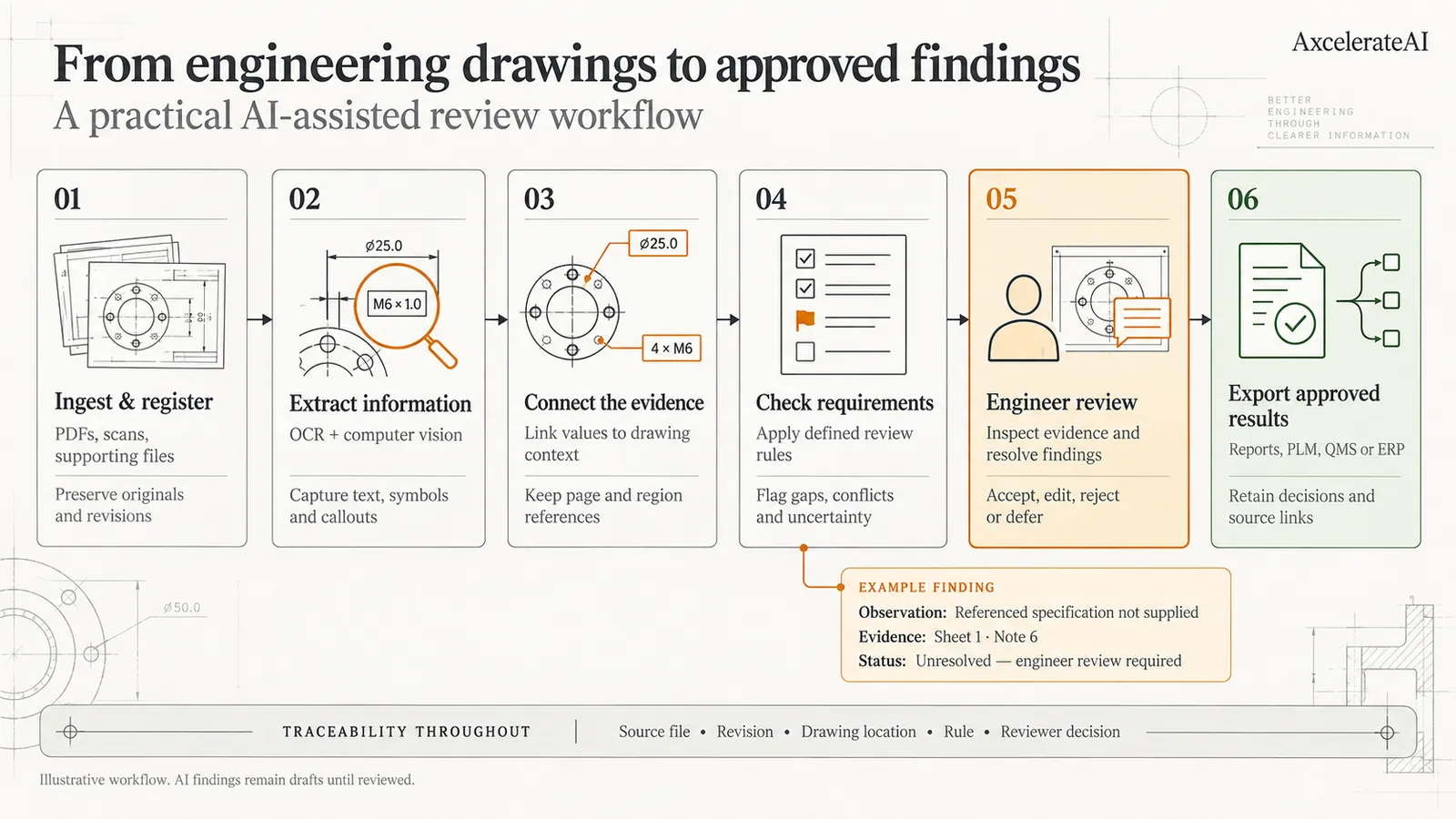 Figure 2: Six-stage technical architecture for custom engineering drawing review — from document registration and content extraction to rule application, evidence presentation, and system export.
For a custom implementation, we recommend separating the workflow into six stages. Each stage should produce inspectable outputs so failures can be diagnosed.
1. Register the documents and establish the review scope
Start with a manifest of the supplied files, their identifiers, and their versions.
Preserve the originals. Record which drawing revision and supporting documents belong to each review run.
The system should also know what it is allowed to evaluate. If the pilot covers title blocks and material notes, the report should not imply that weld requirements or full GD&T consistency were checked.
2. Extract content using the appropriate method
Use available digital text and geometry where they are reliable. Apply OCR and visual analysis where the source is a scan or the relevant information is not available as structured data.
Preserve image quality during processing. Small symbols, decimal points, and fine linework can be important.
If preprocessing rotates, crops, or cleans a document, retain the relationship to the original page so every extracted item can still be located.
3. Connect values to their drawing context
Organize extracted content into a structured representation.
Depending on the scope, this might include drawing identifiers, notes, table rows, callouts, references, and relationships between annotations and features.
Store both raw and normalized values. A normalization step should never silently replace the original evidence.
For ambiguous content, allow the system to return “unresolved” rather than forcing a value.
4. Apply explicit review rules
Define checks with engineering stakeholders before implementing them.
A revision check needs to specify which documents must agree. A material check needs to specify where valid material information may appear. A completeness check needs an expected package definition.
Distinguish company procedures, customer requirements, and applicable standards. Do not treat them as interchangeable.
For GD&T, ASME Y14.5 defines the symbols and rules used to state and interpret relevant requirements. Extracting those symbols is only one part of applying the drawing’s governing requirements correctly. ASME dimensioning and tolerancing overview
5. Present evidence for engineer review
Every finding should make it easy to answer:
- What was observed?
- Where is the supporting evidence?
- Which check produced the finding?
- What remains uncertain?
- What decision is needed?
Display the source crop or page location beside the proposed finding. Let engineers accept, reject, edit, or defer it, with a recorded reason.
A confidence score can help prioritize review, but it should not be presented as proof that an engineering conclusion is correct. AWS’s document-extraction guidance similarly recommends choosing confidence thresholds according to the application and routing uncertain results for additional scrutiny. Amazon Textract best practices
6. Export approved outcomes into the existing workflow
Decide where reviewed findings should go before building the model.
The destination might be a quality management system, product lifecycle management platform, engineering change process, supplier clarification queue, or structured report.
Keep draft findings separate from approved requirements. Export the reviewer’s disposition and source references alongside the result.
The integration should preserve the distinction between “AI suggested this” and “an authorized engineer approved this.”
What should an AI review finding look like?
The following is an illustrative example, not an AxcelerateAI client result.
Suppose an incoming package contains a part drawing whose material field is blank. The supplied files also contain a general note referencing a specification that was not included.
A weak output would say: “Material missing.”
A more useful finding would be:
| Field | Example |
|---|---|
| Check | Material requirement verification |
| Observation | No explicit material designation was found in the reviewed drawing regions |
| Supporting evidence | Blank material field on sheet 1; note 6 references specification SPEC-204 |
| Review limitation | SPEC-204 was not included in the supplied package |
| Status | Unresolved |
| Proposed next action | Obtain SPEC-204 and confirm whether it establishes the material requirement |
| Approval | Pending engineer review |
The distinction matters. The system has identified an unresolved requirement and the evidence needed to investigate it. It has not invented a material or declared the design defective.
Use the same discipline for proposed corrections. Draft a clarification request when evidence is incomplete; do not silently fill gaps with plausible engineering values.
How should AI drawing review accuracy be measured?
Measure each task separately, then evaluate the complete reviewer workflow.
A single “accuracy” percentage can hide failures that matter commercially.
| Metric | What it measures |
|---|---|
| Field extraction correctness | Whether required values match the agreed reference answers |
| Feature association correctness | Whether a value is linked to the correct feature or context |
| Finding precision | How many flagged issues are valid |
| Finding recall | How many known, in-scope issues the system detects |
| Severity-specific misses | Which important problems were not surfaced |
| Unsupported findings | How often the system asserts something without adequate evidence |
| Reviewer handling time | Time spent checking, correcting, and disposing of findings |
| Traceability completeness | Whether findings retain usable source and rule references |
Evaluate results by document type and quality. Clean digital PDFs, low-resolution scans, unfamiliar supplier layouts, and dense multi-sheet packages may behave differently.
Build the evaluation set with engineering input. Include both known problems and documents that should not trigger a finding.
Keep closely related drawings and revisions from leaking across development and test sets. Otherwise, apparent performance may reflect familiarity with a drawing family rather than reliable generalization.
Specialized training is one option to investigate. Published work has evaluated fine-tuned vision-language models for GD&T extraction, but model selection still needs to be based on your own representative test set. Research on engineering drawing information extraction
The pilot should answer a business question: Does the system reduce useful review effort while meeting the agreed standard for detecting in-scope issues?
How to estimate the business value
Start with the cost of the current workflow, including clarification and rework.
A simple planning model is:
Monthly review capacity recovered = package volume × minutes saved per package ÷ 60
For illustration, suppose a team reviews 400 packages each month. If a pilot demonstrates a reduction in human handling time from 30 minutes to 20 minutes per package:
400 × 10 ÷ 60 = approximately 66.7 hours recovered per month
These are hypothetical inputs, not a performance forecast.
Recovered capacity is not automatically a cash saving. Its value depends on whether the team uses it to process more work, reduce overtime, shorten queues, or avoid additional hiring.
Then account for:
- Software or inference costs.
- Integration and implementation.
- Document preparation.
- Engineer validation time.
- Monitoring and maintenance.
- The effort required to manage incorrect findings.
Track quotation turnaround or review backlog alongside labor time if those are the business constraints. Avoid counting several benefits separately when they represent the same underlying time saving.
Should you buy software or build a custom solution?
Evaluate both against the same representative drawings and acceptance criteria.
| An existing product may fit when… | A custom implementation may fit when… |
|---|---|
| Its supported checks match your review process | Your rules depend on customer or supplier-specific requirements |
| Its document coverage matches your inputs | Your packages combine unusual layouts and multiple source types |
| Its review interface meets your needs | Findings must fit an established internal approval process |
| Its deployment model is acceptable | Processing must operate within a particular environment |
| Standard exports are sufficient | Deep integration with existing systems is essential |
Custom development also brings ongoing responsibilities: maintaining rules, monitoring model behavior, handling new document formats, and supporting the application.
Ask vendors to demonstrate the complete workflow on representative material. A polished drawing summary is not enough to establish reliable issue detection or lower reviewer workload.
How to scope a pilot
A strong pilot has a written boundary, a representative test set, and a clear decision at the end.
Use this checklist before development begins:
- Choose one workflow. Define the team, trigger, and review decision being supported.
- Select a small set of checks. Name what is included and excluded.
- Agree on authoritative sources. Establish how conflicts and missing references are handled.
- Prepare reference answers. Have engineers label expected findings and valid exceptions.
- Set acceptance criteria. Include important misses, false alarms, and reviewer handling time.
- Test the interface and handoff. Confirm that findings are easy to inspect and act on.
- Define the next decision. Expand, revise, or stop based on the evidence.
Run the pilot alongside the existing review process first. Record where the system helps, where it adds work, and which document categories it cannot handle reliably.
The end deliverable should include limitations and failure examples, not only successful screenshots.
Considering a pilot? An AxcelerateAI AI Opportunity Audit can provide a starting point for discussing the workflow, data requirements, integration needs, and business case before committing to implementation.
What about deployment and confidential drawings?
Choose the processing environment before moving drawings into a pilot.
Map where originals, extracted content, derived images, logs, and backups will reside. Review access, retention, deletion, and any external model or service dependencies.
Cloud, private-environment, and local deployment options should be evaluated against the actual requirements of the engagement. A deployment label alone does not establish that every data-handling requirement has been met.
For restricted documents, establish an approved review process with the responsible teams before sharing samples.
You can begin a scoping conversation with a description of the workflow and document types. The initial discussion does not need to include proprietary drawings.
Frequently asked questions
Can AI read scanned engineering drawings?
AI can be evaluated for extracting information from scanned drawings, but performance depends on legibility, resolution, symbols, layout, and the required output. A pilot should include representative poor-quality scans and identify when the system must request a better source.
Can AI detect missing tolerances?
A configured workflow can flag cases where an applicable tolerance has not been established from the reviewed sources. It needs to consider general notes, referenced requirements, and scope before calling a tolerance missing. Unresolved cases should go to an engineer.
Is AI drawing review the same as design for manufacturability analysis?
No. Drawing review can focus on document content, completeness, and consistency. Design for manufacturability analysis evaluates the design against a manufacturing process and may require geometry, material, tooling, and process information beyond the drawing-review scope.
Can AI compare drawing revisions?
A system can be designed to identify candidate changes in extracted values and drawing regions. The review process should distinguish actual requirement changes from differences caused by scanning, alignment, or formatting, then route relevant changes for impact assessment.
How much data is needed for a pilot?
There is no universal number. The sample needs to cover the important document types, checks, exceptions, and failure conditions. The data needed to evaluate an existing model also differs from the data needed to train or fine-tune one.
Does every project require a custom-trained model?
No. Begin by testing available extraction methods and models against the defined task. Custom training becomes a candidate when recurring failures justify the annotation, development, and maintenance effort.
Can the system automatically approve a drawing?
Automating extraction or individual checks does not establish readiness for autonomous approval. For an initial implementation, keep release authority within the existing engineering approval process and evaluate any future automation separately.
Plan your engineering drawing AI workflow with AxcelerateAI
AxcelerateAI provides custom AI development spanning computer vision, intelligent document processing, and workflow integration.
For engineering drawing review, our recommended starting point is a defined business problem: a repetitive check, a measurable review burden, and a clear destination for approved findings.
Bring the questions your team repeatedly answers:
- What information takes the longest to locate?
- Which inconsistencies cause clarification cycles?
- What must every finding show before an engineer trusts it?
- Where should approved results go?
Those answers help shape a practical scope for evaluation.
Discuss your drawing-review workflow with AxcelerateAI.
Tell us your document types, approximate monthly volume, priority checks, and existing systems. Start with a workflow description so the appropriate approach to sample sharing can be agreed.
Related Capabilities & Further Reading
Explore connected resources across the AxcelerateAI drawing intelligence ecosystem:
- AI Floor Plan Spatial Analysis Platform — The foundational platform for room segmentation, wall extraction, and spatial graph generation from technical drawings.
- AI-Powered Floor Plan Analysis for Property Valuation — Converting raw blueprints into structured spatial data for automated valuation models (AVMs).
- Automating Building Code Compliance with AI Floor Plan Analysis — How AI automates ADA, FHA, IBC, and NFPA compliance checking directly from blueprint dimensions.
- Best AI Model for Floor Plan Analysis — Benchmark comparison of U-Net, YOLOv11, Mask R-CNN, and GNN models for drawing parsing accuracy.