Document AI · Intelligent document processing
Replace Manual Data Entry.
- Scans, PDFs, photos and Word files
- Validated against your master data
- Cloud API or on-premises
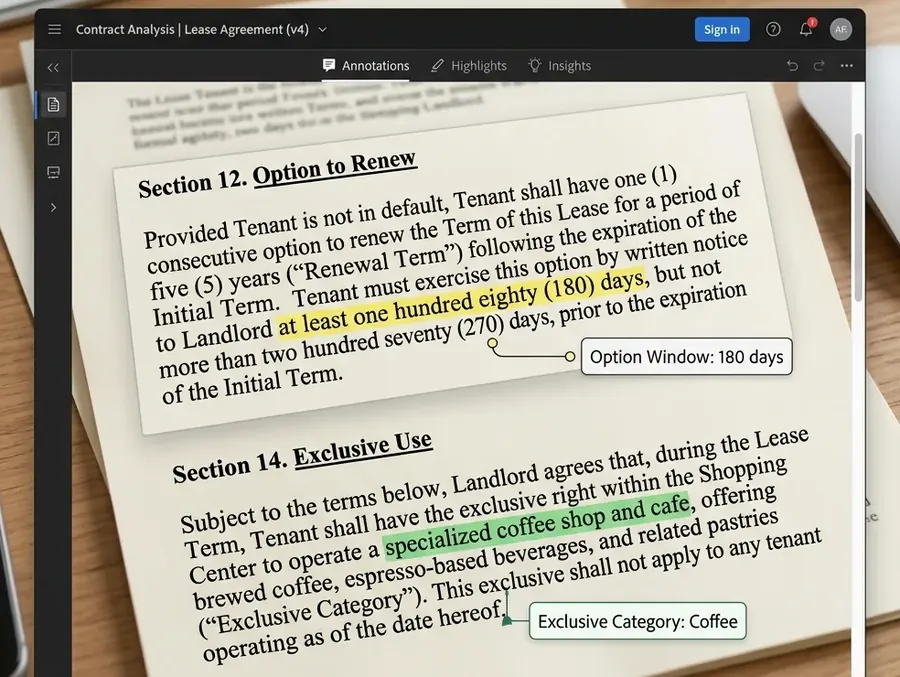
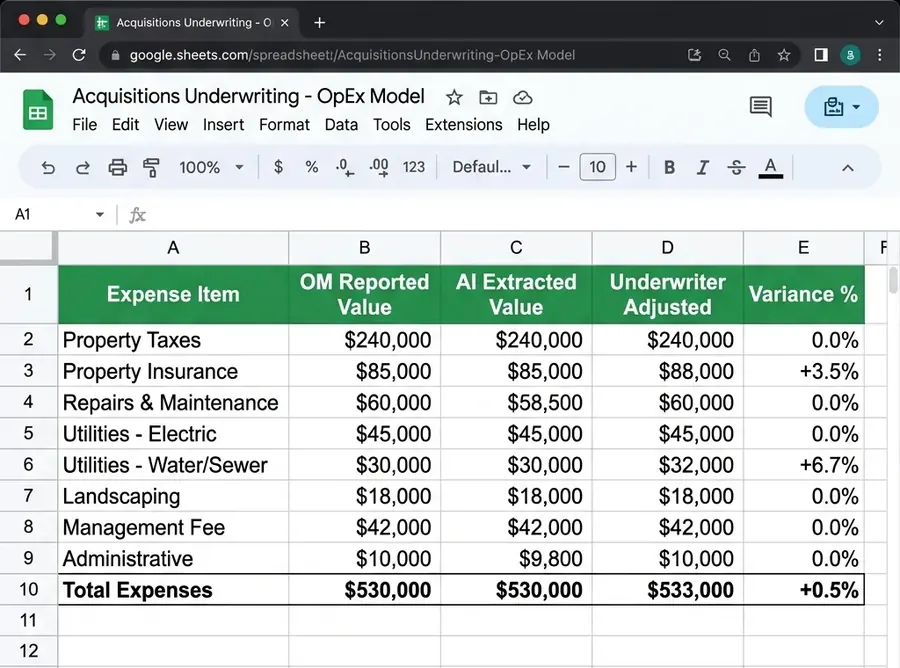
Clauses and figures located in the source document, then checked value by value in your spreadsheet or ERP.
Why it matters
Keying documents by hand doesn't scale
Most teams still retype data from invoices, orders and forms, or maintain OCR templates that break on every new layout.
Documents wait in queues
Files sit in shared inboxes until someone has time to key them.Typing errors cost money
A wrong total becomes a billing dispute, a duplicate payment or an audit finding.Templates are brittle
Rule-based OCR needs a template per layout and fails on scans and new vendors.
| Topic | Manual entry and template OCR | AxcelerateAI document pipeline |
|---|---|---|
| Sorting | Someone opens each file and decides where it goes | Every document is classified by type as soon as it arrives |
| Layouts | One template per supplier or form version | Models read layout and context, so new formats don't need a new template |
| Validation | Spot checks, if there is time | Every field checked against POs, master data and totals |
| Exceptions | Found later, during reconciliation or audit | Flagged immediately, with the source highlighted for review |
| System entry | Retyped into the ERP by hand | Posted through an API with the field mapping already done |
Document types
Any document your team keys today
We start from common business documents and train for your own layouts where needed. These are the types we are asked about most.
Invoices and receipts
Header fields, line items and tax breakdowns extracted, vendors matched and totals checked for automated invoice processing.Vendor, PO, line items, tax, totalSales and purchase orders
Order lines captured and matched to invoices and delivery notes, so PO-to-invoice matching runs without anyone opening a spreadsheet.Items, quantities, prices, delivery datesContracts, leases and OMs
Dates, rent schedules, clauses and deal metrics pulled from long documents where the key facts sit in tables and narrative text.Terms, obligations, NOI, cap ratesLease abstractionPassports and ID cards
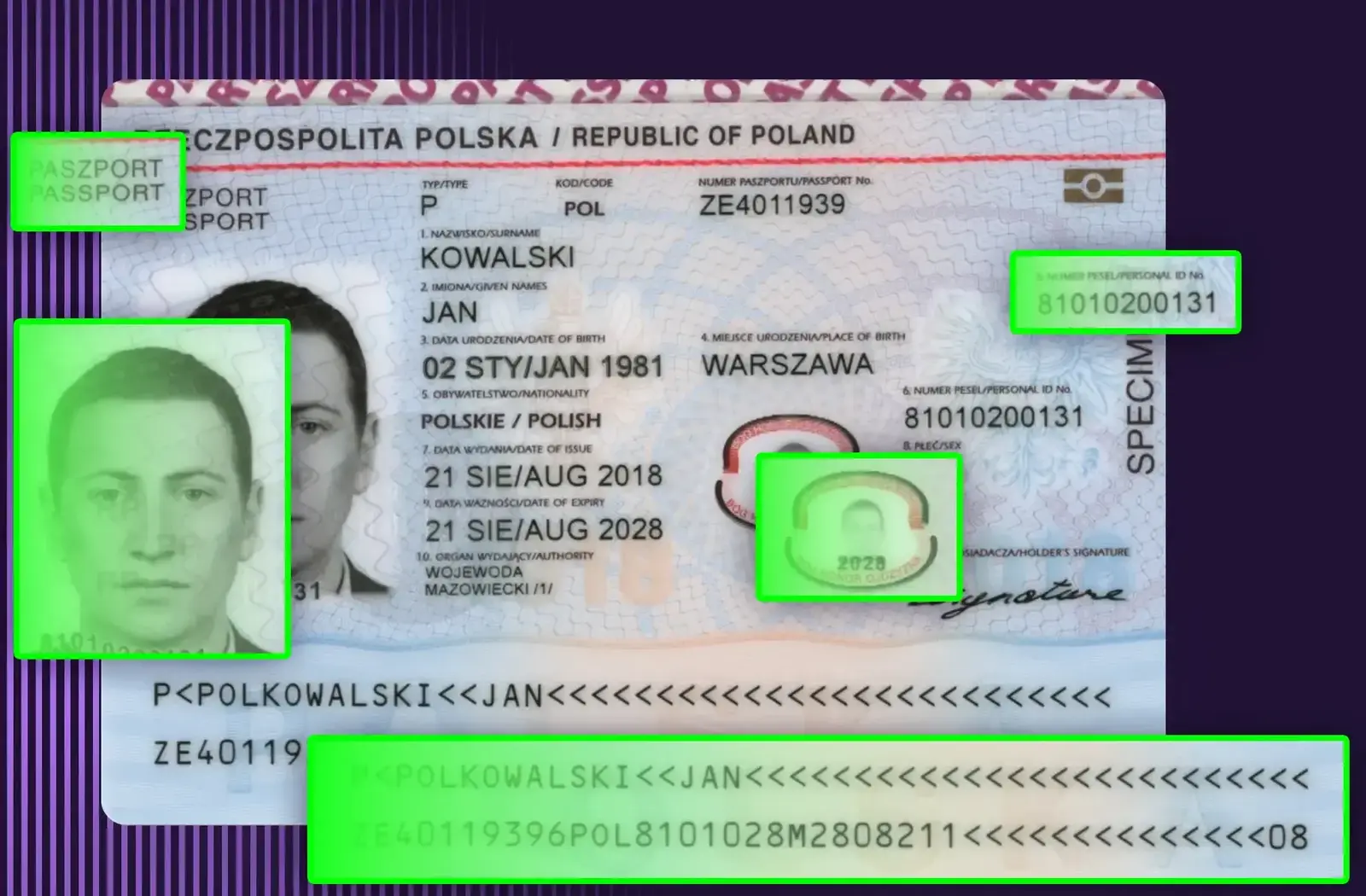
Documents located and cropped, text and machine-readable zones read and validated, and the photo matched to a selfie for KYC onboarding.Name, number, dates, MRZ, face matchPassport KYC case studyBank statements
Transaction histories extracted into clean tables and reconciled against your ledger with automated validation checks.Transactions, balances, periodsUtility bills and energy data
Consumption, meter readings and multi-service charges captured for energy audits, cost allocation and reporting.Meters, usage, tariffs, chargesHR, payroll and government forms
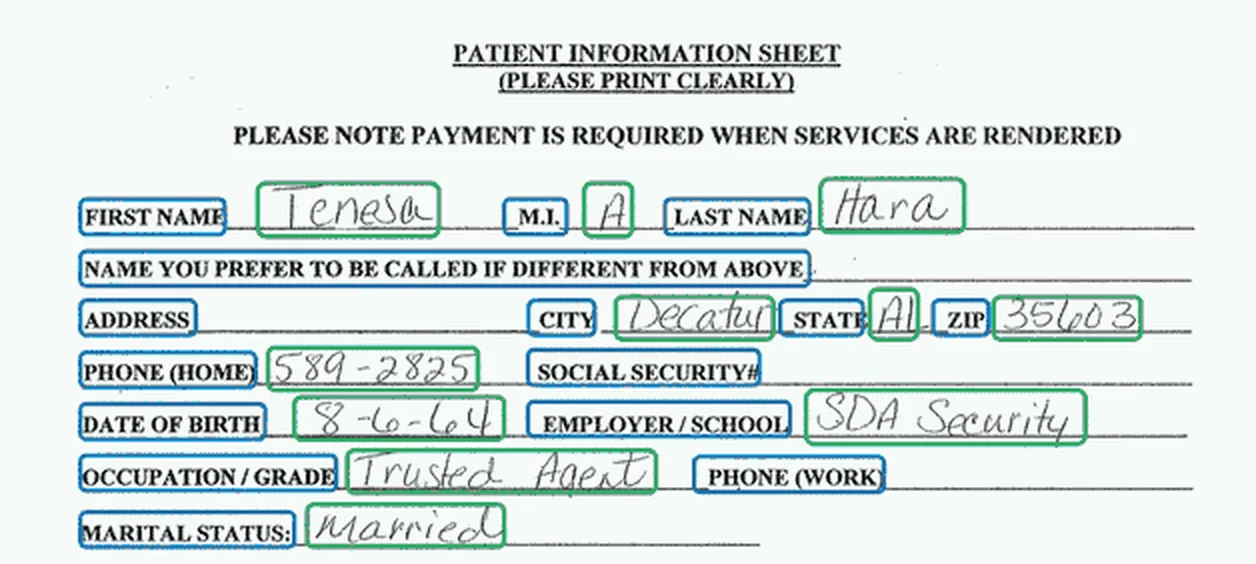
Employee records, timesheets, tax forms, regulatory filings and permit applications processed with minimal manual entry.Form fields, checkboxes, signaturesPrice lists and catalogs
Product and price tables read from PDFs and spreadsheets, then used to update your product database.SKUs, descriptions, pricesDrawings and technical packages
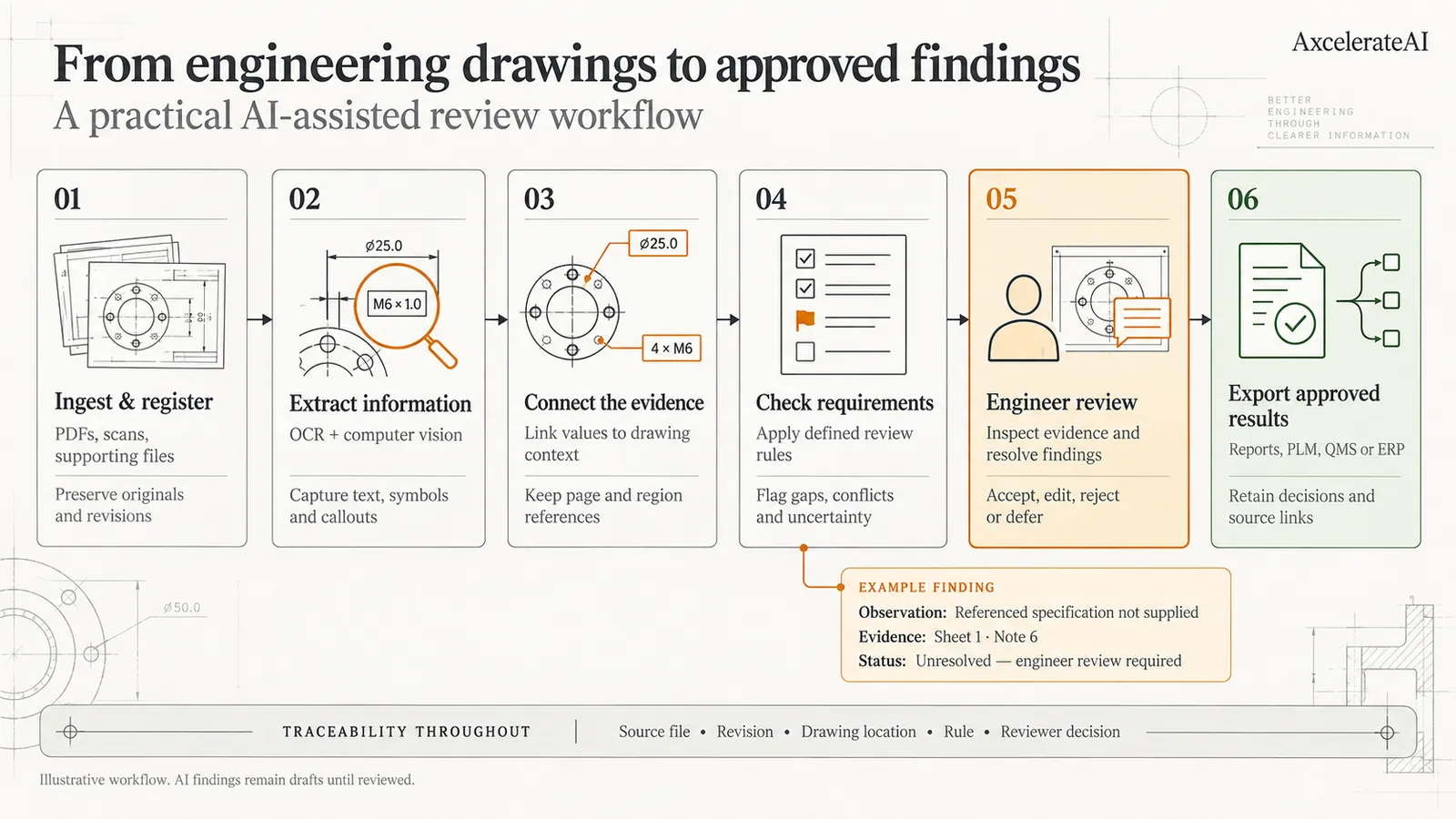
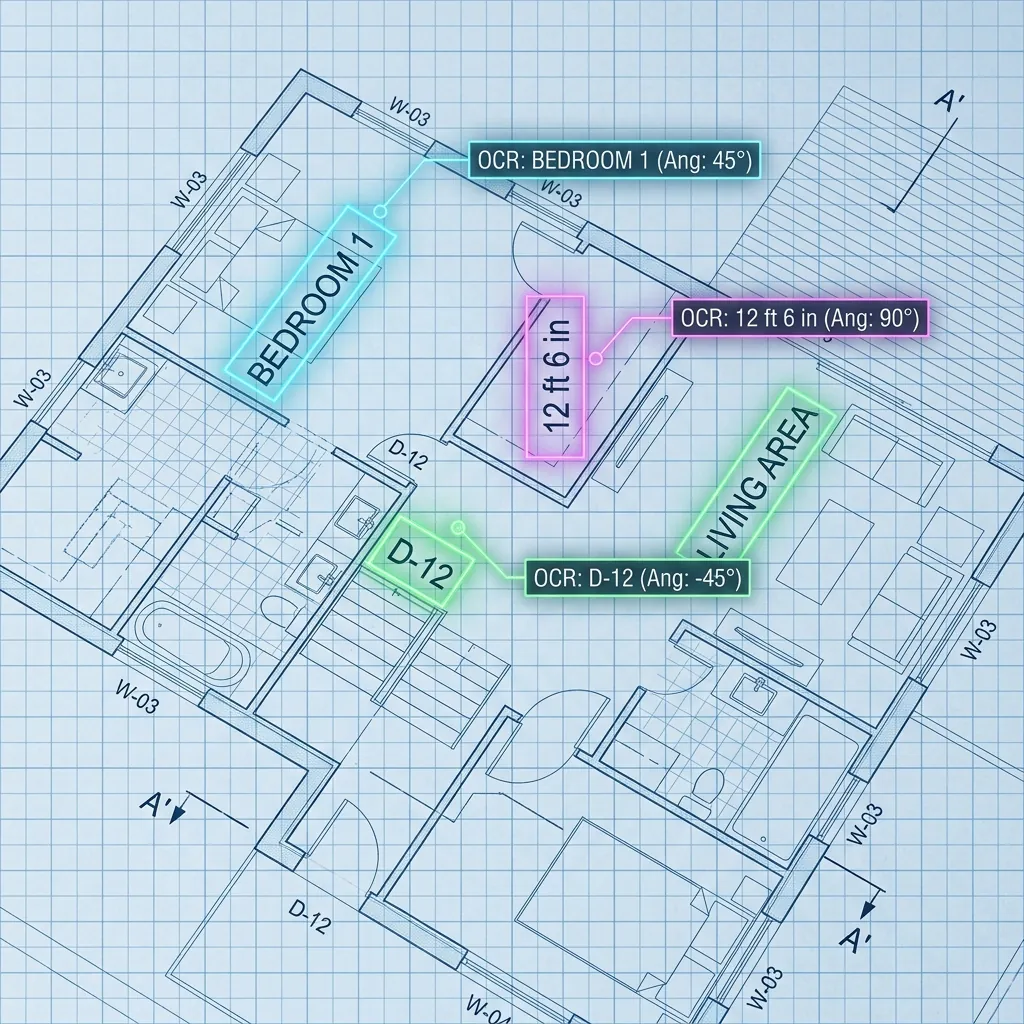
Title blocks, rotated labels, dimensions and notes read from blueprints and engineering drawings, with every value tied to its location.Revisions, tags, callouts, notesEngineering drawing review guide
How it works
From mixed inbox to validated records
Document AI is a pipeline, not a single OCR call. Each stage produces an output you can inspect, so errors are caught where they happen instead of downstream in your ERP.
- Stage 1
Ingest and clean up
Documents arrive by email, upload, scanner, portal or API. Pages are split, de-skewed and rotated, and image quality is checked before anything is read.Normalised pages - Stage 2
Classify each document
A classifier identifies what each file is (invoice, purchase order, contract, ID, form or drawing) and splits multi-document PDFs, so the right field schema is applied.Document type and confidence - Stage 3
Read text, layout and tables
OCR and layout detection find text blocks, key-value pairs and tables, including multi-page and nested tables. For drawings, angle-aware OCR reads rotated and vertical text.Text with positions and table structureLayout detectionTable TransformerDBNet + CRNN - Stage 4
Extract fields into your schema
Fine-tuned models and LLMs map what was read into your fields, including values buried in narrative text. Each value keeps the page and position it came from.Structured fields with source linksFine-tuned modelsLLMs - Stage 5
Validate against rules and master data
Totals are recalculated, invoices matched to purchase orders, vendors and customers looked up in master data, dates checked for logic and duplicates detected. ID documents get checksum validation of the machine-readable zone.Pass, or a named exceptionBusiness rulesERP / CRM lookups - Stage 6
Review exceptions, then route
Values below the confidence threshold and failed checks go to a review screen with the source highlighted. Clean documents post straight to your ERP, CRM or queue, and reviewer corrections feed back into training.Posted records and a review queueREST APIWebhooksJSON / CSV / Excel
- INV-1043_northwind.pdfvia EmailUnsorted
- scan_0187.jpgvia ScannerUnsorted
- PO-7781_bluepeak.pdfvia EmailUnsorted
- MSA_harbor-logistics.docxvia UploadUnsorted
- passport_upload.pngvia AppUnsorted
- vendor-setup-form.pdfvia PortalUnsorted
- DWG-2210_rev-C.pdfvia APIUnsorted
1/4Documents arrive from email, scanners, portals and APIs in any mix of formats: PDFs, photos, Word files and scans.
Accuracy and review
Measured on your documents, checked by your people
A single accuracy number hides the failures that matter. We measure extraction field by field on a test set of your own documents, and design the review loop so uncertain values never post silently.
- Confidence thresholds set per field, so a wrong bank account is treated differently from a wrong memo line
- Every flagged value shown next to the highlighted source on the page
- Reviewer corrections logged and used to retrain the models
- Accuracy tracked by document type and scan quality in production
- Field-level extraction accuracy on typical documents
- 95%+
- Extraction accuracy, passport KYC pipeline
- 98%
- End-to-end KYC verification per user
- <5s
- Offering memorandum analysis, down from hours
- <3 min
Figures from our passport verification and offering memorandum parsing case studies.
In practice
Document AI we have built
The same pipeline adapts to very different documents. A few examples from our projects and guides.
Passport verification for KYC onboarding
- 98% data extraction accuracy
- Fully automated KYC in under 5 seconds per user
- Manual processing costs cut by more than 80%
Offering memorandum parsing for Finance Lobby
- OM analysis cut from several hours to under three minutes
- 95%+ accuracy on critical financial fields
- Handles any brokerage format
Investment summary
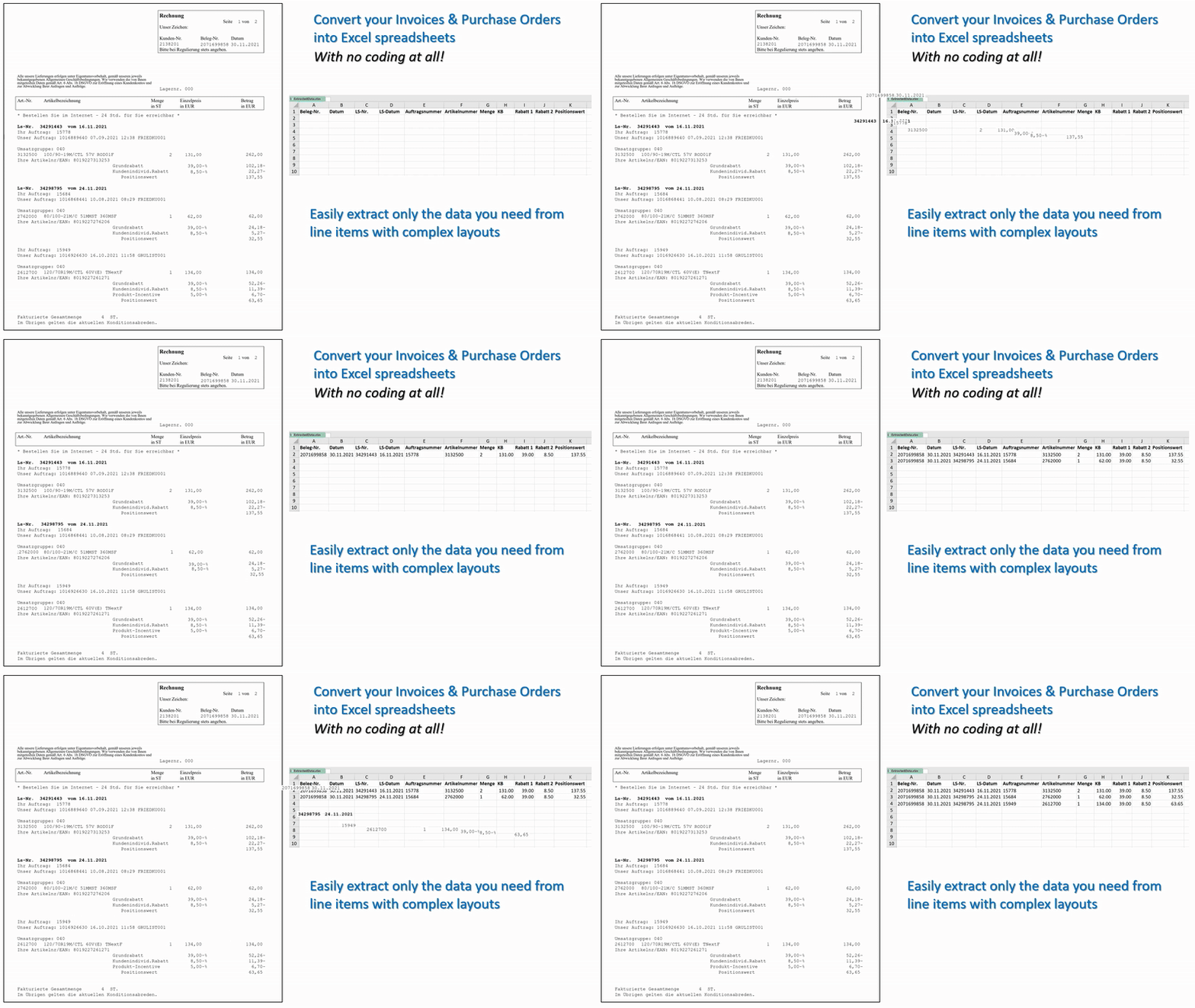
Invoices and purchase orders into spreadsheets and ERPs
- Line-item tables with nested discounts and positions
- Header fields matched to purchase orders
- Output to Excel, CSV or an ERP API
Leases, contracts and blueprints
- Lease terms, escalations and obligations abstracted
- Rotated and vertical drawing text read reliably
- Every value traceable to page and position
Beyond extraction
Automate what happens after the document is read
Extraction is only useful once the data reaches the right place. We build the steps around it, from ERP integration to review queues.
ERP and CRM integration
Verified data pushed into SAP S/4HANA, Oracle NetSuite, Microsoft Dynamics 365, Salesforce or Yardi. We do the field mapping.APIs, webhooks, batch filesRule-based routing
Documents routed on their content: auto-approval for low-value bills, escalation for high-value contracts, exceptions to the right team.Approval rules, role-based queuesDuplicate and anomaly checks
Duplicate invoices, inconsistent amounts and unusual patterns flagged before payment, not after reconciliation.Flags with evidence attachedForm filling in legacy systems
Where a system has no API, extracted data can drive RPA bots that fill web forms and legacy screens.RPA handoffSearch and chat over documents
Processed documents indexed for semantic search and question answering with retrieval-augmented generation (RAG).Vector search, RAGPrivate RAG case studyLegacy pipeline replacement
Manual sorting and fragile OCR templates replaced by models that are retrained as new layouts and suppliers appear.Continuous improvement
Deployment and security
Runs in the cloud or inside your network
Invoices, contracts, IDs and payroll files are sensitive. You choose where the pipeline runs and where the data lives.
Cloud API
Send documents to a REST endpoint and receive structured JSON, or use a simple review interface.On-premises or private cloud
Deploy on your own servers or VPC, with private LLMs for the language steps.Data stays under your control
Originals, extracted data and logs kept where your policies require.Human approval kept
Uncertain results are drafts until a reviewer accepts them, with decisions recorded.
Getting started
Prove it on your own documents first
Share a representative sample, including the messy scans. We train and measure against your team's manual results.
Step 1: Share sample documents
Scoping call
We review your document types, the fields you need, where the data should go and your volumes, and tell you what is feasible.
- NDA on request
Step 2: We train and test a pipeline
4–6 weeks
We fine-tune models on your documents, build the validation rules and measure field-level accuracy against your manual results.
- Accuracy targets agreed up front
Step 3: Deploy and integrate
Production
Connected to your ERP or CRM, deployed in the cloud or on-premises, monitored and retrained as new layouts appear.
- API and review interface
Not sure which process to automate first? An AI Opportunity Audit gives you a prioritized roadmap with ROI estimates in 3–5 business days.
FAQ
Questions, answered
What operations and finance teams usually ask before a pilot.
Working with real estate documents? See OM parsing and lease abstraction.
IDP is software that reads business documents the way a trained clerk would: it identifies what each document is, reads its text, tables and layout, extracts the fields you need, checks them against your rules and sends the result to the right system. Unlike template-based OCR, it copes with new layouts, scans and multi-page documents.
Invoices and receipts, purchase and sales orders, bank statements, contracts and leases, offering memorandums, utility bills, HR and payroll forms, government and regulatory forms, passports and ID cards, and technical drawings. If your team keys data from it today, we can usually scope a model for it.
On typical documents our models reach 95%+ field-level extraction accuracy, and our passport verification pipeline reached 98%. Accuracy depends on scan quality and layout variety, so we measure it field by field on your own documents during the proof of concept and route low-confidence values to a person instead of guessing.
Yes. Validated data can be pushed through APIs or webhooks into systems such as SAP S/4HANA, Oracle NetSuite, Microsoft Dynamics 365, Salesforce or Yardi, or exported as JSON, CSV or Excel. We handle the field mapping to your chart of accounts, vendor records or deal schema.
Yes. The pipeline can run as a cloud API or be deployed on-premises or in your private cloud, including private LLMs for the language-understanding steps, so sensitive documents such as IDs, contracts and financials never leave your environment.
A proof of concept on your own documents typically takes 4–6 weeks. We agree the document types, fields and accuracy targets up front, then measure the pipeline against your team's manual results before moving to production.
Related
Keep exploring
- Document AILease abstractionTenants, rent schedules, dates and clauses extracted from lease PDFs.
- Document AIOffering memorandum parsingRent rolls, financials and deal terms pulled from OMs in minutes.
- LLMs & agentsSovereign AIPrivate LLMs and vision models on your own servers, VPC or air-gapped network.
- Computer visionCustom computer vision modelsModels trained on your own images, video and edge cases.
Book a strategy session
Talk to an AI engineer about your project
Tell us what you want to automate. The first call is a 30-minute working session with an engineer, not a sales pitch.
- Send the form, it takes 2 minutes
- We reply within 1 business day, under NDA if you need it
- A 30-minute call to scope feasibility and next steps