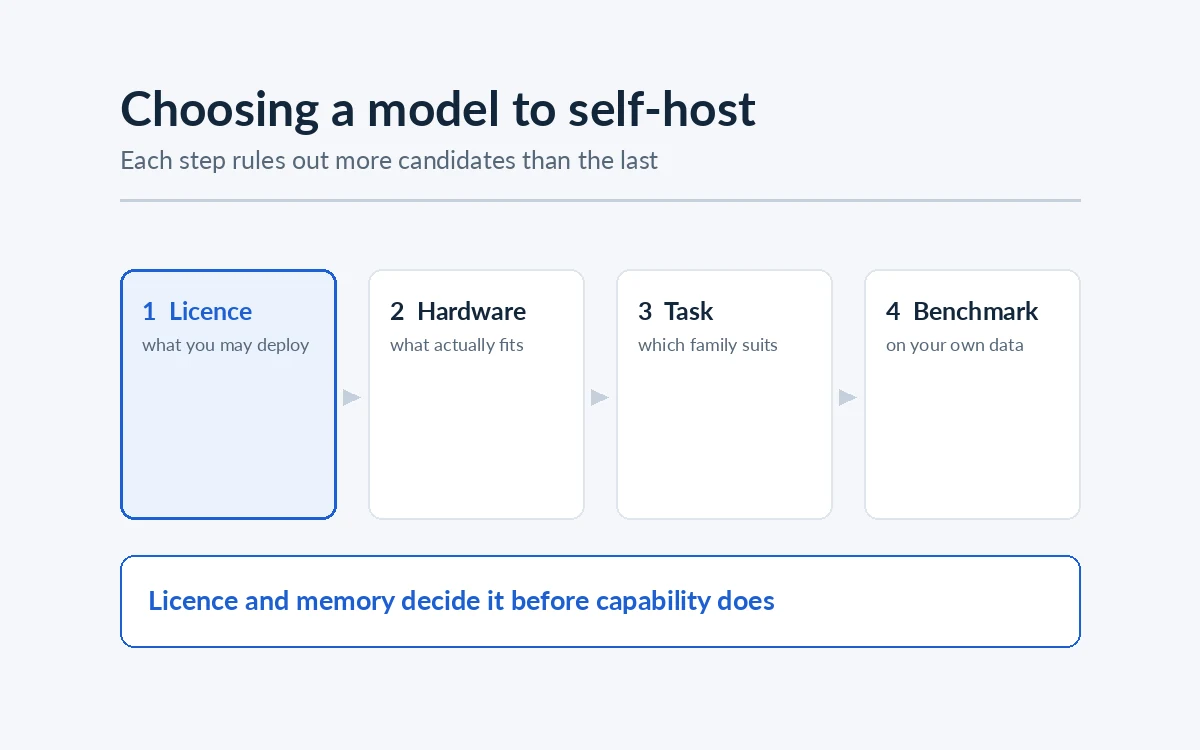
Teams starting a sovereign AI project usually open with the same question: which model should we run? It is a reasonable place to start and a poor place to decide, because the answer depends far more on the GPUs you have, the licence you can accept and the task you are automating than on where a model sits on a public leaderboard.
Below is the order we actually work through, and why each step rules out more candidates than the one before it.
Step 1: The licence rules out more models than the benchmarks do
"Open-weight" is not one thing. The weights being downloadable says nothing about what you are permitted to do with them, and the differences matter commercially.
- Permissive licences (Apache 2.0, MIT) place essentially no restriction on commercial use, modification or redistribution. If you intend to fine-tune a model and ship it inside a product you sell, this is the category to prefer.
- Custom community licences are common among the larger model families. They typically allow commercial use but attach conditions: acceptable-use policies, attribution requirements, naming requirements on derivative models, and sometimes thresholds above which separate terms apply.
- Non-commercial or research-only licences appear on some research releases and rule the model out entirely for production work, however well it performs.
Check this before benchmarking anything. We have seen teams spend weeks evaluating a model they were never going to be allowed to deploy, and the discovery usually arrives via a procurement review at the worst possible moment.
One subtlety worth flagging: a base model and its instruction-tuned variants can carry different terms, and so can different sizes within the same family. Read the licence for the exact checkpoint you plan to run.
Step 2: Work out what actually fits on your hardware
This is arithmetic, not judgement, and it eliminates most of the field immediately.
A model's weights occupy roughly one byte per parameter at 8-bit quantization, and about half a byte per parameter at 4-bit. So a 70B model needs on the order of 70GB just to hold the weights at 8-bit, before anything else.
Then add:
- KV cache, which grows with context length and with the number of concurrent requests. On a busy multi-user deployment this is not a rounding error; it can rival the weights themselves.
- Activation memory during inference.
- Headroom, because a deployment that fits exactly will fall over under load.
A practical planning rule: assume the weights are roughly two-thirds of your real requirement for a single-user deployment, and considerably less than that once you serve a team.
What quantization costs you
Quantization reduces the numerical precision of the weights so the model occupies less memory. Going from 16-bit to 8-bit typically costs very little quality on most tasks. Going to 4-bit saves a great deal more memory and the quality cost becomes task-dependent: often invisible for summarisation and retrieval-grounded answering, more noticeable for multi-step reasoning and code.
The decision this enables is the important one. An 8-bit quantized mid-sized model on the GPUs you already own will outperform a larger model you cannot afford to run, every time, because the larger model is not actually running.
For PharmaBrain we ran Mixtral 8x7B, a 46.7B-parameter mixture-of-experts model, at 8-bit so it fit the client's local servers while still answering in five to seven seconds.
Mixture-of-experts changes the maths
Mixture-of-experts (MoE) models hold many parameters but activate only a fraction of them per token. This gives you the quality characteristics of a large model at the compute cost of a much smaller one — but you still need memory for all the weights, because any expert may be needed at any token.
MoE is therefore attractive when you have enough VRAM but limited compute, and unattractive when memory is your constraint. Knowing which of the two binds you is most of the decision.
Step 3: Match the family to the task
Only once licence and hardware have narrowed the field does capability become the deciding factor. The major open-weight families have genuinely different strengths, and the differences are more about training emphasis than raw size.
- General instruction-following and reasoning. The mainstream general-purpose families are the safe default for a knowledge assistant, where the model summarises and answers from retrieved passages rather than reasoning from memory.
- Code. Dedicated code models are trained on far more source and handle fill-in-the-middle completion, which general models often do poorly. If you are building a private coding assistant, start here rather than with a general model.
- Multilingual work. Coverage varies substantially and unevenly between families, and by language and script. Some families are trained with a deliberate multilingual emphasis; others are predominantly English with lighter coverage elsewhere. Do not take a coverage claim on faith — test it on your own material, in your own domain vocabulary.
- Long context. Advertised context windows and useful context windows are different numbers. If your workload genuinely depends on very long inputs, test retrieval accuracy at the far end of the window rather than trusting the specification.
- Small models for narrow tasks. A 7B model fine-tuned for one task frequently beats a 70B general model at that task, and costs a fraction to serve. Where the job is classification, extraction or formatting rather than open-ended reasoning, start small.
Step 4: Benchmark on your own data, not on leaderboards
Public benchmarks measure general capability on public tasks. They are useful for building a shortlist and close to useless for choosing between the final two or three candidates, for two reasons: the tasks are not yours, and widely published test sets leak into training data over time.
What to do instead:
- Assemble 50–200 real examples of the task, drawn from your own material.
- Have the people who will use the system grade what a good answer looks like.
- Run every shortlisted model against that set, at the quantization you actually intend to deploy.
- Measure latency under realistic concurrency, not one request at a time.
That last point catches teams out regularly. A model that responds acceptably for one user can become unusable at twenty, and the fix is either more hardware or a smaller model — a decision much cheaper to make before launch.
The mistake worth avoiding
The most common error we see is starting from model size and working backwards to hardware. It produces a procurement request for GPUs that cannot be justified, and a project that stalls waiting for them.
Starting from the hardware you have, or can realistically buy, and asking what runs well on it produces a system in production. And in a retrieval-based assistant, the quality of what you put in front of the model almost always matters more than the model's size. Improving retrieval is cheaper than upgrading GPUs, and it does not increase your running costs.
How AxcelerateAI Helps
We select and deploy open-weight models on client infrastructure, on-premises, in private cloud accounts and on air-gapped networks:
- Model selection against your hardware, licence constraints and task, benchmarked on your own data.
- Quantization and serving sized for your concurrency and latency targets.
- Handover of weights, pipeline and runbooks, so the models are yours to run and update.