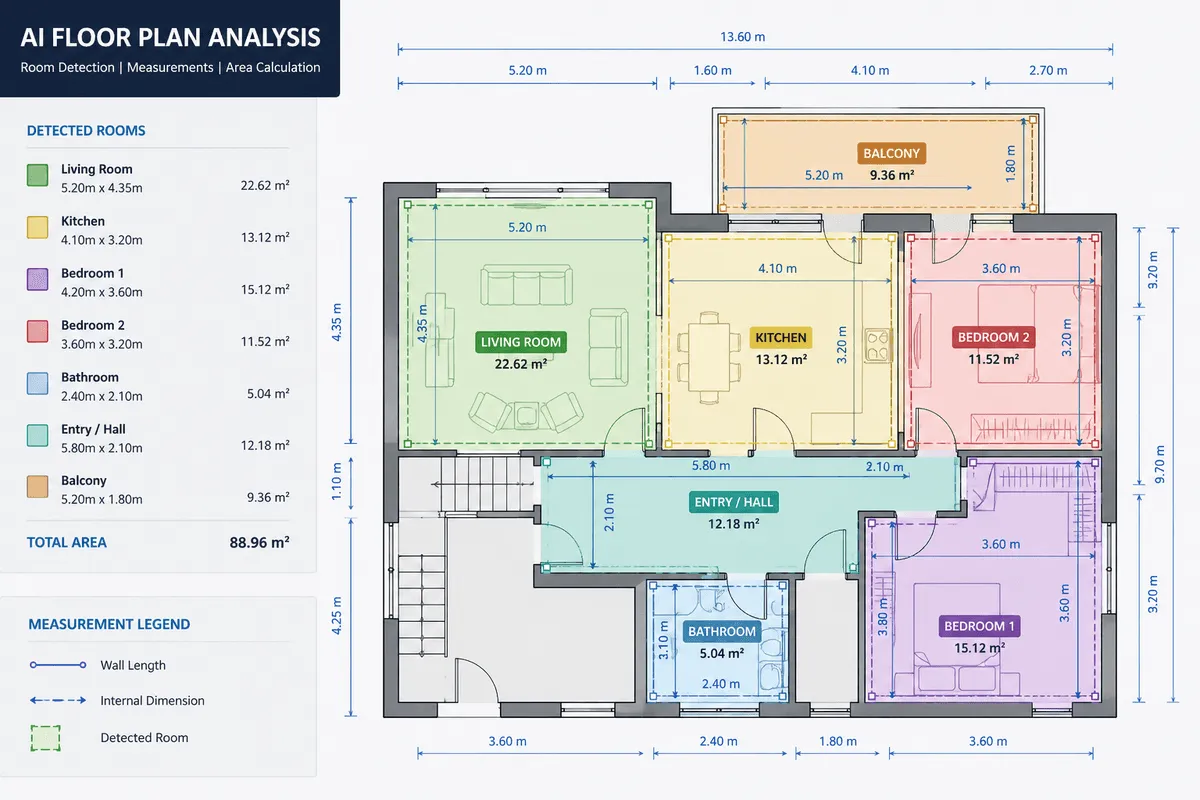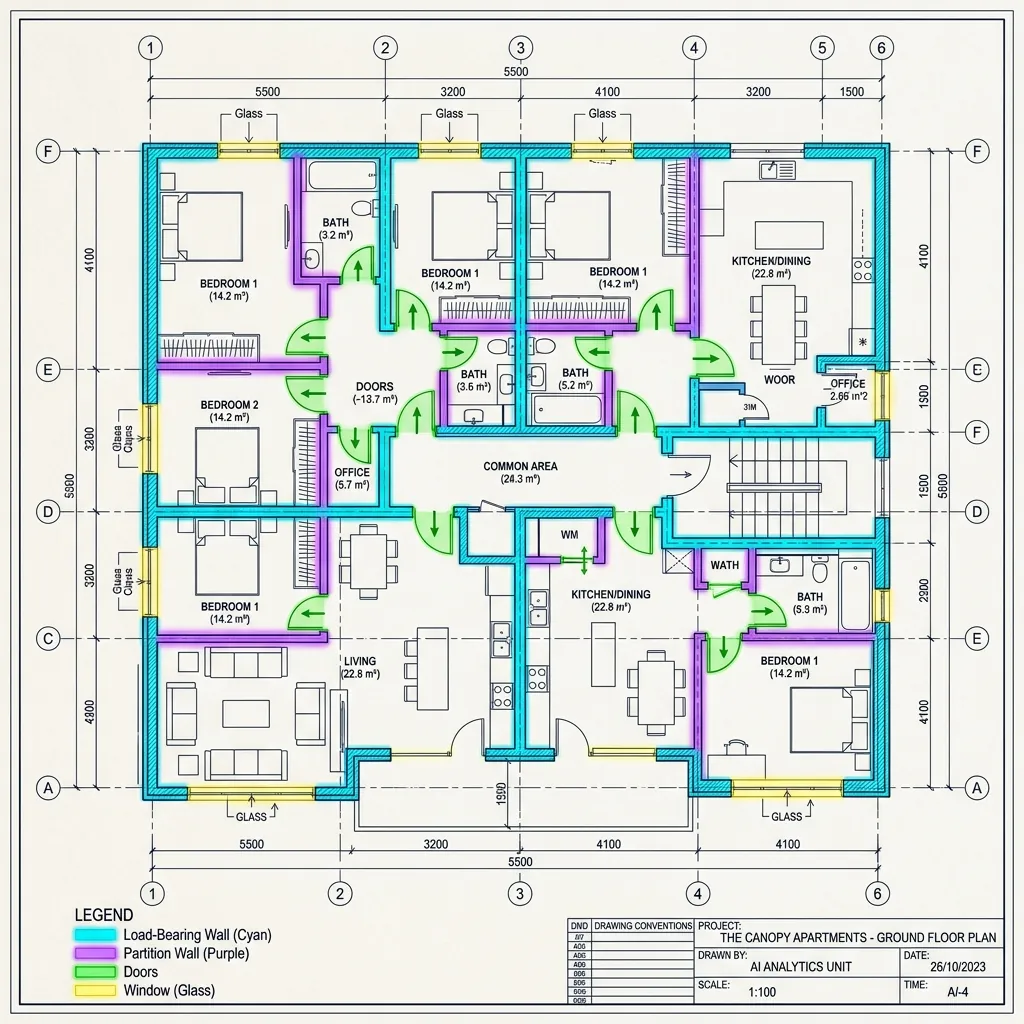
TL;DR: This article explores how Artificial Intelligence is revolutionizing construction estimating through automated floor plan analysis. We break down the unique technical challenges of interpreting complex architectural drawings and detail the hybrid AI pipelines—combining Computer Vision, Optical Character Recognition (OCR), and deep learning segmentation—required to accurately extract walls, doors, rooms, and text labels. Finally, we examine real-world takeoff solutions and discuss why custom-trained models offer the highest accuracy and value for enterprise integration.
Building trades and the broader real estate sector rely on accurate interpretation of architectural plans. Floor plans are the blueprints of construction projects – every wall length, room area, opening, and fixture “directly impacts cost, materials, timelines, and risk”. Traditionally, estimators and architects manually trace plans to count doors, windows, and measure walls. This is slow and error-prone. Modern AI techniques, such as a dedicated floor plan analysis API, can automate this work, enabling rapid quantity takeoffs and insights. Much like virtual staging enhances visuals and lease contract intelligence streamlines paperwork, tools like STACK’s “AI takeoff” can automatically measure floor plan items such as walls, doors, rooms, and symbols to speed up bidding. Similarly, Beam AI advertises software that “reads your project drawings… automatically identifies all material quantities, and delivers a complete, ready-to-use takeoff”. These solutions illustrate how machine learning (ML) and computer vision (CV) are transforming construction estimating.
Challenges of Interpreting Floor Plans
Despite the promise of AI, floor plan analysis is uniquely challenging. Unlike natural images, technical drawings have highly variable notation. Text on plans may be tiny, rotated, or overlapping with graphics. For example, plan text often appears at odd angles (to fit dimensions) or upside down, which breaks ordinary OCR engines. Specialized “Intelligent OCR” (I-OCR) must be used to read technical labels with high accuracy. One case study reports that fine-tuning OCR on drawings achieved up to 99.9% accuracy – but only after extensive customization. Even then, OCR confusion can occur with similar symbols (e.g. “3” vs “8”) or mis-handle overlapping text.
Symbols and graphics pose another difficulty. Architectural floor plans are essentially line art: thick and thin black lines on white, with doors, windows, stairs and plumbing all drawn as abstract symbols. Traditional CV libraries like OpenCV (good at detecting people or cars) fare poorly with such diagrams. For example, a loop symbol (like a circle for a valve) can look nearly identical to a small table or electrical outlet symbol, leading to false detections. Detecting these requires deep learning: models must learn the many symbol variations (often industry- or region-specific) from examples.
Walls are the backbone of a floor plan. A key step is wall segmentation: identifying each continuous wall segment and its thickness. Walls in drawings may be double lines, filled shapes, or hatched areas, and often carry labels (e.g. “R” for reinforced concrete). AI systems typically segment walls by scanning for these thick-line features. For example, Kreo’s whitepaper explains that models can be trained to distinguish exterior walls (usually drawn thick) from interior walls. Doors and windows are similarly identified as “openings” in walls. However, if a model misses a single door, the connectivity of rooms is misinterpreted, which can break the whole analysis.
Large Language Models (LLMs) with image capabilities (like GPT-4V or Google Gemini) might seem promising for floor plans, but they often struggle. One user found that GPT-4 could identify labeled elements in a plan but “drawing any conclusions about the quality of the spaces has been beyond them”. Even newer models hallucinate or miss small details: a plan with one wall misread can lead to absurd outputs (e.g. saying “you must go through a bathroom to get to a bedroom”). In recent tests, Google’s Gemini 2.0 could extract room names and dimensions correctly, but its architectural commentary was “an absolute turd” – basically stating the obvious. In short, no off-the-shelf LLM currently delivers deep architectural insight from raw floor plan images. They may provide structured data (room labels, areas), but their higher-level analyses tend to be superficial or wrong.
These challenges underscore why automated floor-plan understanding is a hybrid AI problem. We must combine OCR for text, classical vision for geometry, deep learning for segmentation, and even graph models or LLMs for semantics.
Key AI Techniques for Floor Plans
Modern floor plan recognition typically uses two AI pipelines in tandem:
- Text/OCR pipeline: Extracts any textual information on the drawing (room names, dimensions, notes). Advanced OCR engines are trained on engineering fonts and can read rotated text. As Kreo notes, I-OCR isn’t just about reading letters – it’s fine-tuned to recognize technical symbols and layout elements (like title blocks, tables, labels). This semantic text layer is crucial: it allows the system to know that a certain room is labeled “Kitchen” or a wall is marked “2000mm”. In practice, we might run multiple OCR tools and cross-validate them to handle unusual text, achieving very high accuracy.
- Computer Vision (CV) pipeline: Interprets the geometric content – lines, shapes, and symbols. This involves both object detection (bounding boxes or masks around discrete items) and semantic segmentation (classifying every pixel). For example, object detectors can find individual doors, windows, plumbing fixtures and electrical symbols. Segmentation models, on the other hand, can “color” entire areas as walls, rooms, or corridors. In fact, a powerful configuration is to use a U-Net or similar CNN for pixel-wise segmentation of walls vs empty space, and a Mask R-CNN (or YOLO-based) model to find every door or window instance.
- Example: A U-Net might produce an output mask where all wall pixels are highlighted. A Mask R-CNN can simultaneously draw boxes and masks around every door and every window. Using both, the system knows where walls are and where openings are. Then, by “closing” the doors and windows (mathematically filling their gaps), it identifies each enclosed area – i.e. each room.
- Vision Transformers: Newer models like ViT models can help capture the global layout of the plan. For instance, a ViT can learn that the kitchen is usually adjacent to the dining room, or recognize multi-story arrangements. Some research has even combined ViTs with LLMs (so-called ViLLA models) to better understand floor plan semantics. However, large foundation models like Segment Anything (SAM) are “class-agnostic” – they’ll separate objects perfectly when prompted, but they don’t know “this is a door vs a window” without further training.
After detecting walls and objects, the pipeline usually builds a graph of the floor plan. In this graph, each room is a node and doors or hallways form edges between nodes. This topological graph encodes adjacency and connectivity: for example, it captures “Room A is next to Room B via this door.” Finally, we enrich that graph with the OCR text labels so that each node is not just “Area #5”, but “Office, 20 m²” (or whatever). This combination of vision and language allows higher-level reasoning about the plan.
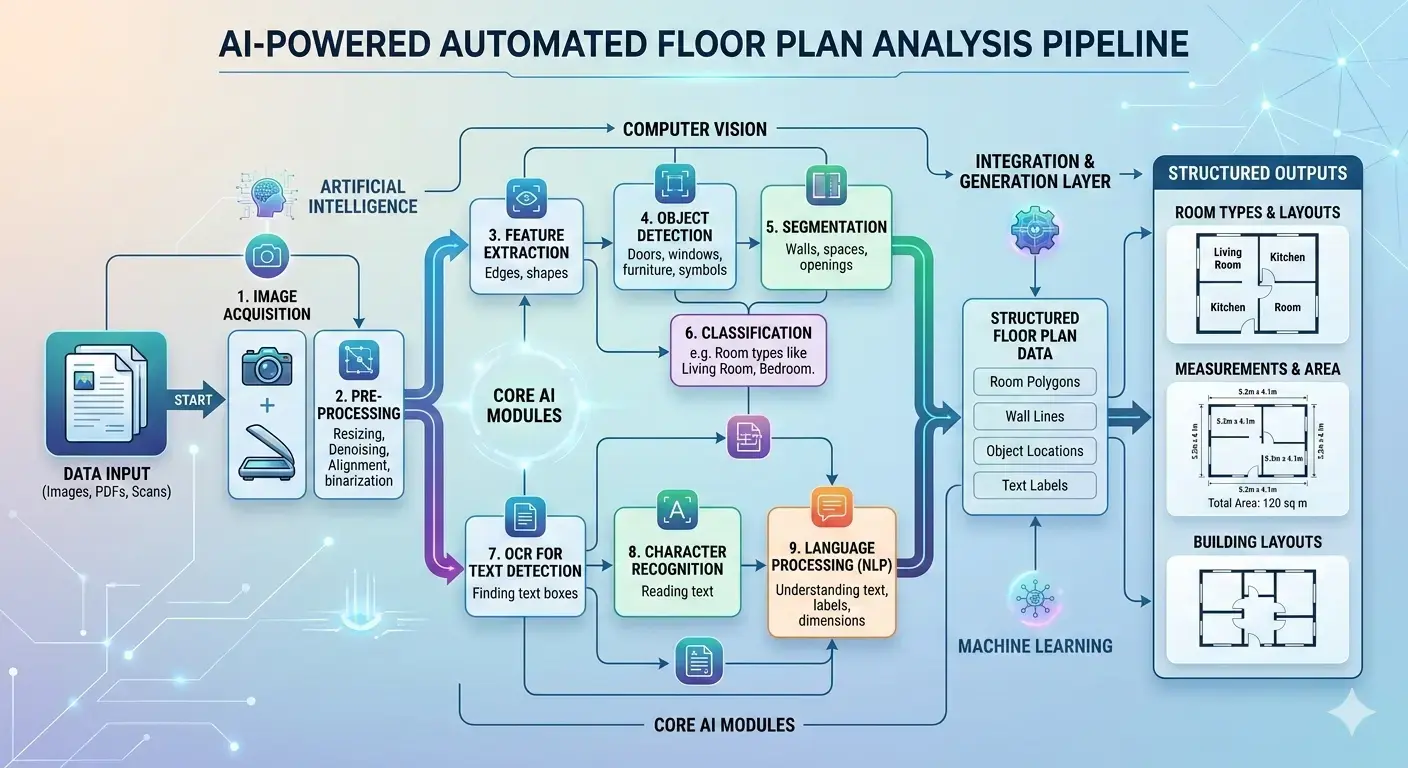
Building an Effective Floor Plan Pipeline
Putting all these pieces together, a practical system might follow these steps:
- Image Preprocessing: Clean the raw plan. Plans often come from scans or PDFs and can be skewed or noisy. We would “deskew” (straighten) the image, enhance contrast, and possibly remove extraneous marks. For very large or high-res plans, we may split the image into tiles (patches) so that it fits in GPU memory. (Tile-based inference is common in medical image analysis and applies here: process each patch with overlap, then merge results.) Early cropping or cleaning can dramatically improve performance.
- Text Extraction (I-OCR): Run an OCR engine (or multiple) tuned for drawings. This yields all text on the plan – room names, dimensions, notes. For example, Tesseract can achieve nearly 100% accuracy on clean architectural text after fine-tuning. Any text strings recognized are parsed (e.g., associating the number “2400” near a wall as “wall thickness 2400 mm”). This text layer becomes part of the semantic output.
- Segmentation of Geometry: Apply a semantic segmentation model (e.g. U-Net) to classify pixels as wall vs non-wall. The result is a mask outlining every wall. We may also run separate segmentation for other classes (e.g. all “floor” or “open space” areas), depending on the task.
- Object Detection: In parallel, run object detection models to find discrete elements: doors, windows, staircases, fixtures. A Mask R-CNN can output pixel masks or bounding polygons for each instance. We train these models on annotated floor plan datasets (there are public ones like CubiCasa, plus custom labels).
- Room Construction: Using the wall mask and openings, we form room polygons. Essentially, we treat the plan as a graph and “close” each door or window so the remaining wall network encloses spaces. Each enclosed space becomes a room, which we can label using the OCR text we extracted. This gives us room areas and relationships.
- Vectorization and Topology: Convert the detected pixels into vector geometry (lines, polygons) suitable for CAD/BIM tools. At this stage we also build the topological graph: nodes = rooms, edges = adjacency via doors. The graph can incorporate semantic links (e.g. connecting an OCR “Kitchen” label to the corresponding room node).
- Quantity Takeoff: From the vectorized data, compute quantities. For example, total wall length (for paint or plaster), floor area per room (for flooring), count of doors/windows, and material types (if hatchings or wall types were recognized). These quantities are compiled into reports or spreadsheets. As one source notes, “utility spaces” can be identified and counted automatically for estimation.
- Integration: Finally, output the structured data for the estimator. This might be filling a BIM (Building Information Model), exporting to Excel/CSV, or integrating with estimating software. In practice, some AI solutions directly export results into popular construction estimation tools or databases.
By breaking the problem into stages (often using different specialized models for each), a system can achieve much higher accuracy than any single monolithic model. For instance, Kreo explains that the model that recognizes walls isn’t the same one that reads dimensions – combining them adds true value. This pipeline approach also makes it easier to tune parts: if OCR is misreading text, we can retrain that component without touching the vision model, and vice versa.
Summary of steps:
- Preprocess (crop/deskew/patch)
- OCR for text (dimensions, labels)
- Semantic segmentation (walls, rooms)
- Object detection (doors, windows, fixtures)
- Room construction (closing openings)
- Vectorization and extraction of lengths/areas
- Export for quantity takeoff (e.g. in Excel)
This modular design is flexible: one could swap in new models or use ensemble approaches (e.g. multiple OCRs or multiple segmentation algorithms) to maximize reliability.
Deployment and Costs
Inference performance and cost are important in practice. Floor plans are often large (thousands of pixels), so GPU memory can be a constraint. A common solution is tile-based inference, as seen in medical imaging: split the plan into overlapping patches, process each, and merge. This allows arbitrarily large plans to be handled on fixed memory hardware. However, tiling adds overhead, and stitching can be tricky at tile borders. Another strategy is to use multi-scale or pyramid inputs so that a model sees the full plan at low resolution for context and high resolution for detail.
Model choice also affects cost. Large models (many parameters) give better accuracy but require more compute. A rule of thumb from transformer research is that inference cost scales roughly as 2 × (#params) × (#tokens). In our case, a CNN’s “params” and an image’s “pixels” similarly drive cost. Thus, in line with industry advice, one should “pick the smallest” model that solves your use case. For many floor plan tasks, a mid-sized U-Net or a YOLOv5/YOLOv8 for object detection may be sufficient. Quantization (running models at 8-bit precision) and pruning are also common techniques to cut inference cost.
Hardware choices vary. Some AI takeoff services offer cloud APIs (you upload PDFs, get back data). Others allow on-site deployment. Platforms like Roboflow even support running vision models on edge devices: they list deployments for NVIDIA Jetson, Raspberry Pi, OAK cameras, iOS, or CPU in Docker. For example, a contractor could run wall-door detection on an on-site Jetson Nano, while running OCR in the cloud. Cost considerations include GPU/cloud rental, API fees, and latency. Vision-Language models like GPT-4V charge per image (on the order of $0.10–$0.20 per high-resolution image), which can add up. In contrast, a custom-trained CNN running on a fixed GPU has a predictable cost (just electricity/hardware depreciation).
In summary, an organization must balance speed vs accuracy vs cost. High-volume use cases (processing hundreds of plans per month) often justify dedicated hardware or cloud credits. Low-volume users might prefer an API model. The good news is that inference for a single floor plan on moderate hardware is usually under a few seconds once the model is loaded. And as industry advice suggests, using lean models whenever possible keeps compute and cost down.
Real-World AI Takeoff Solutions
Several companies already apply these ideas in practice:
- Kamai: This AI takeoff API automatically extracts quantities from floor plans. As the Kamai team explains, their model “turns PDF drawings into accurate, structured data”. It converts walls into lengths, rooms into areas, and components (like doors) into countable objects. The result: what used to take hours of manual work can be done in minutes, without sacrificing accuracy. Kamai emphasizes that “consistency” is a key benefit – the AI applies the same logic to every drawing, reducing human error.
- STACK (USA): As noted above, STACK’s takeoff platform includes STACK Assist, which uses ML measurements to measure walls, doors, rooms, and symbols on the plan. A leading contractor reported that this automation gave them “shorter durations” to bid more complex projects and reliable auto-generated quantities. STACK even provides a case study where their AI generates “clean takeoff lines” that dramatically speed up estimators.
- Beam AI: Beam’s estimating software advertises “automated takeoffs” at ±1% accuracy compared to in-house manual work. According to Beam’s FAQ, their tool “reads drawings” and specifications to produce complete takeoffs ready for pricing models. It supports multiple trades (HVAC, electrical, plumbing, etc.) by training on diverse drawing types.
- Kreo Takeoff: (By the Kreo company behind the pipeline description.) They offer an AI takeoff product that claims to make bids “10x faster” using ML-based measurements. Kreo also provides research and tools for 2D takeoff, leveraging the types of CNN and transformer architectures we discussed.
- Other tools: Traditional CAD platforms (like Autodesk Revit) are incorporating more AI plugins, and startups (e.g. iBim, Togal.AI, and numerous niche vendors) are emerging. Home Depot even announced an AI takeoff tool for contractors, highlighting that the big suppliers see this as the future.
Collectively, these examples show that AI-driven takeoff is already here. The common thread is using CV to extract geometry and connecting it to cost databases or models. Our blog’s deep-dive thus aligns with real innovations in the market.

Limitations of Existing Solutions
While exciting, current solutions have limits that motivate a custom approach:
- Niche Handling: Many off-the-shelf tools assume standard plans. Unusual symbols, non-English labels, or custom elements (like a proprietary electrical symbol) may be missed. A custom solution can be trained on your specific plan types and vocabulary.
- Integration: Commercial products often come as standalone platforms or APIs. You may want tight integration with your company’s BIM/CAD or ERP system. Building in-house or with a specialized vendor lets you tailor the data flow and output format (e.g. directly into your estimate templates).
- Regulatory Compliance: Construction practices vary by region (US, EU, Australia all have different building codes, units, and conventions). For example, wall insulation standards or naming schemes might differ between countries. A custom pipeline can incorporate these rules – e.g. automatically checking that wall lengths comply with local regulations or outputting bills of materials formatted for your market.
- Accuracy vs “Hallucination”: As we noted, LLMs can hallucinate. Generic vision models (even if powerful) might group symbols incorrectly. A bespoke system, by contrast, can include rule checks (e.g. “count one door per detected doorframe, never guess missing ones”) and allow human override.
- Privacy and Control: Some businesses cannot send their plans to cloud servers for proprietary or privacy reasons. A custom (on-premise) solution can run entirely behind your firewall.
In short, while large pretrained models and commercial tools provide a strong base, maximum accuracy often comes from adaptation. We would start with the best public models (open-source U-Nets, YOLO, etc. or even fine-tuned foundation models) and then fine-tune or train them on your own data. This custom-tailoring typically yields much better results for your use case than a “general” model.
Why Choose a Custom AI Solution
For most use cases, the best performance is achieved by using a custom AI solution. This involves the following:
- Use state-of-the-art vision models (U-Nets, Mask R-CNN, Vision Transformers, even foundation models for specific sub-tasks) but train them on your specific floor plan archives, blueprints and symbol libraries.
- Implement the full pipeline: pre-processing, OCR, segmentation, object detection, graph analysis, and takeoff generation.
- Integrate pricing and BIM data so the extracted quantities feed directly into your cost models. (For example, mapping “60 m² of carpet” to your vendor quotes automatically.)
- Include feedback loops: as estimators correct outputs, the AI can learn from those corrections. Over time, your system becomes even more accurate.
Compared to off-the-shelf, this means higher precision (because the model “knows” your building types) and a smooth fit into your workflow. And because it’s your own model, you can keep pace with innovations by integrating new research and models as they become available.
With your own custom solution, you can also manage infrastructure and cost since you can design the solution to balance GPU/cloud usage with performance, using techniques like model distillation or running heavy tasks offline. You get a system optimized for your volume – for low-volume needs, maybe a lightweight GPU or even CPU-only; for high-volume, a dedicated cloud cluster.
Interactive Exploration & Industry Landing Pages
To see how these visual layers and dataset formats come together in a simulated production environment, walk through our Interactive Floor Plan Analysis Pipeline Tutorial.
For specific B2B applications across real estate and construction trades, explore our dedicated landing pages:
- Estimating & Drywalling: Discover how we automate takeoff calculations for contractors and developers on our AI Quantity Takeoff & Estimating vertical.
- CAD & Spatial Digital Twins: Learn about converting scans and drawings into BIM structures on our AI Scan-to-BIM & Digital Twins vertical.
- Fire Safety Compliance: See how AI automatically detects and verifies fire-rated doors against NFPA 80/IBC on our Fire-Rated Door Detection & Compliance use case guide.
Conclusion
Automated floor plan analysis is revolutionizing construction estimating. By parsing drawings with AI, teams can “turn 2D plans” into structured data at machine speed. This speeds up bidding, reduces errors, and frees experts to focus on design rather than data entry. However, to reap these benefits, one must navigate the challenges: plan variability, domain-specific symbols, and AI model complexity.
Our research shows that success lies in combining specialized CV, OCR, and reasoning models in a custom pipeline. The future of construction is data-driven – with AI as your partner, you can accelerate projects from the ground up.
Related Posts in This Series
Explore the full AxcelerateAI floor plan intelligence blog series:
- Interactive Floor Plan Analysis Tutorial — Walk through each AI pipeline layer visually.
- Best AI Model for Floor Plan Analysis — U-Net, YOLOv11, Mask R-CNN, and GNNs compared.
- How AI Extracts Symbols from Floor Plans — Symbol detection and automated quantity takeoffs.
- Why LLMs Fail on Floor Plans — Why GPT-4V and Gemini can't replace custom CV pipelines.
- Solving Blueprint OCR & Rotated Text — Intelligent OCR for engineering drawings.
- Fire-Rated Door Detection & Compliance — Automated NFPA 80/IBC compliance checking.
Explore our solutions: AI Floor Plan Spatial Analysis | Computer Vision for Real Estate